• This forum is the machine-generated translation of www.cad3d.it/forum1 - the Italian design community. Several terms are not translated correctly.

connection walls - roofs

  • Thread starter Thread starter iwaz
  • Start date Start date

iwaz

Guest
hi guys, I'm new and very newbo with revit...

probably and a sad and retrite topic I looked everywhere, tried everything but I can't...I open a new thread on this topic because I tried all :eek:. .

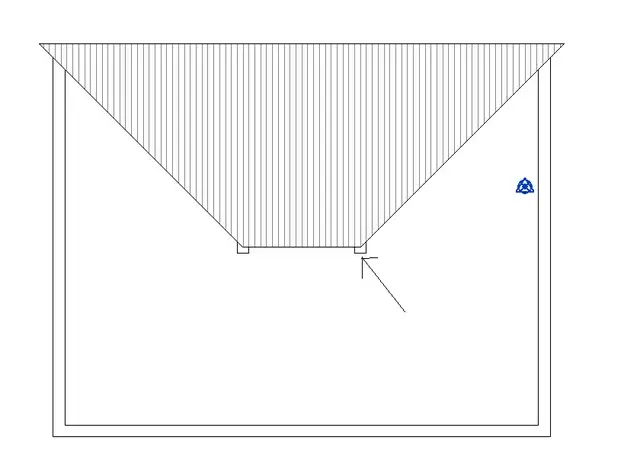
I attach the photo of what happens to me
tettomuro.webpwith the commando associate/base I can not lift the wall until the height of the roof, gives me an error message "impossible to maintain wall and goal united". I can lift those 15-year-olds... only the 30-year-olds...

I also tried the solution to remove a portion of the wall by lifting it over the roof but zero, I can not use well the empty function.. .

possible that such a simple thing requires all these complicated turns? How can I solve this? Thanks bye:cool:
 
Last edited by a moderator:
without seeing the file it is difficult to understand its cause.
In general, for the wall concerned, try:
- to use the "dissocia" command to verify that there are no other "unions"
- verify that the wall in question has not been edited with the command "change profile" at the top

try also to use a different type of wall (other type) : if it works, use the new type of wall, rename and change materials and thicknesses of the new type
 
Hello gfrank, thank you for the answer.. .

I tried to dissociate, delete the walls from 30 generics and put them back from scratch... but nothing
I tried to delete them and replace them with 15 walls, but nothing...that error message remains. . .

Boh. .
 
place the link of a test file I created from scratch, to show you the situation you create
http://www.filedropper.com/prova_14the piantine e questa
tetto.webpif the roof leaves it as well, the outer walls do not hook, if instead than leaning the roof in half-pillar support the bonfires in the edges of the pillar (indicated with the arrow) it hooks.. .
 
Last edited by a moderator:
apart from that I don't understand the usefulness of a roof made like that...anywhere controls the joints of the walls: if your wall has come to the corner on both sides should be able to associate it
 
the walls of the quadrilateral have arrived but it does not make me associate them to the height of the falde...while to the height of the pillars...

If I disjoin them, I'll get them together... see below
disgiunti.webp
 
Last edited by a moderator:
thanks tristan, I read your post in a hurry, you were right, I solved by joining the corner walls, sorry but I did not know the existence of that option :biggrin:
 
Well, it's settled.

I invite you to attach the images, through the command "go to the advanced mode" and to use the procedure "manage attachments" to attach the images.
 
Good morning, everyone! I am also new, I apologize, but I have not been able to find the section on the presentations...... I am accusing to this discussion because I also have the same problem, I place an image:Cattura.webpAs you can see, until a certain point the continuous facades have associated with the cover, which said incidentally, is a roof generated by a solid coming from rhino, then others are not: they are those that overlap to the cover.... would you have idea what the problem can be? ? ?
 
... considering that the problem is "only" on the cover part, it is possible that the problems are consequence of the imported solid from rhino . try to make a piece of roof generated directly from revit and see if the problems persist ...
 
The problem is solved! the strange thing is that it seems to give problems only along the edge and not with the walls inside....mah!! at this point the only solution I think is to edit the profile of the panels one by one.....
 

Forum statistics

Threads
44,997
Messages
339,767
Members
4
Latest member
ibt

Members online

No members online now.
Back
Top