
• This forum is the machine-generated translation of www.cad3d.it/forum1 - the Italian design community. Several terms are not translated correctly.

connects bubble text to the specified table

  • Thread starter Thread starter Esselle
  • Start date Start date

Esselle

Guest
Good morning, I often draw frames with various laser cut plates, of which, for practicality I insert the drawings of developments in the same table of the frame.
I then use the function "link bubble text to the specified table", to identify the various elements.
in some situations I also have 30 or 40 sheets to "bollare", I would like to know if it is possible to let solidworks know that 30 views at the same time must refer to the specified table, instead of having to do this one view at a time, thanks.
 
if they have to connect to the same table you can try to select more or all views at once and tell them to which table to connect, but I don't always work.
if each sheet must connect to a specific table I do not think it is possible
 
if they have to connect to the same table you can try to select more or all views at once and tell them to which table to connect, but I don't always work.
if each sheet must connect to a specific table I do not think it is possible
normally they have to connect all to the same table, I tried to select multiple views, as you suggest, but the command, in my case, is effective only on the last selected view.
 
hi, if you select all the views and then ask to connect, connect only the last view. I, by chance, discovered that if you do the first sight, put the separate cut and then put the other views, those put after putting the distinct will have already flagged the link option to the cut-off automatically.

:

sent by my clt-l09 using tapatalk
 
I couldn't replicate what you say.
I pass through what I did after reading your intervention.
I made a new board of a set consisting of more details in sheet metal and I put in any view of the said together.
I've put in the cut.
I opened the first sheet and entered the development on the table and connected the view to the distinct.
I opened the second sheet and entered its development on the board and the connection check was not active.
What am I wrong?
 
wrong to ask me I'm a jerk.. :

I didn't realize it was a set. .
I thought it was a multibody part.

However it changes little, instead of the cut, put the distinct particular.. :

sent by my clt-l09 using tapatalk
 
wrong to ask me I'm a jerk.. :

I didn't realize it was a set. .
I thought it was a multibody part.

However it changes little, instead of the cut, put the distinct particular.. :

sent by my clt-l09 using tapatalk
in the previous intervention I wrote an inaccuracy I use the separate table materials, what do you mean by distinct details?
 
The mistake is mine, a relapse of past times.
is correct the distinct name of materials. .

sent by my clt-l09 using tapatalk
 
the fact that the views of the parties do not connect to the distinct materials is because this is done to the aid.
each new view of the axieme is automatically connected to the distinct, but those of the parts are not.

Also select multiple views can not work because, I notice now, the fact is selected only one and you understand it because in the context menu is indicated which part to open.
I am looking for if there is any option that specifies to use for each new view the table present.
I'll let you know
 
the fact that the views of the parties do not connect to the distinct materials is because this is done to the aid.
each new view of the axieme is automatically connected to the distinct, but those of the parts are not.

Also select multiple views can not work because, I notice now, the fact is selected only one and you understand it because in the context menu is indicated which part to open.
I am looking for if there is any option that specifies to use for each new view the table present.
I'll let you know
Thank you, for your work, if you solve this thing you would save a lot of time.
 
But I did! ! ! ! ! !

I don't know anything about macro and I took that text as it was, then I read the text of the macro and finally says: "change bom name here". I replaced that : "bill of materials1" with my "distinct materials 1" and went!
 
good; when someone puts our heads on and investigates, analyzes things, they are satisfactions
 
I regret this debate, because it happens sometimes that after entering a distinct material that solidworks appoints "distinta materiali1", it happens to have to erase and put it back and at this point it is named "distinta materiali2".
the macro that I took from the forum is working only if it acts on "distinta materiali1", so I created a new macro for when I have inside the "distinta materiali2", obviously it does not work!

place the texts of the two macros in the hope that someone will correct my mistakes, thank you.
 

Attachments

I regret this debate, because it happens sometimes that after entering a distinct material that solidworks appoints "distinta materiali1", it happens to have to erase and put it back and at this point it is named "distinta materiali2".
the macro that I took from the forum is working only if it acts on "distinta materiali1", so I created a new macro for when I have inside the "distinta materiali2", obviously it does not work!

place the texts of the two macros in the hope that someone will correct my mistakes, thank you.
hi, the macros to me work, however I attach the modified macro so that you can select the distinct on the featuremanager or in the graphic area
 

Attachments

After using a little macro I allow myself to observe two things.
when exit the window "connects seen to the torch etc etc" if I press the "no" button nothing happens, you could choose which views connect?
must first select the distinct and then launch the macro, it would not be better the reverse and then select which distinct to use?

said that, so it already works wonder.
 
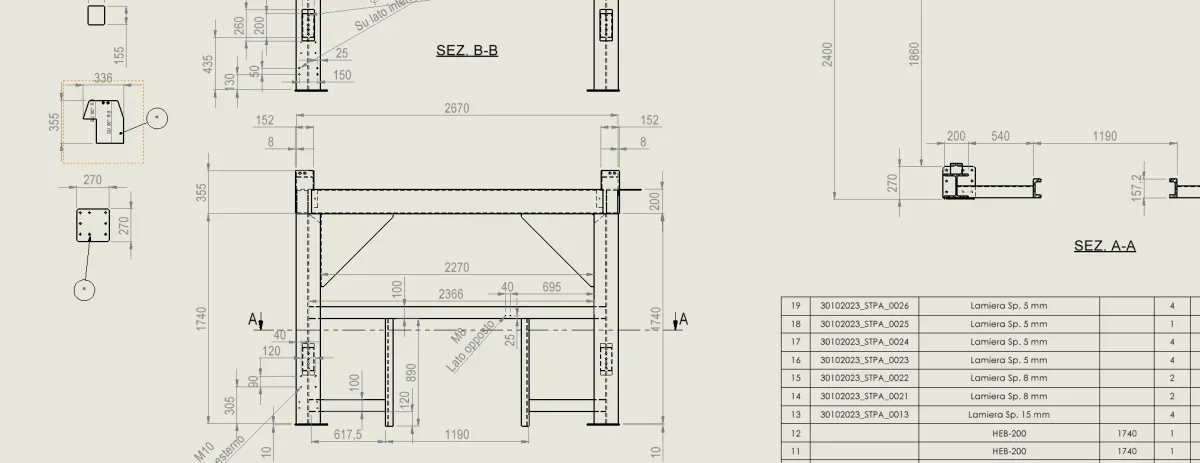
I refer to this debate, because I can no longer associate the table with the number of the details, as from the attached image. both that I turn the macro, both that manually associate through the property key the number of the part to the table always get an asterisk. . .Screenshot 2023-11-27 094406.webpDo you have any ideas in mind?
 

Forum statistics

Threads
44,997
Messages
339,767
Members
4
Latest member
ibt

Members online

No members online now.
Back
Top