
• This forum is the machine-generated translation of www.cad3d.it/forum1 - the Italian design community. Several terms are not translated correctly.

constraints

  • Thread starter Thread starter oq172
  • Start date Start date

oq172

Guest
Help!

ask you gurus of design:

I can't understand the logic of constraints offsets. How do I explain to inv where I have to move the detail that I'm assembling about the fixed part? I read the explanation about online help but I can't make this work as I say.
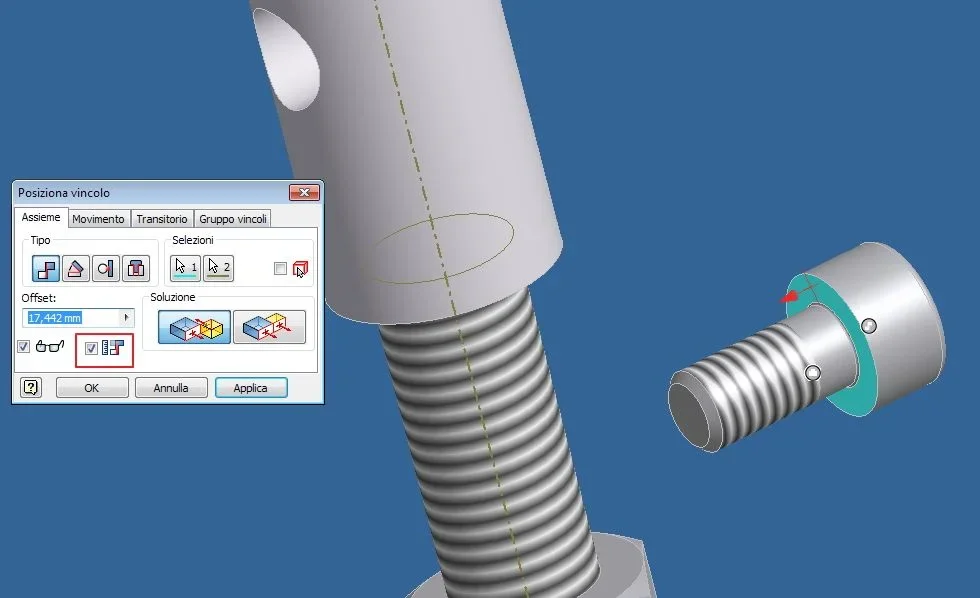
 
on a practical level, provided that when you make a constraint you must always respect the hierarchy, that is to report surface 1 to 2 and not the contrary, when you want to give it the offset you must be attentive to the verses of normal, for the sign you should reason but most times it is enough to go for attempts, if it is not less, very simple.
 
We always start with the fact that a detail is fixed in your set. Usually as suggested above just put the sign in front of the quota
 
So... Meanwhile thanks for the answers, then .. the first detail is fixed by default, I tried to change the sign of the quota but that it is positive or negative does not change anything, can be that wrong something but I do not understand. today while we were fighting it also began to change the offset axis i.e. before it moved the piece along the x axis, at some point it moved it along the axis y... I'll be hydrophobic and maybe I'll kill someone... Anyway good evening to all
 
try to manually place the component where more or less should be
then in the bound window, put the check in the highlighted box in red
this already offers you a offset distance, which you can change
see the example attached, with the screw at distance from the axis of the threaded pin. . .
vincolo.webp
 
the other icon with the glasses you need to preview the position that would go to occupy your object before confirming the bond
 
I had to create a set of sketches to place the piece as I say... but no one finds problems with constraints? How come changing the sign to the offset share doesn't change anything? How come he decides to move to +x every now and then to +y every now and then to +z every now and then a little here and a little there (at the same time I mean)? It is not much that I work there but little girls if these are the premises.. .
 
bambinelli questions sono the premesse...
you are approaching badly, constraints are a very simple thing and are easily governmentable.
You need someone to show you two or three things, possibly live.
 
you are approaching badly, constraints are a very simple thing and are easily governmentable.
You need someone to show you two or three things, possibly live.
You are definitely right, today I realized where the error was, I was trying to place the piece with only one constraint, then adding others I arrived at the bark ban. But now I would like to ask, without polemics, but if he asked me the long axis to make the move would not be easier?
 
But if he asks me the long axis that moving would not be easier?
you are not moving, you are putting a constraint (face against face, axis with axis, hole with hole etc. )
If you want, instead of using the constraints, you can try with "assembly", which is closer to your idea of assembly of the pieces.
I use it little but, in some cases, I find it really comfortable (I confess that I discovered it from no more than 10 days, than gnugno ).
with only one bond, then adding more
put the minimum necessary of constraints, choose them well, possibly as if you should do the assembly in the workshop.
two pieces fixed with screws, are bound by the holes they have and not with the alignments of the faces, so also controls the interaxis of the holes (better to arrange them on the pc than in the workshop).
all components of a set, even screws and washers, must be completely bound.
I mean that a spacer, or a washer, can be placed with only a perno/hole bond but, if you prevent it also rotation, at the long run you will have benefits (maybe I will be more explicit in the future with some example )

Hi.
 
you are not moving, you are putting a constraint (face against face, axis with axis, hole with hole etc. )
If you want, instead of using the constraints, you can try with "assembly", which is closer to your idea of assembly of the pieces.
I use it little but, in some cases, I find it really comfortable (I confess that I discovered it from no more than 10 days, than gnugno ).


Good morning, is it true that I'm putting on a constraint, but at the time when I impose an offset I actually move along a board, my question is, if you ask me the axis along which move is no easier? I am not very practical of inv, perhaps autocad (used for 20 years) is still too present in my mind.. slowly, breaking your bubbles every now and then I'll be able to get really cool and I'll send you all home. in any case thanks to the help and the next., hello

One thing, though, I've read that you can change the sign to the offset share, but nothing changes to me, it's as if inv didn't really care about it... Is it normal?
 
perhaps autocad (used for 20 years) is still too present in my mind.
That's right, inventor.
breaking your bubbles every now and then I'll be cool.
I, too, before becoming very cool, worked with autocad and the approach with inventor 5.3 was disarming.I did 3 half days of course and "all became clear".
Then, looking at things done even a year ago, I was laughing, you never have to stop, you have to always experience.

Bye.
 

Forum statistics

Threads
44,997
Messages
339,767
Members
4
Latest member
ibt

Members online

No members online now.
Back
Top