Bye to all,
I am now beginning to use revit and I come across a problem that is perhaps very simple but being a novella in matter, I need your help.
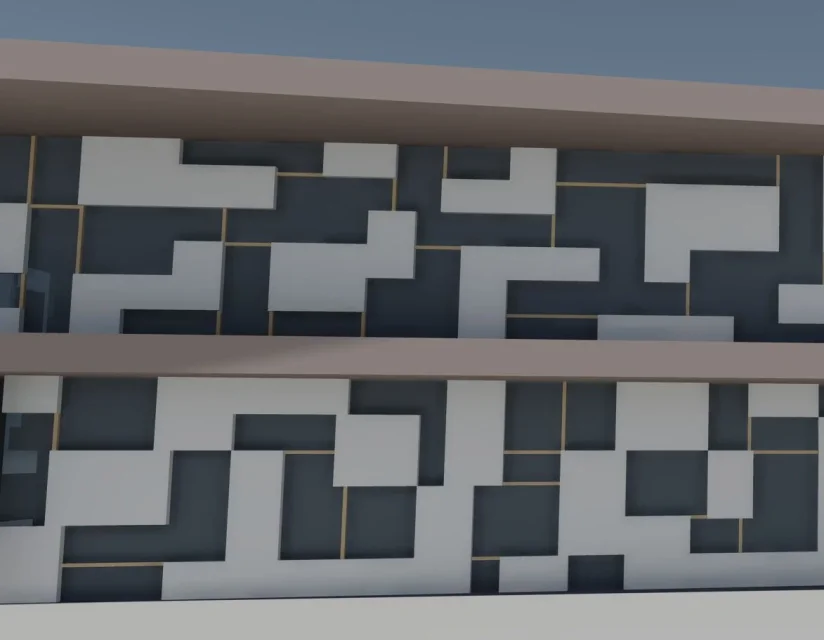
I have to make a continuous façade with buffer panels like thisHow can I do that?

thanks in advance
Here's a better image. .
continuing to try again I figured out perhaps how I should do , divide the facade continues into panels with "grille facade continuous" and then to each panel assign a different "system panel" creating all the types I need. However to do this the only way I have identified, once the grid is created, is: right-click -> select panels on host -> select the panel by unlocking it and then check the new type. Does this mean to be able to change only one panel at a time, is there any other solution?
Thanks again
I've installed it on my computer.. I think I understand that it works a bit like fathopper. ) but I don't know more. .
I'll do nothing by changing one by one...
Thank you
but, if there is no reason to repeat, not if it can do with any method. dynamo is not magic! we want to have a system in the facade. If there is no one, you have to do objects "manually", one by one. unless you have a "random" design. In that case, you could do whatever with dynamo. However, as you see exactly in the image, I don't think you can do if it's not manually.