• This forum is the machine-generated translation of www.cad3d.it/forum1 - the Italian design community. Several terms are not translated correctly.

cose scomode with swx

  • Thread starter Thread starter cacciatorino
  • Start date Start date
and for the odds, a virtual sharp is normally created automatically and the odds remain attached to this.
Okay, I'll see how it works.
often when I generate the table of a piece similar to an existing one, I do not remake it from scratch but I leave from that of the similar piece, and often happens that some quotas are tickled.
 
thanks, it works perfectly, although it would not be bad to see the piece change instantly after the change, without asking for regeneration.
you can do it, more or less as you say, enabling you to move/resize functions. double click on the feature, you will see three grips one of which resizes it for example along the extrusion direction. the other two move it on the sketc plane and allow you to take it on another face. if you double-click it on the sketch, in the history tree, resize the sketch and even here you see the preview of the result but if the sketch is completely quoted you have to put the flag on "no odds to the drag/setting in system options/choices
I practically never use it because I don't like it much, but I'm still the "old":confused: 2007.

Hi.
 
I add:

2- there is no such thing. but with drag&drop on preselections between edges or faces or with the alt button, you get automatic couplings.

3-with the property tab builder you can in the environment together, fill out the properties of all or some components.
you can do this, just select the components.
you can do it with a ctrl+a, with a selection box or with the shift command.
the property tab builder is very powerful and you can withdraw data from a txt file, from excel or from a database.

Alternatively, if you don't like this solution, you can insert a separate material in the environment together, which includes all columns, on which you would enter the data and view it in a new window.
just click inside the cells and automatically fill out this data even in the file properties.

you can also do it from windows, from solidworks explorer and even in table putting, if you have created a compiled folder, like autocad blocks.

4- Apart from filters, solidworks interacts with the selection made (popup).
if you select a component face, you can mate it, to edit it
(component) or change the function....what else you have to do...it seems better than if.
If I have to be swivel, when with you suffer above the various components, he does not automatically open the "other selection" function, but you have to wait 2 seconds, I have already done rmb + click on the command.
Keep in mind that your mouse positioning on the components is not always accurate... how many edges..while we have the magnifying glass.


5-ctrl+8 actually did it once, but some set of users requested to remove it.

6-you can do it quietly, read the help. you fill the folders under list welds.

7- that's not true. with instant3d enabled (default), what you ask is part of standard behavior.

8- does it automatically if you select an axis... check also the help
 
2- there is no such thing. but with drag&drop on preselections between edges or faces or with the alt button, you get automatic couplings.
I'll see if I'm impatient, of course the method you use if it's very fast.
3-with the property tab builder you can in the environment together, fill out the properties of all or some components.
you can do this, just select the components.
you can do it with a ctrl+a, with a selection box or with the shift command.
the property tab builder is very powerful and you can withdraw data from a txt file, from excel or from a database.
this of the tab builder is very good, although sometimes I would use a trick like the manager's full of if (I attach image).


4- Apart from filters, solidworks interacts with the selection made (popup).
if you select a component face, you can mate it, to edit it
(component) or change the function....what else you have to do...it seems better than if.
swx and if they work differently. If, on the contrary, swx, you select the command first and then the entity on which to apply it, then at that point knowing already what you want to do is whether it is concerned to apply the right filter on the entities to which that command will apply. If I have to insert a bond, if you automatically select only faces, if I have to know the properties of a part, select the components automatically. if instead I work from contextual menu, clearly though as swx not knowing a priori what I intend to do opens a list of very long choice.
If I have to be swivel, when with you suffer above the various components, he does not automatically open the "other selection" function, but you have to wait 2 seconds, I have already done rmb + click on the command.
Keep in mind that your mouse positioning on the components is not always accurate... how many edges..while we have the magnifying glass.
the automatic selector timeout if it can be adjusted, I keep it half a second.
5-ctrl+8 actually did it once, but some set of users requested to remove it.
patience, even if it's a deactivable option, you see there are people who don't like it.
6-you can do it quietly, read the help. you fill the folders under list welds.
I have seen, now I will see if it is exploitable for the situation of my client who has a particular need deriving from the way of working in 2d to which they are bituated.
7- that's not true. with instant3d enabled (default), what you ask is part of standard behavior.
seen this too. I tend not to use direct editing commands to avoid accidental changes, as happened to a user on the se-st American forum who believed to iron a face also rotated it by 0.001 degrees and then ended up moving it by 5mm and the share changed by 4.98, it took us two days to figure out what had happened.
8- does it automatically if you select an axis... check also the help

si ho visto.
 

Attachments

  • gestione_proprieta.webp
    gestione_proprieta.webp
    147.5 KB · Views: 23
If, on the contrary, swx, you select the command first and then the entity on which to apply it, then at that point knowing already what you want to do is whether it is concerned to apply the right filter on the entities to which that command will apply. if I have to insert a bond, if automatically select only faces,
with swx you can do indifferently in the two methods, or before the entities or before the command.
If you call back the command first clearly will let you select only the entities compatible with that command.

if you first select entities and then for example constraints, the system automatically deducts the useful coupling. Of course, sometimes for the same pair of entities can be used multiple couplings, he deducts one and you just need to check that it is what you need; before giving theok change by selecting the correct one for the specific case, see animation/preview and confirm.

greetings
Mar
 
We put that I want to repeat a feature (e.g. a hole) along a line. the command is very simple, but I can't find a way to parameterize it.

I explain better with an example: I want that along that segment, the hole is repeated n times, and n must remain constant even if I change the length of the segment. Clearly it must be swx to update the processing step to maintain my condition.
or, perhaps more useful, I want swx to increase or decrease the number of repetitions if the length of my segment changes, but keeping the pace constant.

Is the only way to make equations?
 

Attachments

  • Pattern_swx.webp
    Pattern_swx.webp
    77.5 KB · Views: 10
We put that I want to repeat a feature (e.g. a hole) along a line. the command is very simple, but I can't find a way to parameterize it.
thanks to the usual colleague I solved: you have to use the function: "long-curve recetition."
 
two other things:
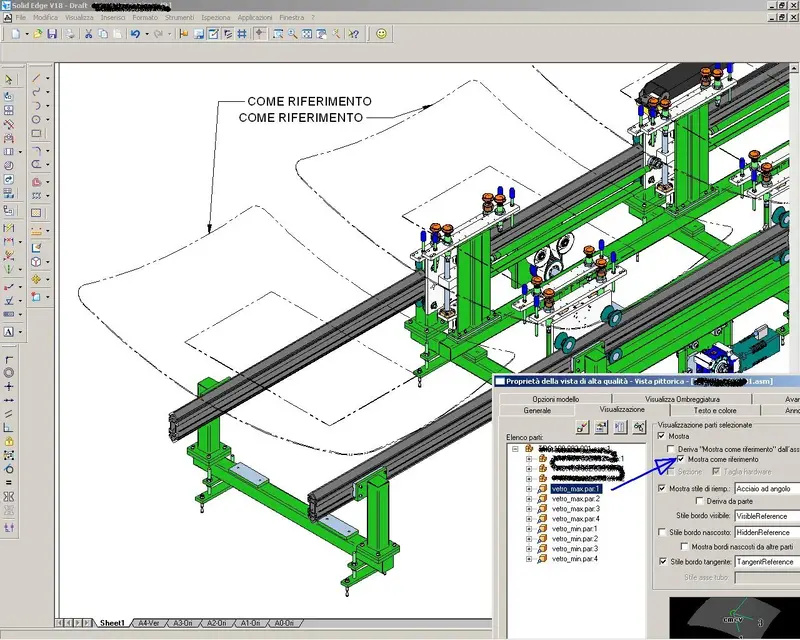
[Tavola] show as reference

in itself I can display a component in the table with thin and transparent line, and also excluding it from the distinct, marking a casel on the shaft of the parts in draft. the thing is useful when I want to include in the table only the "silhouette" of a component, for example a carter that contains a transmission, a frame of which I only care to show the encumbrance and as help to the editor, but that I do not want to cover other parts that actually are part of the group to which the drawing refers. I did not find the way to do it in sxw (allego example).
[Generale]Is there a way to export and import dwg/x_t/step/pdf files in a batch? I've seen that I should use the task scheduler but it looks like we need a license higher than the base to use it. Is there another way?
 

Attachments

  • riferimento.webp
    riferimento.webp
    219.1 KB · Views: 27
two other things:
[Tavola] show as reference

in itself I can display a component in the table with thin and transparent line, and also excluding it from the distinct, marking a casel on the shaft of the parts in draft. the thing is useful when I want to include in the table only the "silhouette" of a component, for example a carter that contains a transmission, a frame of which I only care to show the encumbrance and as help to the editor, but that I do not want to cover other parts that actually are part of the group to which the drawing refers. I did not find the way to do it in sxw (allego example).
I don't know if there's another way, but I'm telling you mine, pretty arzygogular but working. There will be a more "furbo" but I haven't found it yet.
then, you know that there is a way to define the style of line and the level of a certain component (in the tree of the features of the clickdx table the component and character of the line of the component). Only if I do it normally in the view changes the character of the component, but the same covers everything behind me.
I create a visualization status in the axieme of origin that let me see the only reference component and in the drawing copy the view with all the details on itself (ctrl-drag of the view in the tree and the drag on the sheet that contains it), after having blocked it in place not to lose the references. I'll have 2 identical views over it. now, in the property manager of the new active the display status of the only component and I attribute the characters of the line. Now I can choose the display type (hidden lines, in sight, dotted) and the original view will be seen in transparency.
a tip: put the view below in the foreground and hide that of the component when working, in order to avoid doing things unfair view (schizzi, quotas, sections) .

Surely there's a better way, but I don't know what it is...:confused:
[Generale]Is there a way to export and import dwg/x_t/step/pdf files in a batch? I've seen that I should use the task scheduler but it looks like we need a license higher than the base to use it. Is there another way?
Since 2009 it seems to me that it is possible to do it also with the base.
 
rather arzygogular but working. There will be a more "furbo" but I haven't found it yet.
then, you know that there is a way to define the style of line and the level of a certain component (in the tree of the features of the clickdx table the component and character of the line of the component). Only if I do it normally in the view changes the character of the component, but the same covers everything behind me.
I create a visualization status in the axieme of origin that let me see the only reference component and in the drawing copy the view with all the details on itself (ctrl-drag of the view in the tree and the drag on the sheet that contains it), after having blocked it in place not to lose the references. I'll have 2 identical views over it. now, in the property manager of the new active the display status of the only component and I attribute the characters of the line. Now I can choose the display type (hidden lines, in sight, dotted) and the original view will be seen in transparency.
a tip: put the view below in the foreground and hide that of the component when working, in order to avoid doing things unfair view (schizzi, quotas, sections) .

Surely there's a better way, but I don't know what it is...:confused:
I think I understand. actually as a solution is complex, but the important thing is that it works, and that it resists updates! Besides, they're very rare cases so even five minutes of extra work isn't a problem.


Since 2009 it seems to me that it is possible to do it also with the base.
I was trying with the student version and it doesn't work, but maybe it depends on the fact that the student version has the export disabled (of course for 3d formats, I don't know if even for 2d formats, but now I can't verify). I'll ask the dealer.

Thank you.
 
two other things:
[Tavola] show as reference

in itself I can display a component in the table with thin and transparent line, and also excluding it from the distinct, marking a casel on the shaft of the parts in draft. the thing is useful when I want to include in the table only the "silhouette" of a component, for example a carter that contains a transmission, a frame of which I only care to show the encumbrance and as help to the editor, but that I do not want to cover other parts that actually are part of the group to which the drawing refers. I did not find the way to do it in sxw (allego example).
if the shape is simple you can recalculate it with convert entities and then hide the component.

About the post inherent to the selection of the command and the filters that activate consegnuenza you said that with solidedge with the coupling the filter of the faces is activated. Can't you mate an element to a sketch entity? this with swx is possible and is also very comfortable.


two other things:
[Tavola] show as reference

in itself I can display a component in the table with thin and transparent line, and also excluding it from the distinct, marking a casel on the shaft of the parts in draft. the thing is useful when I want to include in the table only the "silhouette" of a component, for example a carter that contains a transmission, a frame of which I only care to show the encumbrance and as help to the editor, but that I do not want to cover other parts that actually are part of the group to which the drawing refers. I did not find the way to do it in sxw (allego example).
[Generale]Is there a way to export and import dwg/x_t/step/pdf files in a batch? I've seen that I should use the task scheduler but it looks like we need a license higher than the base to use it. Is there another way?
for this I believe it serves the office (the second license step) or some third party program.
I, for example, do it with the pdm...
 
a tip: put the view below in the foreground and hide that of the component when working, in order to avoid doing things unfair view (schizzi, quotas, sections) .
I tried, but so I can't enter quotas between components belonging to different views! :frown:
 
About the post inherent to the selection of the command and the filters that activate consegnuenza you said that with solidedge with the coupling the filter of the faces is activated. Can't you mate an element to a sketch entity? this with swx is possible and is also very comfortable.
do you mean if you can select the sketches to use them as couplings? It is possible, but I usually do it only in cases where it serves (e.g.: to center a screw in the middle of a socket), in that case if I select a circle of a sketch if it automatically displays what he calls "implicit axis" to be used as a mating for a concentric bond, for example. The same can be done with points of course.

another thing about the constraints that I like in swx is the bond of coincidence to the faces: It is useless to me, it would be enough to impose the offset = zero. In fact, if it does so, it always uses the quota constraint with zero offset, even if you can tell him not to define the quota and leave it floating (i.e., at any time it can decide to transform the bond into a coincidence by putting offset = zero, parallel avoiding to bind the quota, fixed by inserting the offset that interests you, possibly parametric) or to define the offset to your liking. instead in swx to do these three things you have to use one of three constraints: coincident, altitude or parallel, and then if you realize that you have wrong, you have to delete it and remake it.
the coincidence bond also exists in itself, but it is only used if others fail, for example to bind a face to a certain variable offset from one point.


for this I believe it serves the office (the second license step) or some third party program.
I, for example, do it with the pdm...
sin, competition inserts this function already from the basic license which costs much less than standard swx! :biggrin:
must be checked whether it is a limitation of the student version (which does not export to dwg) or even the standard license.
 
I tried, but so I can't enter quotas between components belonging to different views! :frown:
This in swx is not possible.
and by the way imho makes little sense.
If the two views are not perfectly aligned (and in swx is a tragedy... I know how many times I've been disaligned causing troubles in the morning... leave the various types of alignment. often you "lose" or do not find the right references (just that 2 views do not have the same details displayed that deline... for any type of alignment is imposed. I have repeatedly demanded an alignment between edges, but nisba...:mad:) the odds are totally high.

Suggestion, also this time through the display states. create a visualization status with + reference component (asm+rif) and one with only no reference (asm), as well as one with the only reference (ref. the "below" view (the reference one) will have as a final display status asm. the above will have as ref. hide for a moment the view above with ref, go to that below with asm and activate the asm+rif status. quote the axieme and the reference and then back to the asm state. revisualizes the view of the only ref and it will seem that you quoti the two views.

if you allow quotas between views? swx only allows sketches in one view taking entities from the other, but then loses references.
 
Suggestion, also this time through the display states. create a visualization status with + reference component (asm+rif) and one with only no reference (asm), as well as one with the only reference (ref. the "below" view (the reference one) will have as a final display status asm. the above will have as ref. hide for a moment the view above with ref, go to that below with asm and activate the asm+rif status. quote the axieme and the reference and then back to the asm state. revisualizes the view of the only ref and it will seem that you quoti the two views.
I'm gonna try, but it's hard for something that's so helpful and so banal.
if you allow quotas between views? swx only allows sketches in one view taking entities from the other, but then loses references.
Yes, it is possible without any problem, among other things I use it since 2001 every day and has never failed me an alignment between two views, even the 25th regeneration.
the quotas between views I used very little, two or three times in all in particular cases (as in fact you noticed it makes little sense if not in very special cases). I was wondering why if I use two superimposed views, their use becomes practically mandatory. with the system you proposed instead should become superfluous.
But how do you align the two views? I find myself doing only one alignment, horizontal or vertical, and when I give them the other, I disable the first.
 
I'm gonna try, but it's hard for something that's so helpful and so banal.
It's longer to say than to do.
you're not the only one who thinks the table is better than that of swx...:cool:
Yes, it is possible without any problem, among other things I use it since 2001 every day and has never failed me an alignment between two views, even the 25th regeneration.
...beato te...:frown:
to the swx whistle the ears every time I keep particular alignments.
The ugliest thing is that I can't align a view of a component correctly on another view of another part, taking as references elements of the two views and in my opinion "it's a crazy shit" (cit.)
But how do you align the two views? I find myself doing only one alignment, horizontal or vertical, and when I give them the other, I disable the first.
you can align the view according to its center or according to its origin and are different, so you use one or the other. the fact is that even taking the origin, this is also different depending on the components present (don't ask me why...) and many times "falls" alignment. to align them correctly I make use of the identical display status for the two views, the alignment and then lock the location.
 
another thing about the constraints that I like in swx is the bond of coincidence to the faces: It is useless to me, it would be enough to impose the offset = zero. In fact, if it does so, it always uses the quota constraint with zero offset, even if you can tell him not to define the quota and leave it floating (i.e., at any time it can decide to transform the bond into a coincidence by putting offset = zero, parallel avoiding to bind the quota, fixed by inserting the offset that interests you, possibly parametric) or to define the offset to your liking. instead in swx to do these three things you have to use one of three constraints: coincident, altitude or parallel, and then if you realize that you have wrong, you have to delete it and remake it.
try to change the bond, you can move from one to another without canceling and remaking. . .
 
try to change the bond, you can move from one to another without canceling and remaking. . .
You're right, I found the problem because I put a bond between the circular edge of a circular area and a flat face, and then entered the constraint. In that case it is impossible to change the type of bond later. But if I select face-face I can do as you say.
 
You're right, I found the problem because I put a bond between the circular edge of a circular area and a flat face, and then entered the constraint. In that case it is impossible to change the type of bond later. But if I select face-face I can do as you say.
I'll make a big use of it. I almost never tie face-face.
I go all over the skeletons, constraints and references, I am so accustomed to the high reliability of these that when I work in a more "pick" way it seems to me to make porcates.

I think I'm a victim of acute parastrubbolite, grandpa stefano warned me, I didn't listen to it and now I pay the consequences!!!: eek:
 
I'll make a big use of it. I almost never tie face-face.
I go all over the skeletons, constraints and references, I am so accustomed to the high reliability of these that when I work in a more "pick" way it seems to me to make porcates.

I think I'm a victim of acute parastrubbolite, grandpa stefano warned me, I didn't listen to it and now I pay the consequences!!!: eek:
Let him lose that, it's been since there's cad3d suffering from the fact that our grapes are bitter and so much worth leaving it where it is...

I who for a while have worked without parameters I have to say that it is really a nightmare, after one has formed with sketches and quotas: knowing that to change a model just take a face and pull it makes me sick, what could happen to my models during the night?? ? ?

As for skeletons and sketches, it's a mode that I've never used with, I'll see to explore it, it actually looks like a quick and robust way to work.
 

Forum statistics

Threads
44,997
Messages
339,767
Members
4
Latest member
ibt

Members online

No members online now.
ciao
Back
Top