• This forum is the machine-generated translation of www.cad3d.it/forum1 - the Italian design community. Several terms are not translated correctly.

cosmetic thread in environment design

  • Thread starter Thread starter Biggmetals
  • Start date Start date

Biggmetals

Guest
Morning, :36_1_4:Immagine.webpI can't make the thread appear on the table.... the design you see is composed of all different parts, joined in a set;
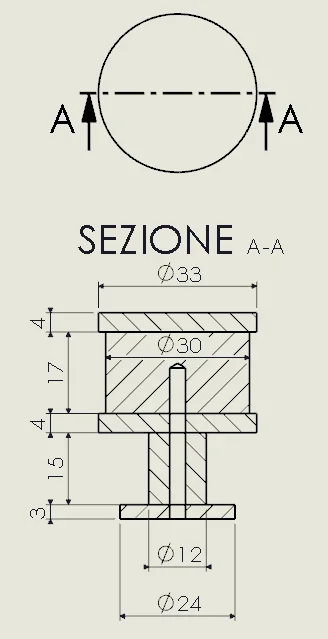
each hole was made with the "creation wizard holes" function on each part, using these options (in the screen the function for the d30x17 piece)
Immagine.webpI tried to see on the guide (I'm starting to hate it) but despite following all the methods (annotation, high quality etc) they don't want to know how to tick up bitches!
in the environment part you see the "circumference of the thread" (I don't know how to call it), in the environment together no and in the drawing neither.
I can't figure out why I'm doing the [bleep] program like he wants, every now and then I see it, sometimes I don't...

I'm freaking out!
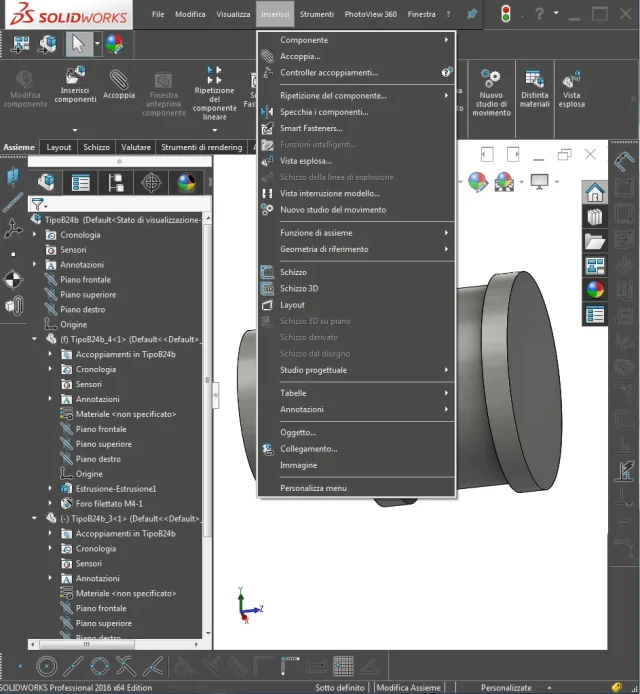
 
(present only for assemblies)
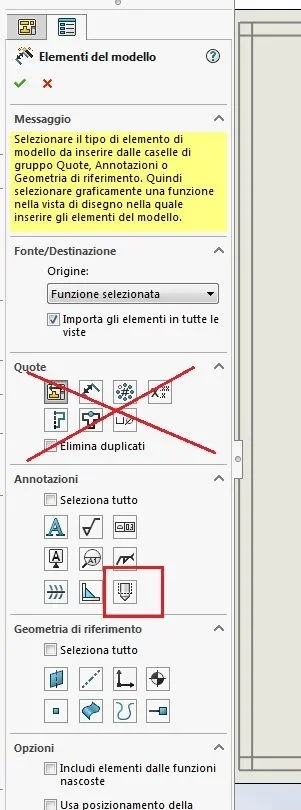
I am in the file together and how you can see model element to me is not in "insert"....Immagine.webpin the meantime I solved by drawing them on the table, I would like to succeed in solving it once and for all but, sooner or later I happen on a table with 6545424 threaded holes and what do I do? ;

in "annotations" there is but once selected by this message when you select the edge of a circular model
"in the context of a set, cosmetic threads can only be added to the functions of the axieme," I think because the function was created in part environment... but I'll just see the thread!

edit: I tried to design a single component and thread appears, as well as additional girth in the part file.
 
Thank you! ! !
You opened me a massive world, thank you so much as ever.

I can ask you, though, why if I go to create the table of a part, it automatically puts me in a set?
Is there the way to set it by default that you always see at any table?
 
Bye.
I wanted to use the same command in a board of a tree (another thread on the forum) and in elements of the model the thread icon in elements of the model does not appear exactly.

Has anyone had such a problem?
 
-you must verify that the annotations are visible (modification>show/hidden> annotations
-you have to put the view in high quality mode
-The annotations on the model must be visible (in ambient edisegno expand the view in the featurar manger, go to the function containing the threads and verify that they are in visible mode)
 
I tried but nothing to do.
I can't even quote the external thread.

Thank you very much for the suggestions.
Surely I will be wrong somewhere
 

Attachments

I see all the threads, but I have been beeping it with 2019.
try to pass views from high quality draft quality
 
I also with 2016
Perhaps I have not been clear enough.

I can't quote the thread in 2d. If I use the intelligent quota, I'll have a distance for the external thread and the diameter for the inner one.
I didn't want to hand it over.
I apologize for misunderstanding.

sent by my sm-a750fn using tapatalk
 
I apologize. rereading was clear the question, he misled me that "hello I tried but nothing to do. " which appeared to display the thread.

If you insert an image it would be useful.

for the male thread (external) you can not automatically have the letter m. should be inserted by hand; of course you know that for this type of thread the outer diameter should be selected and not the cosmetic thread.

the female thread (hole) the quota with the m without problems selecting the two lines of the cosmetic thread
 
I apologize. rereading was clear the question, he misled me that "hello I tried but nothing to do. " which appeared to display the thread.

If you insert an image it would be useful.

for the male thread (external) you can not automatically have the letter m. should be inserted by hand; of course you know that for this type of thread the outer diameter should be selected and not the cosmetic thread.

the female thread (hole) the quota with the m without problems selecting the two lines of the cosmetic thread
Thank you very much.
All right.
I managed to make the quotation.
Thank you all.
 
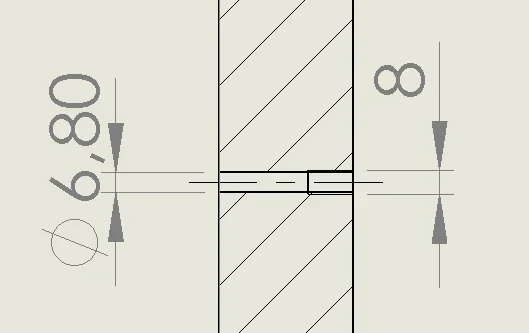
Hi, I'll resume this discussion, I'd like to understand why I can't quote the m8 cosmetic thread in the picture. Female thread with 6.8mm hole. It's just an example (I know I could use the hole creation command).
I made "import model elements" and "high quality", the cosmetic thread is seen but if the quot is returned only the linear quota (as in photo)....
I deduce that I have to hand the correct letter m.?

in the case of gas threads, it will be necessary to beat by hand all the acronym (e.g. 1/4") I imagine.. .
1710363879905.webpthanks to who will answer
 

Forum statistics

Threads
44,997
Messages
339,767
Members
4
Latest member
ibt

Members online

No members online now.
Back
Top