
• This forum is the machine-generated translation of www.cad3d.it/forum1 - the Italian design community. Several terms are not translated correctly.

cousin fem su freecad

  • Thread starter Thread starter Mito125
  • Start date Start date

Mito125

Guest
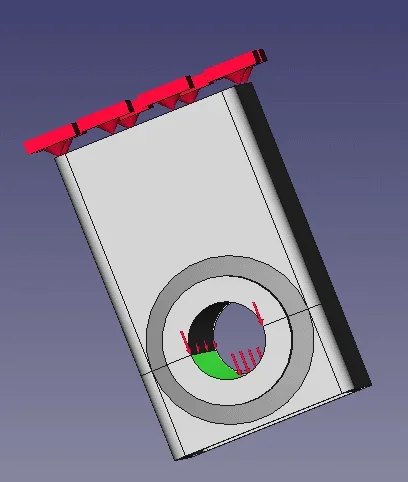
Good morning, I'm starting to move the first steps in this sector. I realized the part with creo and then imported in freecad. Here I took the fem form and did the analysis. But I would like to be sure of what I got. I've made screens by not practicing the project because it's over 10 megas.1.webp2.webp3.webpabove all on the forces I have some problem. I'm not sure I set them correctly. I have a force of 9400 newton that you have to download on the lower surface of the central hole. Is that correct? sorry for the very trivial element but it is a first departure. Thank you.
 
The simplest thing you can do is make a very simple model, which you can solve even with the beam theory so as to compare the results. You're going very much Watch out for the measuring units because wronging the accounts of a 10-100-1000 factor is a moment, and on complex geometries it is not easy to realize that the results are wrong.
 

Attachments

the results should be correct, I analyzed the structure with the eurocode 3 and we have... the values are corrected by fem (micron deviations and vonmises voltage below 100mpa)... it seems all correct and this worries me;)
 
the units of measurement, if you have not changed anything, you have the strength in n and the deformations in mm.
the application of force as you did, is what we normally do all of us when we are in a hurry, because still you have the full 360° surface loaded with force.
the correct operation is to divide the inner face of the cylinder so that it actually loads 180°.
globally the total deformation is about equal but localized pressure will see that it will increase due to the half area.
you can divide the surface by modeler or use it in freecad workbench part....where you will pull two rows and with the Boolean operation create the divided surface. somewhere on the forum I explained it recently.
 
I suggest you look This is post, especially to have fem results visualization tools better than the integrated viewer.
by downloading bconverged calculix you can open the .frd files directly by clicking on it and you will have a tool where you can save images, probe the various points and get the results. above all does not change units at home.

will open you a dos shell where you see or results and a graphic window from which activate various drop down menus with the mouse to choose how to see the model, mesh, with mises, main stress, or arrow x,y,z....ecc.
 
the application of force as you did, is what we normally do all of us when we are in a hurry, because still you have the full 360° surface loaded with force.
the correct operation is to divide the inner face of the cylinder so that it actually loads 180°.
having made the model with creo I already have the surface divided and I loaded the model right on the lower one.
I'm going to read the posts. Thank you.
 
having made the model with creo I already have the surface divided and I loaded the model right on the lower one.
I'm going to read the posts. Thank you.
if the circular surface of the hole is already divided into two parts, then in two half circular surfaces, just load the surface you need and possibly, if the direction is not what you want, add a reference edge to which the force must be parallel (field direction of the screen).

So how you described it all right.
 
then, we go back to using the model I used in the other post. with the same forces and considerations. as the only variant we go to make the cutting of the inner surface of the round in order to be able to apply the force only on a half.metà.webpto do this, using the workbench of part design of freecad, we use the command creates a reference plan and using the front face of the tube, we go to create the plane at a certain quota that coincides to the center of the hole.
at this point, we pass to workbench part to use the command affetta in composite.
so we will get a cut of all the solid and so we can go into the workbench fem and apply the force on the half of the cylinder.

as predicted there are differences because the tubular picture feels globally of the same type of force and does not vary its tension and deformation. Instead, in the contact area, we have a strong diversity that is around 50% precisely because having half the surface we have the surface pressure that doubles. the side edge, being thin affected by an amplification greater than about 90%.

we can see the tension of von mises between the divided model (180°) and the whole one (360°):
confronto.webpThis is also demonstrating that the point of application of the load is important and mainly changes the tensions locally and therefore allows to approach more or less to a truth simulation.

the percentage increase is calculated as 100*(Real voltage - simplified voltage)/ true voltage.

clearly in the first approximation, if we want to understand the overall trend and the goal is to save time, surely not to divide the face can be valid. If instead we want to investigate the tensions in the tube/saving area, then we must take all the necessary steps to approach the real behavior.

just to be able to see how it does, I attach my freecad model where I removed the results to lower the file size. If you want to simulate, just activate the simulation, write .inp and then run calculix.

to divide a flat surface instead, it is easier because you can do a sketch and then always use the command affetta in composite.taglio piano.webp
 

Attachments

Last edited:

Forum statistics

Threads
44,997
Messages
339,767
Members
4
Latest member
ibt

Members online

No members online now.
ciao
Back
Top