
You are using an out of date browser. It may not display this or other websites correctly.
You should upgrade or use an alternative browser.
You should upgrade or use an alternative browser.
User1
Guest
you should create a new profile with the points that follow the trajectory, enter the section that interests you and then with the command costs you create everything.
ferrezio
Guest
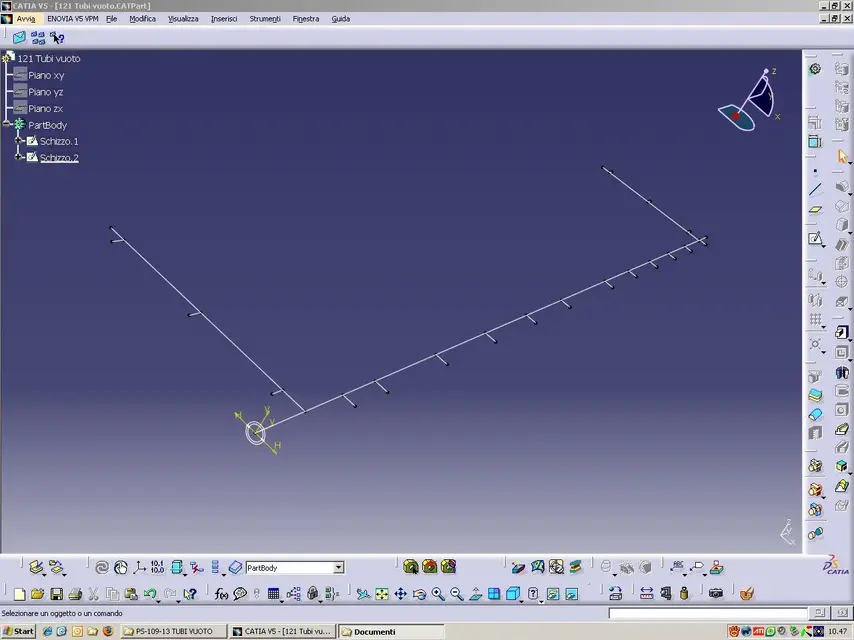
Obviously for such a branched path it is impossible to use only one sketch and one director, however you can exploit the possibility to publish the curves of a profile and, and use the same section on multiple curves with the options of figure.I need to create a pipe with a complex layout (see photo)
the "costola" command only accepts a unique profile.
how to do it fast?
Mar
Hi.
Attachments
mcbramby
Guest
oppure la power copy
User1
Guest
hi ferrezio, you should excuse me if I didn't explain myself well, but in fact it's just what I wanted to say too! the main trajectory can create it with only one sketch!
marcofa
Guest
"You can use the possibility to publish the curves of a profile, and use the same section on multiple curves with the options of figure. "
excuse but can you explain better how to get sketch 1 with selectable profiles separately? What are the options of figure?
Mar
excuse but can you explain better how to get sketch 1 with selectable profiles separately? What are the options of figure?
Mar
ferrezio
Guest
by entering abiente sketch you can use the feature profile command.
allows you to publish different lines of the same profile and use them in 3d.
After that, you can use the various "profiles" (which are visible under the sketch).
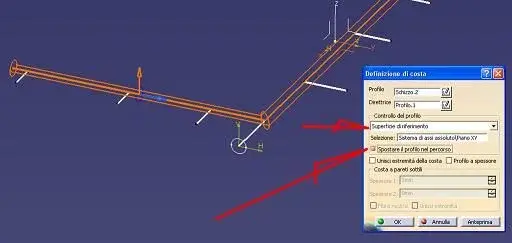
option 1 allows you to develop a coast by turning the direction of the section over a surface, but survivor allows you to activate option 2 that allows you to transfer the section from a point where it was traced to the point of use.
Pay attention to how you draw the section (i.e. to the reference system), it would be preferable to use a sketch placed, so that the position turns out to be the same for each director.
Hi.
allows you to publish different lines of the same profile and use them in 3d.
After that, you can use the various "profiles" (which are visible under the sketch).
option 1 allows you to develop a coast by turning the direction of the section over a surface, but survivor allows you to activate option 2 that allows you to transfer the section from a point where it was traced to the point of use.
Pay attention to how you draw the section (i.e. to the reference system), it would be preferable to use a sketch placed, so that the position turns out to be the same for each director.
Hi.
Attachments


marcofa
Guest
Great!
What do you mean by "short position"?
Mar
What do you mean by "short position"?
Mar
marcofa
Guest
marcofa
Guest
Sorry, I get it! a command for each profile.
Thank you.
Mar
Thank you.
Mar
marcofa
Guest
User1
Guest
I was also interested in this subject, applying the commands that the sign. ferrezio recommended. Everything works properly! Thank you very much!
ferrezio
Guest
You need to learn how to handle the sketch positioned.I managed to generate part, but it's different from yours.
sketch 2 appears only once and not in every coast.
Mar
Unlike the standard sketch this has the particularity that you can orientate it according to the utility.
You find it in the submenù of the sketches.
When you start the command you will find yourself fields, in the first defi to define the plan, in the second zero (through a point) and in the third you define the orientation of the axes.
once you create the first sketch, create the second in the following way:
1- via dx key on the first field create an orthogonal plan to one of the curves
2- in the second part if you select the intersection option of curve and select the same curve where you created the normal plane.
3- neglects the east and tracks the circle with the center on the hv axes of the sketch.
Get out of the sketch.
at this point by using the coast options as in the previous figures, you will see that you can reuse the same sketch several times.
Hi.
marcofa
Guest
dear ferrezio, thanks to the tutorial.
I also used the same sketch 2 for all coasts.
sequence:
sketch 1
sketch 2
coastline1 profile 1 sketch 2
coast2 profile 2 sketch 2 (in the tree below coast1)
etc.
is the result the same or is there any catch?
Mar
I also used the same sketch 2 for all coasts.
sequence:
sketch 1
sketch 2
coastline1 profile 1 sketch 2
coast2 profile 2 sketch 2 (in the tree below coast1)
etc.
is the result the same or is there any catch?
Mar
ferrezio
Guest
yes the result is correct, I apologize if I threw down that tutorial but not having been able to download the attached files, I understood you had difficulty in the posizonated sketch.
Hi.
Hi.
marcofa
Guest
But I don't understand why in your tube every coast has its own sketch 2 , while in my only the first coast has the sketches the others do not.
Hello and thank you
Mar
Hello and thank you
Mar
ferrezio
Guest
because you have the active hybrid modeling, it is the particular display of the tree, when you reuse parts defined in other points.But I don't understand why in your tube every coast has its own sketch 2 , while in my only the first coast has the sketches the others do not.
Hello and thank you
Mar
you can disable it through tools\options\infrastucture\partinfrastructure table "document" disabled the hybrid modeling option.
You will see that without this active gets a model equal to mine.
Hi.
User1
Guest
sign. ferretious, but the hybrid modeling that works has? I just started with the v5 cat, I would like to know its function! Thank you again!
ferrezio
Guest
I will try to make you a short text to explain it, but don't call me sign anymore. Otherwise you will charge a cash of negram.sign. ferretious, but the hybrid modeling that works has? I just started with the v5 cat, I would like to know its function! Thank you again!
Hi.
marcofa
Guest
dear ferrity,
Could you please look at my "catch opening problem" infrastructure post and help me out?
Thank you.
Marcoke
Could you please look at my "catch opening problem" infrastructure post and help me out?
Thank you.
Marcoke