• This forum is the machine-generated translation of www.cad3d.it/forum1 - the Italian design community. Several terms are not translated correctly.

create a solid by filling the space between two sheets

  • Thread starter Thread starter gymbg
  • Start date Start date

gymbg

Guest
Hi.
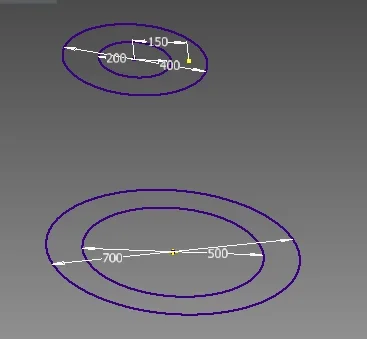
I have 2 cone trunk-shaped sheets, circular base, not concentric. is it possible to "fill" the blank area between the two sheets to get a solid?

In practice it is a mold in which concrete is casting. I have the dix of the mold, I should get the artifact that you create. Is there any command that fills me the 3d area of the mold?
 
I draw to explain myself better... .tramogge.webp
- - - updated - - - -I have to fill the area between the two sheets. . .
 
create a plan on the edge of those surfaces, do a sketch projecting the 2 edges and extrude by activating the new solid option
 
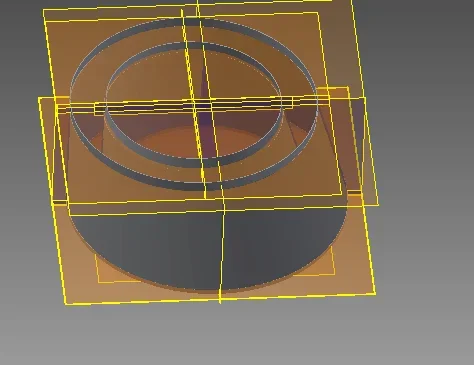
I'm sorry, but I can't. I'm getting this situation... with the two floors and the two sketches.
prova semplice.webpnow how do I extrude starting from one profile and coming to another? Since it is not a regular parallelepipedo?
 
I'm sorry, I didn't see the texture of the surfaces.
you can make 4 surfaces and then solidify everything.
 
Yes but the question is always that... how solid???? Oh sorry but I'm hard.... :
- - - updated - - - -or if you have any links to see with similar problems I study :)
 
...in the end solved by making a sketch on every single floor in correspondence of each of the internal and external corners of my silhouette, then joined with the loft command of the 3d model card creating a positive extrusion for the external profile and a negative for the internal one...(to empty it)
 

Forum statistics

Threads
44,997
Messages
339,767
Members
4
Latest member
ibt

Members online

No members online now.
Back
Top