• This forum is the machine-generated translation of www.cad3d.it/forum1 - the Italian design community. Several terms are not translated correctly.

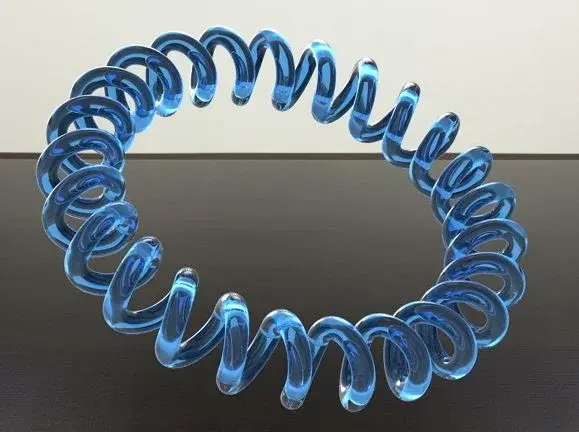
create a spring following a path

  • Thread starter Thread starter Cad.System
  • Start date Start date

Cad.System

Guest
Hello everyone
I ask all of you if someone has ever created a spring on a curve or spline with autocad
I should draw a spring, and it's not a problem here, the problem arises if I have to follow a trajectory, like the old spiral telephone cable.
I'll get you some pictures of how I'd like to make it.
1243252850_ddvip_4930.webp
1243252851_ddvip_2814.webpthanks to all
 
Last edited by a moderator:
Could it be an idea? creating the arc on which the spring develops, the profile of the spring that develops along its path, drawing between them of the arches having radius as the radius of the spring and extruding for tractor the profile of the spring...... could be an idea, laborious but possible
51af6.webp
o7kf1y.webp
aepow1.webp
 
Last edited by a moderator:
I tried on a spline trajectory but I don't like it.
disegno1o.webpyour mode is better for the moment, if there are no other methods.

If you can explain the steps you do, maybe it can also serve others.
Thank you.
 
Last edited by a moderator:
I built two polygons, the first smaller inscribed and the second largest circumstrict having both 25 sides and at each point of the two polygons I designed a circle that then would be the profile of the spring, rotating the ucs of 90° and making it pass for two of the circles I then drew the alco of trajectory having as radius the half of the distance between the two circles, finally I extruded the circle for trajectory, am enough
Would you explain your procedure?
 
doking as you can see from renderings.
the first I did it with the original dwg file yours, and as you can see it comes as if it wasn't smooth enough.
39215745.webpthe second instead I had to explode the series erase all the traces and then join them in one solid and export it to iges.
as you can see, the final rendering is much better.
81324574.webp
 
Last edited by a moderator:
I built two polygons, the first smaller inscribed and the second largest circumstrict having both 25 sides and at each point of the two polygons I designed a circle that then would be the profile of the spring, rotating the ucs of 90° and making it pass for two of the circles I then drew the alco of trajectory having as radius the half of the distance between the two circles, finally I extruded the circle for trajectory, am enough
Would you explain your procedure?
the procedure I used is as follows:
I made a spline with random trajectory.
then I made an offset of the same in both parts.
on the outer spline I made two circles that in turn I replicated along the direction with the command series on trajectory.
once you place the circles in the right way I made arches and replicated in turn in the same way.
I deleted all the circles including the spline and with the joint command I joined the arches.
at its beginning I inserted the circles with radius you want and then with the sweep command I made a single spiral solid.
Unfortunately, not having placed the circles correctly, when the curvature starts, a splash comes, (as you can well notice on the photo).
I hope I've been quite clear.
 
the procedure I used is as follows:
I made a spline with random trajectory.
then I made an offset of the same in both parts.
on the outer spline I made two circles that in turn I replicated along the direction with the command series on trajectory.
once you place the circles in the right way I made arches and replicated in turn in the same way.
I deleted all the circles including the spline and with the joint command I joined the arches.
at its beginning I inserted the circles with radius you want and then with the sweep command I made a single spiral solid.
Unfortunately, not having placed the circles correctly, when the curvature starts, a splash comes, (as you can well notice on the photo).
I hope I've been quite clear.
in practice we did the same thing:finger:
 
in practice we did the same thing:finger:
with a small difference with your procedure, in the end in place of extruding all arches you can simply join them and then make a sweep.
passages are less.

However doking we try to look for if there are other solutions because in my opinion it is not the maximum, of course it could go for a concentric spring, but not on a path made of different bends along a trajectory with curves of different angles.
These are unfortunately autocad peels.
but are we 2 that we know autocad in this forum?
or did not happen to anyone to run into building a spring with autocad?
But...
 
but how do you join the bows? I'd be curious to understand your procedure well.
In any case, I think they're in front of an autocad limit, I think you could solve with rhino. Perhaps he comes tristan and takes out one of his:)
 
but how do you join the bows? I'd be curious to understand your procedure well.
In any case, I think they're in front of an autocad limit, I think you could solve with rhino. Perhaps he comes tristan and takes out one of his:)
and why not... if tristan knows more well come.
the arches join them with the simple command you find on the menu.
I use autocad 2012 and 2013, I don't know you.
ah I press that you can do it from 2012 onwards, since 2011 back does not.
and nothing but create everything in a single polyline.
 
Yes, but I see it hard to make a spring around a board with so many curves that winds on different ucs, at least with autocad
 
the lisp builds a spiral (spline) around a curve drawn on the plane, or almost.

It was rushed and without so many controls, unfortunately I don't have much time available.

the spline starts and ends without a tangency vector, beginning and end could therefore not be as desired, in case I suggest to stretch the curve slightly and then cut the excess spiral part.

Let me know. . .
 

Attachments

the lisp builds a spiral (spline) around a curve drawn on the plane, or almost.

It was rushed and without so many controls, unfortunately I don't have much time available.

the spline starts and ends without a tangency vector, beginning and end could therefore not be as desired, in case I suggest to stretch the curve slightly and then cut the excess spiral part.

Let me know. . .
thanks gp I try to put it in and I will let you know.
 
the lisp builds a spiral (spline) around a curve drawn on the plane, or almost.

It was rushed and without so many controls, unfortunately I don't have much time available.

the spline starts and ends without a tangency vector, beginning and end could therefore not be as desired, in case I suggest to stretch the curve slightly and then cut the excess spiral part.

Let me know. . .
you are right gp sin that just in the beginning and in the end coincide and not even if a spline changes direction on the ucs plane, in the latter case the spiral no longer follows the trajectory but all in all goes more than well is above all speed of execution. thank you but I didn't consider the lisp, maybe because I somehow want to succeed in the company with the only autocad commands.
would be really convenient to fix or complete this lisp.
well done:finger:
If there are other tips, go under. Bye!
 

Forum statistics

Threads
44,997
Messages
339,767
Members
4
Latest member
ibt

Members online

No members online now.
ciao
Back
Top