• This forum is the machine-generated translation of www.cad3d.it/forum1 - the Italian design community. Several terms are not translated correctly.

create mesh( volume) between plane and curved surface

  • Thread starter Thread starter Gallup
  • Start date Start date
geomagic I don't know how to use it, but I witnessed a demo (with model provided by us in real time, not those four ready cubes that use for demos usually...the person who kept the demo had not had the time to study that model), and I was amazed
I agree, geomatic, for what I could see, is one of those phenomenal software in parameterizing scan surfaces. very interesting as software. I found some videos on youtubevideovideoI never used it and I don't know where to start, honestly. It's a software that I recommend you to learn more about by consulting the online tutorials.
 
then hybrid modeler history-based. Perhaps it is not the most correct solution for your field, but mesh management and repair tools should be there anyway. I personally would have seen the freeform better for you.

design x
freeform
 
a Chinese proverb says:
Give a fish to a man and feed it for a day, teach him to fish and feed it all your life.
plantation > fish
fishing rod > nx, spline on the points of the stl, projection spline on plane, extrusion and subtraction convergent-solid
But was it okay?
 
then hybrid modeler history-based. Perhaps it is not the most correct solution for your field, but mesh management and repair tools should be there anyway. I personally would have seen the freeform better for you.

design x
freeform
freeform is a sculptor and many commands only work if you buy a 3ds harware
design x is perfect fast and easy:
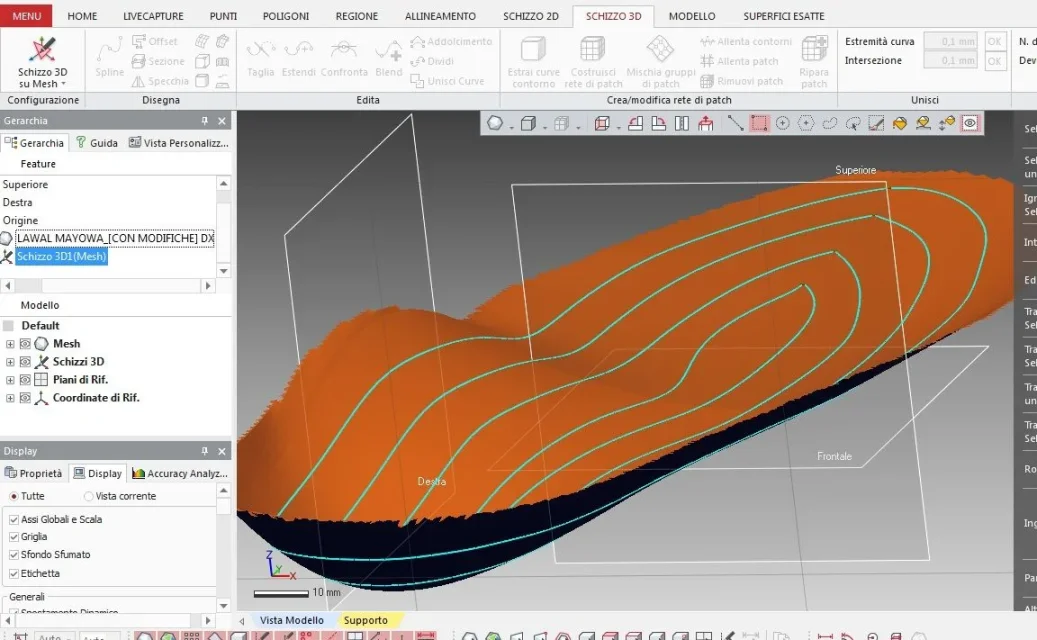
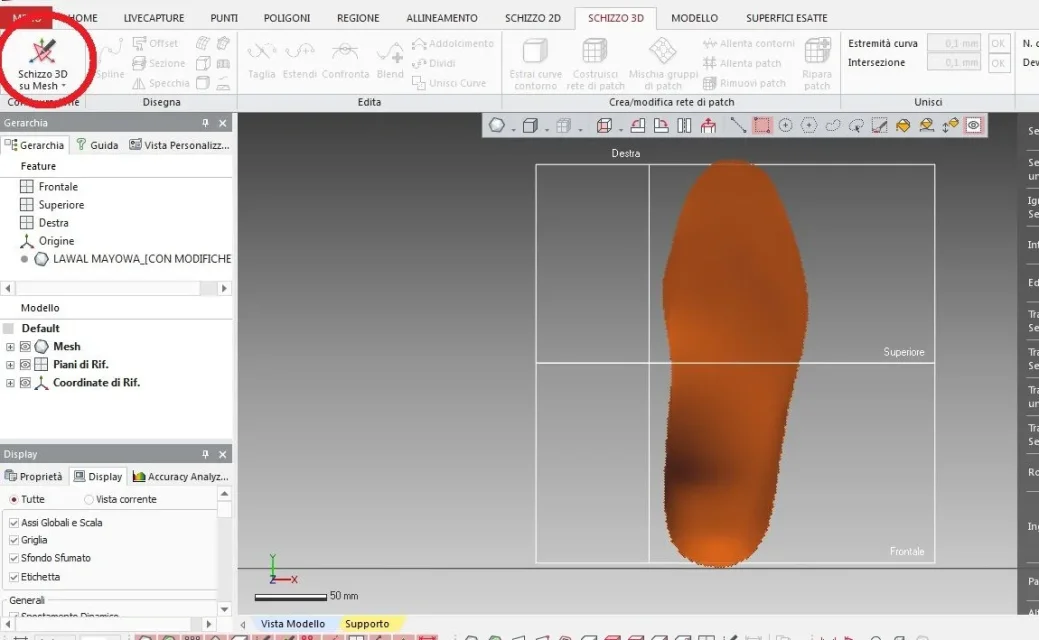
3d sketch on mesh01s3dsumeshImmagine.webpcurve on mesh, which leans like a silk scarf on mesh
there is also the dynamic change of sight, i.e. the plantar turns automatically as I put the points of the spline, i would stay all day02curvasumeshImmagine.webpoffset of the first as before03offsetsumeshImmagine.webpall offsets from which you make the surface04treoffsetImmagine.webp
 
freeform is a sculptor and many commands only work if you buy a 3ds harware
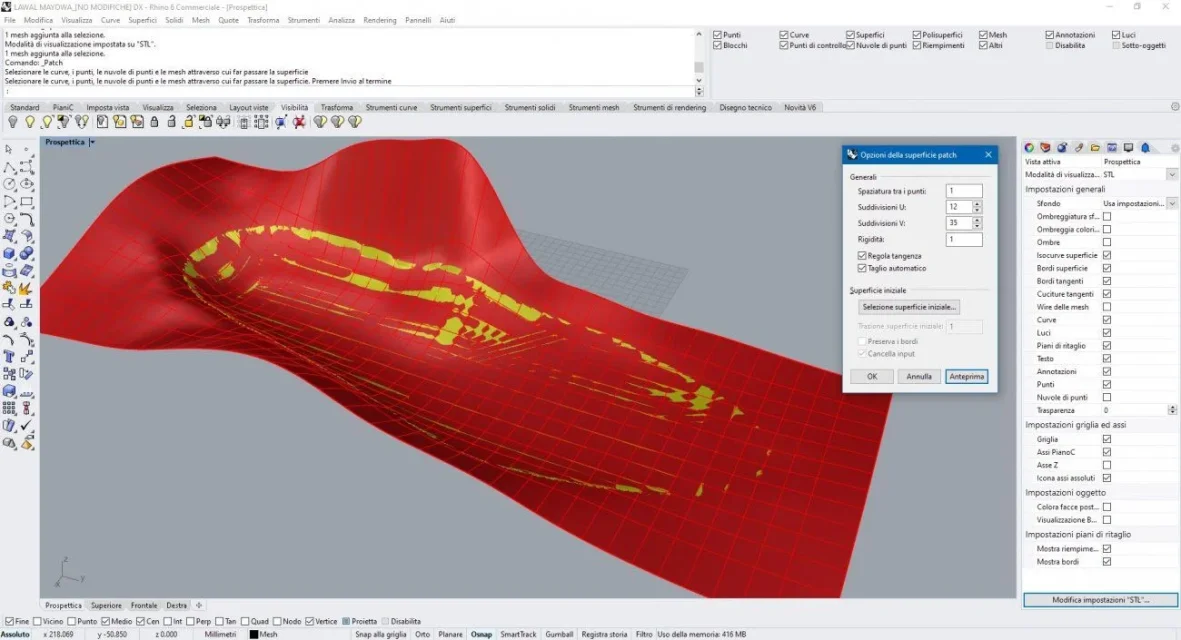
true, however if you talk about knowledge baggage for the profession that @gallup it will be most likely to be more useful. the insole is a fool that with rhino, which costs 1000€ + VAT, you do with a commandRhino Patch.webpvice versa, the bones of the foot placed previously require a much more complex modeling, in which solids and surfaces serve little.
 
Then guys, as suggested by shirokko, I took the fishing rod and I went fishing: I opened stl file on geomagic, I did not create mesh opening it, I think it makes more sense first to make the projection of the edge of the insole on the adjacent lower floor, close it all and then meshare.
therefore, I go on 3d sketch where I generate a curve relative to the edge of the starting insole, the project on the adjacent lower floor already present in automatic obtaining therefore a second curve, through command fills face genero a surface to close the empty curve under the insole, finally from the loft option I try to close all but it gives me errormesh.webp
 
Then guys, as suggested by shirokko, I took the fishing rod and I went fishing: I opened stl file on geomagic, I did not create mesh opening it, I think it makes more sense first to make the projection of the edge of the insole on the adjacent lower floor, close it all and then meshare.
therefore, I go on 3d sketch where I generate a curve relative to the edge of the starting insole, the project on the adjacent lower floor already present in automatic obtaining therefore a second curve, through command fills face genero a surface to close the empty curve under the insole, finally from the loft option I try to close all but it gives me error
your process can work, provided the mesh has regular edges. In your case you can see that some faces on the edge of the mesh have sides that in projection overlap, therefore you create unusable contours.
I do not know in detail the commands of the software you are using, but in principle you should:
1. create a closed spline that smoothly approaches the jagged edge of the starting insole
2. project it on the reference plane
3. with the procedure indicated by +forte I would regrow the surface of your starting insole
4. create a solid extrusion with the spline on the top floor more than the starting insole
5. Cut the solid with the surface created at point 3.

This way you have a solid of surfaces that you can export/save into stl for simulation.
 
softening the edges I can close it, now I have to be able to fill the open spaces between generated curve and jagged mesh, tips? Cattura.webp
 
read what I wrote to you. in particular point 3, to get a surface similar to that you see in post #48
You mean post 47? then build various internal curves that adapt to the starting mesh and from those recreate the mesh from scratch having so the outside edge not serrated? but do I not lose a lot of detail in the curvature of the insole in this way?
 
You mean post 47? then build various internal curves that adapt to the starting mesh and from those recreate the mesh from scratch having so the outside edge not serrated? but do I not lose a lot of detail in the curvature of the insole in this way?
Yeah, maybe do it harder if you want more detail. However I think you have confused ideas on mesh and analytical surfaces.
 
You mean post 47? then build various internal curves that adapt to the starting mesh and from those recreate the mesh from scratch having so the outside edge not serrated? but do I not lose a lot of detail in the curvature of the insole in this way?
add also longitudinal and transverse lines then go to suitable patchpl0Immagine.webp
 
no direct and automatic command can do well with a scan with a dima/contorno done so badly, now I make a glass of red wine, for precision a 4 euro coop chianti a bottle.

Good night and golden dreams
 

Attachments

I agree with what Shirokko wrote about that jagged edge. the edge so serrated prevents having a regular spline and therefore also the result of its extrusion will be a slaughterhouse. it is necessary to reconstruct as listed before.
Of course these software, it turns around, they all think about the same way. we need to understand each one's philosophy. for example autocad is perhaps spartan and even less "modern" but the operations to be carried out are large.
looking at other geomatic video tutorials, to me from the impression that this software still has discrete tools to manage the edited mesh.
I also have the command to destroy the hammer... :https://www.facebook.com/marco.s.co...602425780/?type=2&video_source=user_video_tab
 

Forum statistics

Threads
44,997
Messages
339,767
Members
4
Latest member
ibt

Members online

No members online now.
Back
Top