
• This forum is the machine-generated translation of www.cad3d.it/forum1 - the Italian design community. Several terms are not translated correctly.

create point, with extension of lines, as i do!! !

  • Thread starter Thread starter piccio__87
  • Start date Start date

piccio__87

Guest
banal question!:finger:

I need to extend two lines to make them meet... so create a point and take it as a reference for a quota.
(in the table)

How do I do it?

Thanks.:biggrin:
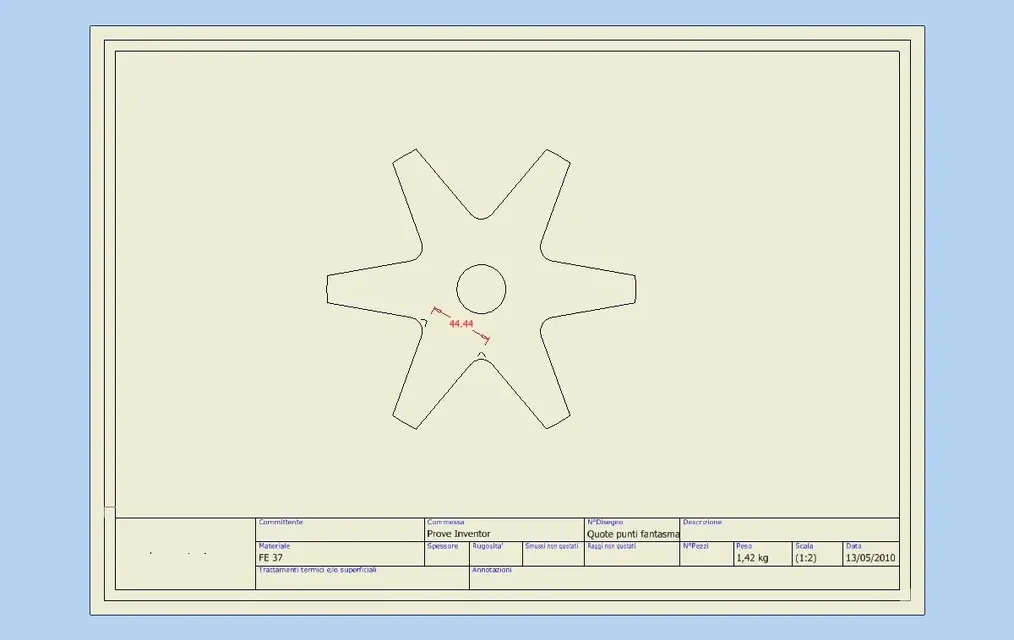
 
banal question!:finger:

I need to extend two lines to make them meet... so create a point and take it as a reference for a quota.
(in the table)

How do I do it?

Thanks.:biggrin:
Make a sketch on that view. project us the lines you need to stretch and draw the lines of stretching, parallel to those projected of the view.
cut them on the intersection and get out of the sketch.
share normally.

... and do not use the caps to write. . .
 
When I create the sketch from the table, the projection symbol is gray!! !
so even if I design the lines then give them obviously coincidences etc etc. I am useless because it does not detect them!!!
I'm sure I'm wrong!
 
When I create the sketch from the table, the projection symbol is gray!! !
so even if I design the lines then give them obviously coincidences etc etc. I am useless because it does not detect them!!!
I'm sure I'm wrong!
Because you're doing a sketch all over the table, not on the view.
first click with the mouse on the view to highlight it, then click on the sketch command.
It should work.
One thing: the "point" of the sketch, is not visible when you get out of the sketch, or at least I've never been able to make it visible, so if you need a crucider, you have to draw it. . .
 
I'm so sorry. !

I clicked sketch and select the view!!!
...and took me as a sketch the whole table!
I'm sorry. ! ! !

Thanks tarkus!
ps: Also to me is not visible the cruciform once out of the sketch! Why did they make this choice... mha
 
to make a quota from an intersection that is not there, it is not necessary to make a sketch. .

quota -> click on the 1alinea -> button dx "intersection" -> click on the 2alinea -> at this point the ghost intersection -> click on the point to be listed.

easier to do that than to say
 
to make a quota from an intersection that is not there, it is not necessary to make a sketch. .

quota -> click on the 1alinea -> button dx "intersection" -> click on the 2alinea -> at this point the ghost intersection -> click on the point to be listed.

easier to do that than to say
That's right! :finger: I wanted to say it, but I see you have already written it:
 
Yes, I know, but it works only if as a reference for the second part you have a line or another entity already defined, which is true is the most common case, but it does not make you do it between two ghost points...:biggrin:
 

Attachments

  • Quote punti fantasma.webp
    Quote punti fantasma.webp
    19.2 KB · Views: 42
I didn't get it, but it's obvious that in two places you don't get it done. points do not have a direction, so what intersection can they have?
 
Maybe I get it, but you're wrong... You do it.
- share command
- click left on the 1st line to extend
- click dx, intersection
- click left on the 2nd line to extend (1st ghost point)
- click left on the 3rd line to extend
- click dx, intersection
- click left on the 4th line to be extinguished (second ghost funt)
- positions the quota
 
Hi, guys, I'm going to interfere because, having to generate a quotation like the one we're discussing, something strange happened to me. I press that I had not read the indications of the Ilario yet and that, until yesterday, I too drew a sketch inside the view to create remarkable points to which to attach the quota. Yesterday instead, resuming this necessity, I started the quotation and did not have the need to click on the line and select "intersection", but it was enough to approach me to one and to the other line so that the site automatically identifies the remarkable point (by means of dotted lines of extension). the beautiful but it is that today it does not do it anymore!!!!!!! it seems it is necessary to set an extension snap automatically (as it existed in autocad) but I can't trace it. Do you have any ideas??? ? Thank you.
 
the recognition of the apparent intersection does so if the quota is already included
example quoti normally one of the two lines then select the left key share of the mouse hooks the green grip trascinnalo on the apparent intersection (as it did with autocad mec)
 
It's the first thing I thought about, but it's not. I started from a table absolutely without quotations. I do not refer to the specific green grip of quotas or other remarkable points. but, placing me on one and the other element, the extensions were automatically projected with a black dotted line; until identifying the intersection point of the two.:mad:
Now, on the same design, at instance of a day, I can not repeat the operation:confused::angry::angry:
 
to the third post I was about to add the answer, then read the post of mauro, very just.
 
I'm sorry, but no one has had similar experiences to mine or have any idea what I'm talking about?!! Thanks again.
 
to make a quota from an intersection that is not there, it is not necessary to make a sketch. .

quota -> click on the 1alinea -> button dx "intersection" -> click on the 2alinea -> at this point the ghost intersection -> click on the point to be listed.

easier to do that than to say
Thank you very much:finger:
 
hello to everyone, someone can tell me if you can insert a coordinated quota with references from virtual intersections (as for a simple parallel quota)? see image.
Thank you.
 

Attachments

  • Quota coordinata.webp
    Quota coordinata.webp
    19.4 KB · Views: 12

Forum statistics

Threads
44,997
Messages
339,767
Members
4
Latest member
ibt

Members online

No members online now.
Back
Top