
• This forum is the machine-generated translation of www.cad3d.it/forum1 - the Italian design community. Several terms are not translated correctly.

create quota "n° xx passi da xxx mm"

  • Thread starter Thread starter dicifa
  • Start date Start date

dicifa

Guest
Bye to all,
I happen several times to create quotas by specifying the "n° of long steps tot.mm" (e.g. 10 steps from 100mm) and when I make the quota I have to write it manually. ...I don't like this too much because if I change the length of the step the share does not update because done manually.
Someone can tell me if there's a chance to make this kind of quota.

I attach an example in pdf.

Hi.
 

Attachments

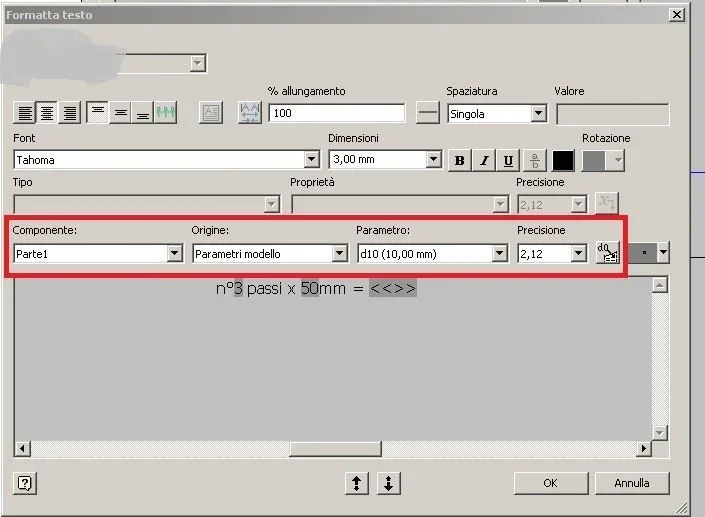
in practice you have to go to “weight” two parameters on the side and you will go to recall editing the quota.
As I imagine that the holes were made with the serial command, the parameter of the step you have already established while you will have to create a user parameter that is the number of steps as inventor defines the number of holes, so for example n_passi=dxx-1.
at this point double click on the quota, click the icon at the top right “start text editor” in the second pane select user parameters, in the third selections n_passi and in the fourth the number of decimals after the comma. click the last icon to insert it into the editor.
repeat the operation for the model parameter of the step value.
Hi.
editor quota.webp
 
in practice you have to go to “weight” two parameters on the side and you will go to recall editing the quota.
As I imagine that the holes were made with the serial command, the parameter of the step you have already established while you will have to create a user parameter that is the number of steps as inventor defines the number of holes, so for example n_passi=dxx-1.
at this point double click on the quota, click the icon at the top right “start text editor” in the second pane select user parameters, in the third selections n_passi and in the fourth the number of decimals after the comma. click the last icon to insert it into the editor.
repeat the operation for the model parameter of the step value.
Hi.
View attachment 37445
Thank you! That's what I needed![emoji1]
 

Forum statistics

Threads
44,997
Messages
339,767
Members
4
Latest member
ibt

Members online

No members online now.
Back
Top