• This forum is the machine-generated translation of www.cad3d.it/forum1 - the Italian design community. Several terms are not translated correctly.

create very irregular solid

  • Thread starter Thread starter edoberna
  • Start date Start date

edoberna

Guest
Hello everyone,
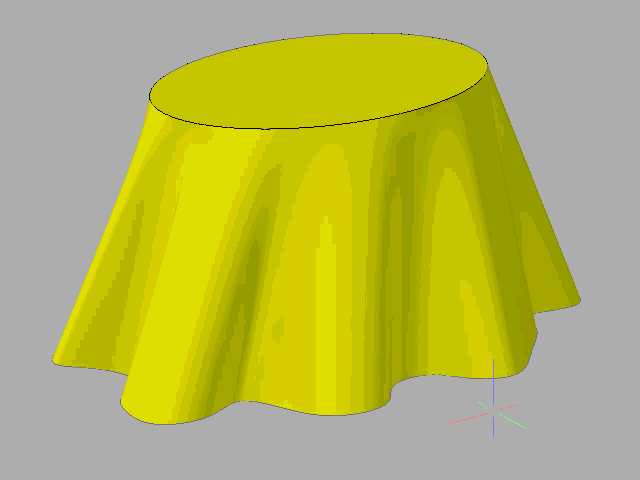
I have to create a solid by combining two surfaces... so far nothing serious!:smile:
the problem is that one is a kind of oil stain (or fantasy imagine a quadrifoil) and the other is an ellipse.
The loft command obviously doesn't work.. .
How do you do that?
 
to make it short I have to disdain this and then print it in 3d on some site...

solidoirregolare.webp
 
Last edited by a moderator:
for the loft do not choose the surfaces, but the spline and the boundary ellipse, then scolpiscisuperf.
 
Perfect! It works great!
two things:
1) What do I need the command to sculpt surface? I actually get the precise solid.. .
2) if I want to change some parts of the solid, I go with edgesurf (supcoon) and then change the mesh?
 
Okay, I said a caper! No supine that has nothing to do with a bat...
trying to be more specific, I got this solid:Schermata 2015-02-04 alle 14.43.10.webpSome waves, however, do not return right, being a little too wide and creating corners that I would not like.
How do I shape the surface of the solid?
 
...some waves, however, do not return just being a little too wide and create corners that I would not like.
How do I shape the surface of the solid?
Meanwhile, you can recreate 2d curves in order to produce a more satisfying result.
to change the solid selection and then act on the grips, the more vertices have the original curves, the more grip you have available for the changes.
 
the problem is that the grips do not know how to select them and move them :-((()
when they select the solid, they appear in some points of the blue squares (which I presume are the grips) but if I try to move them, I move all the solid.
 
Okay, I don't know, but the form I had made at the first warrant didn't allow me such changes. . .
to me it was interested to be able to change the course of the vertical guns so that they go more narrowing (more to pyramid than to cylinder we say).
is it not possible to go to touch the volumes of the surface "hand"?
Last question... is it possible to extrapolate the surface by putting it on a floor?
 
by hand you can change the geometry derived from the 2d as indicated before, otherwise you could model with mesh, but it is more complicated and, according to me, not necessary for an all-in-one form as simple as yours.
It seems strange to me that you don't find the way to adapt it with the grips available.
in autocad you can not develop a surface on the floor.
 
I managed to get the desired shape working on the loft guides, so the solid now is all right that I have to empty it.
the empty command does not work me however and gives me the error message (in English): "no loop through new edges and vertes"
Moreover I would not like to vote it only inside but also under so that it can then fill it with material to make it more solid.
How do I solve this?
 
with loft creates a surface, not a solid, with superfluous close the top, union of the two surfaces then thicken... If you're lucky and the object doesn't self-intersection... :biggrin:
 
I think loft creates solids if you start from two parallel closed polylinese between them as in my case, in fact I have a solid. .
 
command: loftcurrent wireframe density: isolines=4, mode creation of closed profiles =solido
select cross sections in loft order or [PUnto/Unisci più spigoli/MOdalità]: moclosed profile creation mode [SOlido/SUperficie] <solido>: </solido>suselect cross sections in loft order or [PUnto/Unisci più spigoli/MOdalità]: found(s) 1
select cross sections in loft order or [PUnto/Unisci più spigoli/MOdalità]: found(s) 1, 2 total
etc.
 
hard to help someone reading a list of the autocad prompt says: "I didn't understand a bat."
or you have no idea how autocad works or you better tell us what you don't understand.
Do you at least understand that bold texts are commands/options or not?
 
very nice and kind tristan... Your intervention was very useful!
Anyway, I perfectly understood that it was the loft command line, but what I was trying to say to gp was that by joining my two closed polylinese I got a solid not a surface!
said this, my problem now is to empty the solid and I did not understand if gp suggests to recreate the solid through surfaces and then apply the procedure mentioned above or otherwise.. .
 
very useful as your "mmm I didn't understand a bat"
select cross sections in loft order or [PUnto/Unisci più spigoli/MOdalità]: moclosed profile creation mode [SOlido/SUperficie] <solido>: su</solido>These two lines taken from the gp post are the loft command options that allow you to create a surface instead of a solid. Is that clearer?
 
Okay, so I figured it out. The application is: what do I need to create the surface?
 

Forum statistics

Threads
44,997
Messages
339,767
Members
4
Latest member
ibt

Members online

No members online now.
Back
Top