
• This forum is the machine-generated translation of www.cad3d.it/forum1 - the Italian design community. Several terms are not translated correctly.

creation of fitting surfaces

  • Thread starter Thread starter PAnz3r™
  • Start date Start date

PAnz3r™

Guest
Then,

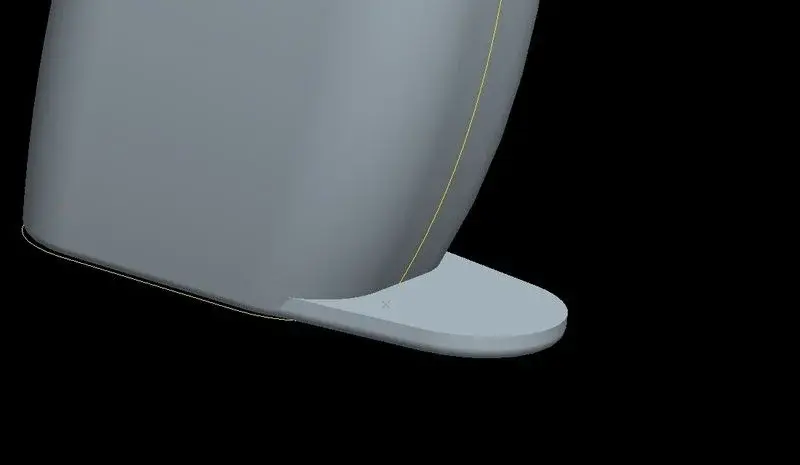
I have a problem with the use of surfaces, in the sense, as long as it comes to creating surfaces using reference curves that I do (which I managed to do after n thousand attempts and asking for help), in advance, it's all right, it comes pretty well and I can do my things.... now I found myself in front of a dilemma that I can't solve and I lost a lot of work time :|.... then, it's very simple. ..I would like to collect with a surface the beak and body you see in the figure, a soft fitting surface naturally.

My problem is that I can't create curves using curved creation functions (or free or slow) because I can't snap to the references I'm interested in....I always find myself with curved airfields and, the only time I can "snap" a point of the curve is on the starting point holding down uppercase..... :\

How can I do that?

Thank you.
 

Attachments
  • help1f.webp
    help1f.webp
    6.7 KB · Views: 26
Last edited by a moderator:
Then,

I have a problem with the use of surfaces, in the sense, as long as it comes to creating surfaces using reference curves that I do (which I managed to do after n thousand attempts and asking for help), in advance, it's all right, it comes pretty well and I can do my things.... now I found myself in front of a dilemma that I can't solve and I lost a lot of work time :|.... then, it's very simple. ..I would like to collect with a surface the beak and body you see in the figure, a soft fitting surface naturally.

My problem is that I can't create curves using curved creation functions (or free or slow) because I can't snap to the references I'm interested in....I always find myself with curved airfields and, the only time I can "snap" a point of the curve is on the starting point holding down uppercase..... :\

How can I do that?

Thank you.
hi panz, official call ...:-), the images are inserted in the attachment, not posting them on external links.
the regulation provides for reasons of legibility and security.

it is possible to connect according to many systems and with many different results, if you place the file I can show you some examples.
 
This is the file ^^^, I put the mediafire link hoping that it is not forbidden :

is very simple ragass I have to connect with a beautiful curved surface that becca and the body of the handle

Thank you.
from maxopus: and they are two .... you have to zip and attach files, do not insert them on external links to cad3d.
 

Attachments

Last edited by a moderator:
please maxopus you could put as a rule to indicate with what version the files that are attached.
so you know before downloading them, if you see that they are for a higher release you avoid.
Thank you.
 
please maxopus you could put as a rule to indicate with what version the files that are attached.
so you know before downloading them, if you see that they are for a higher release you avoid.
Thank you.
You are right, by the way it is a set rule of the regulation but, many users ignore it.
 
I could also help you, but I honestly don't understand what you're asking.
Do you want a radius or a surface? could come in a thousand different ways.
 
then I want to create a fitting surface between that lower protrusion and the rest of the handle.. .usanto the style function to have the surface, my problem is that I can't create the limit curves because I can't snap on the references. ..however I want a fitting with surface
 
then I want to create a fitting surface between that lower protrusion and the rest of the handle.. .usanto the style function to have the surface, my problem is that I can't create the limit curves because I can't snap on the references. ..however I want a fitting with surface
Okay but here I came, what I meant is how the hell you want this superfic, I can create it in a thousand ways!
the limit curves as you want to do, from where it has to leave, until what maximum do you want to go?
Can't you do a print screen and draw it on the image?
We try to be more precise in the demands, we are not guessing here...
 
the image cannot be put... .

Did I mention the handles that have those finger dividers between the two on the trigger and the others below? or between the two free fingers and the bottom of the handle? You know, they have all the surfaces connected to each other. ..that I want to do, something similar to creating the spout of a jug for water as there is in the drill inside I create, only that I have to collect that flat surface with the rest of the handle but I want to shape the surface that will collect the two entities....not using "agreement". . .

If you have a thousand ways, I'm good one:biggrin:
 
If I understand, you want to snap any points on a surface, right? !
I don't even know if you use I create, because your wf5 file opened it! O

you can create a curve starting from a section, and taking points on this curve you are sure that they are on the surface. or you can create points directly on the surface and set offset from references to pleasure.
 

Attachments

Perfect! Big wolf! That's what I need to do...that is, I need to create something similar to the bugnature you've done in the middle, in the sense that I need to reconnect with this hypothetical handle of the forms to create the classic fins that are on all the handles that serve to protect the fingers that are not on the trigger...I don't know if I explain. .

how do you create and control points on surfaces?

the file that is under your post I downloaded it and opened it but if I move the insertion point at the bottom skips everything:\
 

Forum statistics

Threads
44,997
Messages
339,767
Members
4
Latest member
ibt

Members online

No members online now.
Back
Top