• This forum is the machine-generated translation of www.cad3d.it/forum1 - the Italian design community. Several terms are not translated correctly.

creation table for inserting blocks with autocad 2007

  • Thread starter Thread starter vegeth
  • Start date Start date

vegeth

Guest
I need to draw a legend

1) when I create a table (from command line:table) and inside his cell I insert various blocks (of course each block in his cell) why the blocks are not all uniform and at the same size? (Is there no way to scale them all the same?) if when I insert the block use scale for each block I have to give it a different scale factor so that more or less the blocks approach to being of equal size but in the end I can not even do so.
2) on a table made up of 12 blocks, using half center only 7! how is it possible why others do not center?
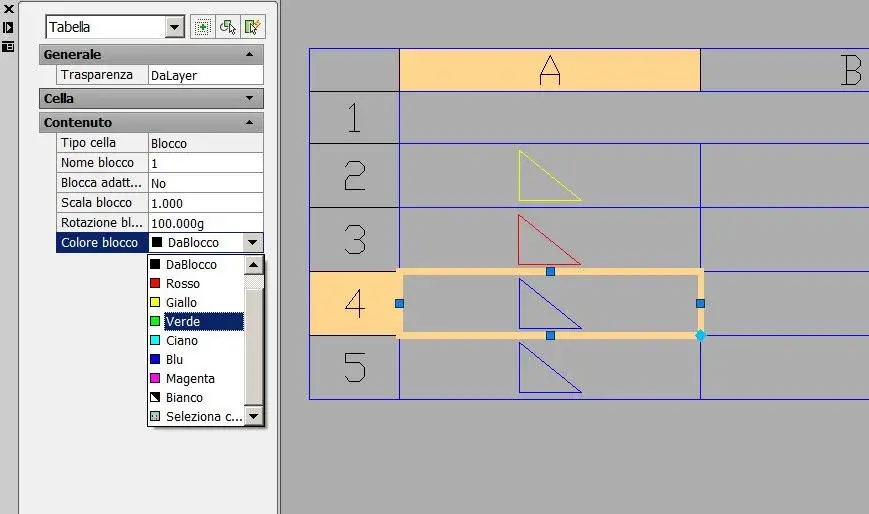
3) Why can't I change layers and its color in the blocks inserted within the created table?

Thank you.
 
Can anyone help me? I have to finish design boards, I am under delivery and I can't understand why autocad makes me this joke:-(if you can help me, please would you do me a huge courtesy.

Thank you.

*and*
 
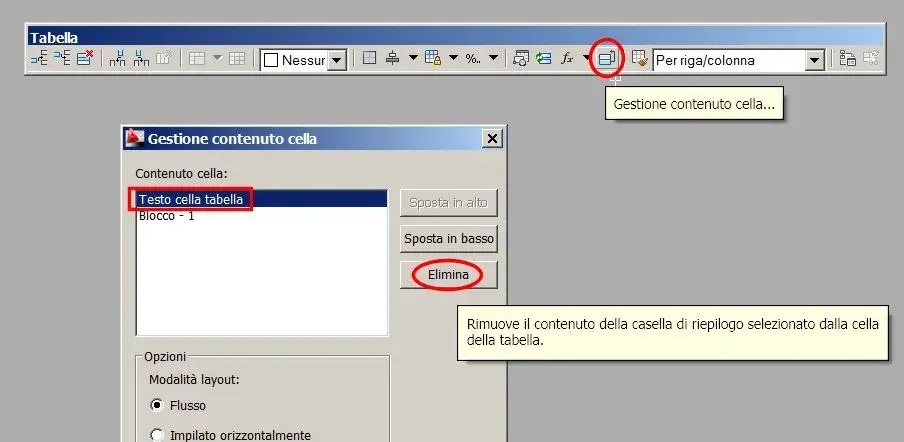
see in cell content management if, besides the block, there is something to remove.
 

Attachments

  • 332.webp
    332.webp
    26.3 KB · Views: 24
1) Have you set the option "adapted automatically"?
2) may also depend on the location of the base point of each block
3) if the blocks have been created on a layer other than layer 0, they will keep the color of the original layer.
 
I answer to joseph:
1) I did not set it because otherwise the blocks are as big as the cell and comes a legend for blinders...I set the scale and found a suitable scale factor for cyasun block, but when I use half center on 12 symbols they are centered only 7!7 si and 5 no, just do not understand. I've always created the same blocks.
2) also changing the base point during the creation of the block the result does not change:-(
3) the blocks have always been created on the zero layer and with neutral color (i.e. white), inside the block table I can not change the color, nor layer, if I change colors to the edges of the table (table layer: red color) e.g. red my 12 blocks become all red, instead I need es a layer name:green, other layer name:red, I need 6 on layer:red and 6 on layer:green so that I can I simply change
I found a solution but it's too slender and you lose a lot of time, you have to create the blocks by forcing the color of the layer for example one of red color and a green doing so when I insert in the table autocad inserts the correct colors for each symbol, but you know how long it takes to create maybe even 50 blocks with different colors I don't pass anymore...:-(
 
I answer to jp:

Unfortunately management cell content is in the background (not active) is not because I can't activate it, do you know by chance the keyboard command to activate it so bypass the table panel? or can you tell me how I didn't disable that function?
 
from the guide:" if in a table cell there are multiple blocks, use the cell content management dialog box to customize the display of the cell content. "
therefore the option "content management" is activated only if in the cell there are 2 or more objects (blocks, texts, fields, etc); if needed, you can enter a blank text line and then not visible.
 
if the color of objects in the blocks is "dablock" you can change it later, from the property window, selecting the cell.
 

Attachments

  • 333.webp
    333.webp
    24.8 KB · Views: 15
:biggrin: hello to all!!!:biggrin: I work with 3 lcd monitors in triplehead configuration, I set my working air by moving the autocad panels where I preferred and then I blocked them so avoided accidental shifts, since the result obtained I like except the work area. at the closing of autocad and at its reopening, autocad I did not keep the setting of my newly saved working airliner, I have already tried to remeter things to place again moving the panels x several times, recovering everything but to the reopening same problem!! It is as if autocad does not store the setting of the working area that I created. according to you how can I do not lose all the time configuration?

thanks to alliiiiiii

*and*
 
I would also like a small hint if and how you had solved the previous problem before leaving with another totally different one, on which another discussion would be appropriate for greater clarity
 
Hi, guys, first of all, I wanted to thank everyone because you're helping me a lot, I've done some tests on your advice... the advice of g.p. was very useful and it worked very well!:-) creating the color of the blocks from "block" with properties changes the color of the single block, it is perfect, the only neo is that I have to change from ownership the color of the blocks and not from layers as I am accustomed to doing usually, cmq just make a legend layer and insert the blocks in that layer and change the colors from propitiancy, if they turn off that layer also freezes Another mole is that my block library is made from layers, x use them with the legend I have to create another all from block! It is a shame to have a double of the same symbols!
 
I apologize to joseph if I couldn't answer in good time but I was trying all your good advice and in the meantime, in the test I happened another ehehhehe problem :-)
 
I am trying to finish this legend and I am succeeding with your help. We have to solve the question of scale and middle center.

Thank you.

*and*
 
Bye to all,

Here I am joseph, the 2 points are the following and with a brand new 3 always working on the table, I strongly hope that it does not happen + problems...:-(

1) I have to draw a legend, when I create a table (from command line:table) and inside his cell I insert various blocks (of course each block in his cell) why the blocks are not all uniform and at the same size? (Is there no way to scale them all the same?) if when I insert the block use scale for each block I have to give it a different scale factor so that more or less the blocks approach to being of equal size but in the end I can not even do so. see image 01

2) on a table made up of 12 blocks, using half center only 7! how is it possible why others do not center? see image 01

3) I don't know why autocad doesn't make me see the horizontal lines (invisible just like excel) x because I want to see them at video, but I don't want them printed. luck that I had made a copy from the original file, the problem is that from the original file the horizontals have disappeared and in the copy no!!!com' is possible?and even if I copy the table from the copy file and insert it into the original the horizontals are not kept, disappear! !what should I do?see image 01 and 02

thanks to all

*and*
 image
 
I know I couldn't fit the image, I certainly did something wrong, explain how to do nicely.

thank you all!! !

*and*
 
joseph intended that you attach not an image, but a portion of dwg with table and blocks, otherwise we can't try.

to load files you have to go into management attachments.
 
thanks gp, let's try (point 3 I solved it was a stupidity that made me miss the whole day) that nerves is always like this.

If you can solve those two feathers and especially those in the middle of the center I can finish my project.

Thank you

*and*

ps: I attach the file, green symbol (it is ok is the correct centered one), red symbol (it is not centered as autocad nn inserts it centered, I do not explain why).
 

Attachments

The table has a strange behavior.
- the table was created in autocad or imported from another program?
- or was it inserted in a previous version of autocad (e.g. 2005)?
try to start again from scratch and also refer the table with vers.2009.
 

Forum statistics

Threads
44,997
Messages
339,767
Members
4
Latest member
ibt

Members online

No members online now.
Back
Top