
• This forum is the machine-generated translation of www.cad3d.it/forum1 - the Italian design community. Several terms are not translated correctly.

cross orientation of wrong defaul

  • Thread starter Thread starter MARCOC
  • Start date Start date

MARCOC

Guest
hello to everyone, today I happened to open a file of soldworks (part), which in isometric view introduces me the main orientation of the axes, different from all the files seen until now
I'll put on the picture1546610523211.webpCan you tell me where they set up? ? ?
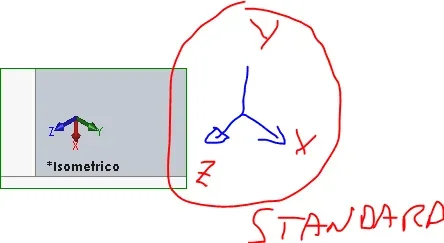
and the first time I happen to see a solid file with different standard orientation

Thank you very much
 
pressing the space bar shows the orientation menu. magic is in the third top row keyorientamento.webp
 
Hi, I had the same problem, I wanted to know if the axle configuration can save it so that they are always fixed like that, or I have to do it again for each model.
or should it be set on the starting template?
 
I don't think there's a way to save the orientation of the views once and for all. you can set it in the model (I think it's what you call template), and, by consistency, in this case I would make a model with the renamed main plans.
for existing parts or assemblies you will always have to remake the orientation.
 
in the sense that you select the body move it in the desired orientation and every time you will find the file oriented as saved. in the left tree you will find an extra function that you can suspend or delete to return to the origin of creation.
 
is a possible solution. but does not solve the question of the orientation of the views.
By the way, the change of standard views is also saved within the file.
 
is a possible solution. but does not solve the question of the orientation of the views.
By the way, the change of standard views is also saved within the file.
It seems to me the only way to reorient the cross and the standard views follow the reorientation. ie with ctrl+1/2/3ecc you have the views repositioned as change, if you want to return to the previous position suspend the function. I don't know if I reorder the table.
 
so you roar the part, not the "crocino". if you read the thread the solution you see it.
 
so you roar the part, not the "crocino". if you read the thread the solution you see it.
excuse but what difference is there to move the cross around the model or model around the crucifix? I had found this fault solution of a stl file that sent in print was not in the desired location, moved and copied aligned with the printing plan by starting the job from the right origin. question up to date standard views could solve these problems too?
 
Let me have a laziness: You can't hear it. terna, or axis orientation would be more correct.
I come to this point: in 1990 or so in a lessi autocad manual that there are a thousand ways to do the same job.
the mode suggested by meteor is functional, and is used by many designers.
If you stay inside solidworks, maybe in a non-multibody part, you have no contraindication.
I put the problem because my perspective is not the table but the cam: having the part consistent with the machine axes and with the relative views was very important to me.
However, even if we talk about conventions, I find quite questionable to rotate objects because I am subsurfaced.
 

Forum statistics

Threads
44,997
Messages
339,767
Members
4
Latest member
ibt

Members online

No members online now.
Back
Top