• This forum is the machine-generated translation of www.cad3d.it/forum1 - the Italian design community. Several terms are not translated correctly.

curved surface _ lid of a box

  • Thread starter Thread starter Eleonora313_57
  • Start date Start date
absurd above all the fact that the person who made these drawings has graduated in architecture
being still a student, I'd go slowly with criticism because you still don't have the knowledge to judge, otherwise that design would have understood. being graduates does not mean knowing how to draw
I modeled it with solidworks that I don't know how to use 3d autocad and I look good at it...
follow the advice of tristus or seek on the net on how to make revolutions of material and rivolutions of cutting because I did so precisely, a revolution in a sense adding material and a revolution of cutting in the perpendicular sense.
the work from whom was commissioned?
 
quiz
This should be the box pattern. for the surface of the cover on autocad is the command to create surfaces starting from polylinee _edgesurf or "surfaces different sections"

procedure like that described by technomodel
so for example with the second command (what is it called in English?) should I create different sections to join?
Unfortunately I'm away from home and I don't have a pc with me so I can't do any tests right away...
 
from the
being still a student, I'd go slowly with criticism because you still don't have the knowledge to judge, otherwise that design would have understood. being graduates does not mean knowing how to draw
I modeled it with solidworks that I don't know how to use 3d autocad and I look good at it...
follow the advice of tristus or seek on the net on how to make revolutions of material and rivolutions of cutting because I did so precisely, a revolution in a sense adding material and a revolution of cutting in the perpendicular sense.
the work from whom was commissioned?
by the same person who made the drawings
 
so for example with the second command (what is it called in English?) should I create different sections to join?
is the icon that is located near the loft command icon, in one of the images I posted previously is visible (it is that icon that resembles a small network). But it seems that autocad does not want to accept that method of construction.

no problem, we change method using the loft command and adding more construction lines to meet autocad.
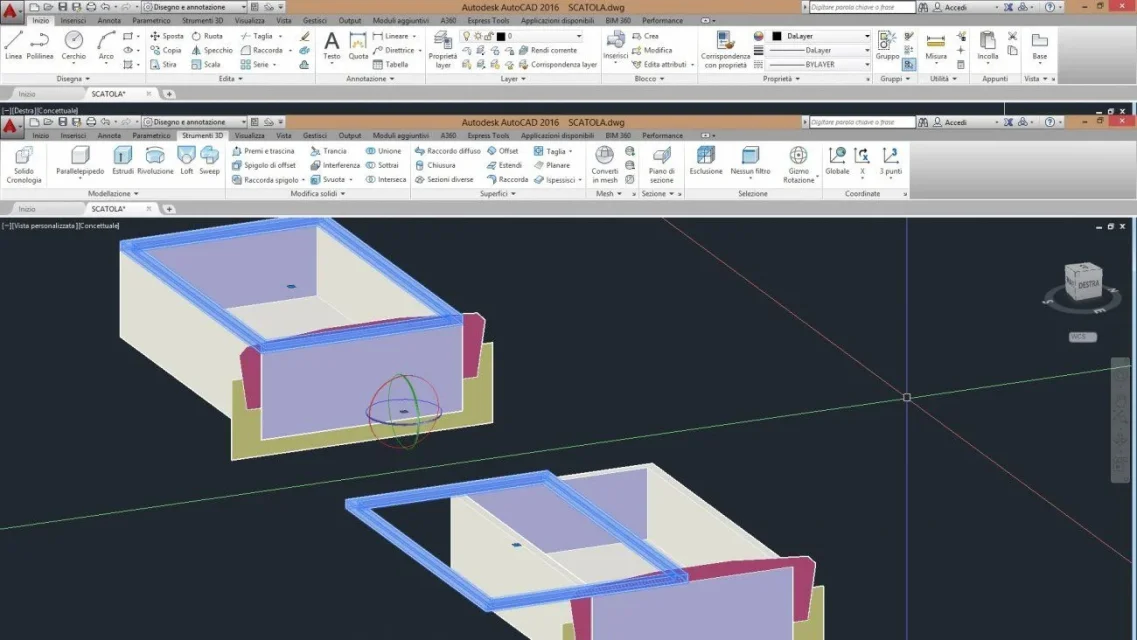
I prepared some screenshots:
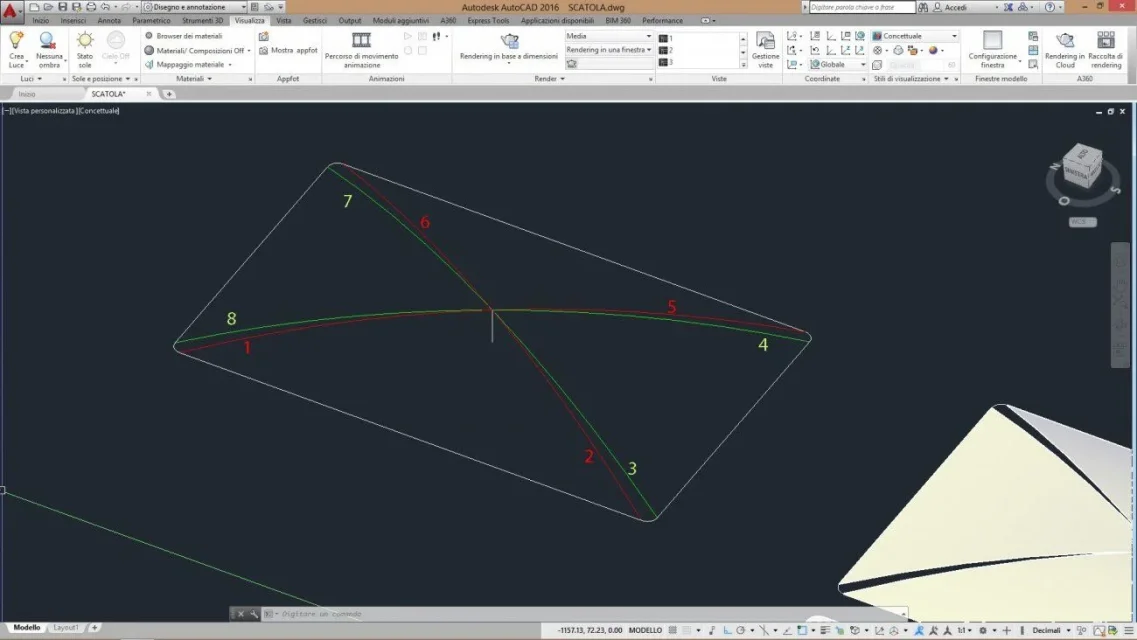
build arches as in image 3, breaking them (command breaks first point-second point) in the center. I built 4, two red and two green. breaking them to the center I get 8 semi-archs.
with the loft command selects the semi-arch 1 and then the semi-arch 2 and confirms. proceed in this way for all the semiarchs.
at the end of operation you will have a result as in image 4
always in image 4 you return the loft command and select the semi-arch 1 then the semi-arch 2, send, and select the curve 3 as a guide.
join the union command all the newly created loft surfaces and thicken them a little if you want to get a solid.
 

Attachments

  • Immagine3.webp
    Immagine3.webp
    57.4 KB · Views: 7
  • Immagine4.webp
    Immagine4.webp
    82.9 KB · Views: 8
  • Immagine6.webp
    Immagine6.webp
    81.7 KB · Views: 7
  • Immagine5.webp
    Immagine5.webp
    123.1 KB · Views: 4
There is a mistake in the measures. the inner drawer must be shortened in height of half a centimeter. the total height of the inner drawer must be 5.5 and not 6. as shown in Figure 9.
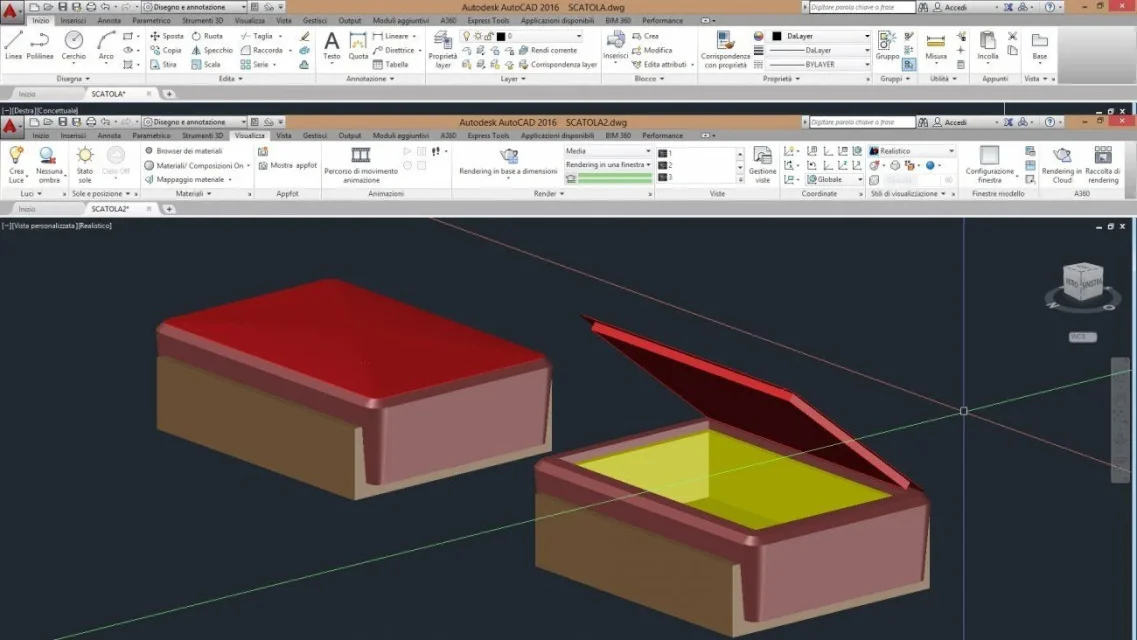
if I have well interpreted the design the result should be that in figure 13
 

Attachments

  • Immagine9.webp
    Immagine9.webp
    86.1 KB · Views: 11
  • Immagine13.webp
    Immagine13.webp
    81.3 KB · Views: 13
There's a nice box of objects. It's a project that looks like it's made for autocad. It's not particularly difficult. Autocad's doing great.

some advice for construction.
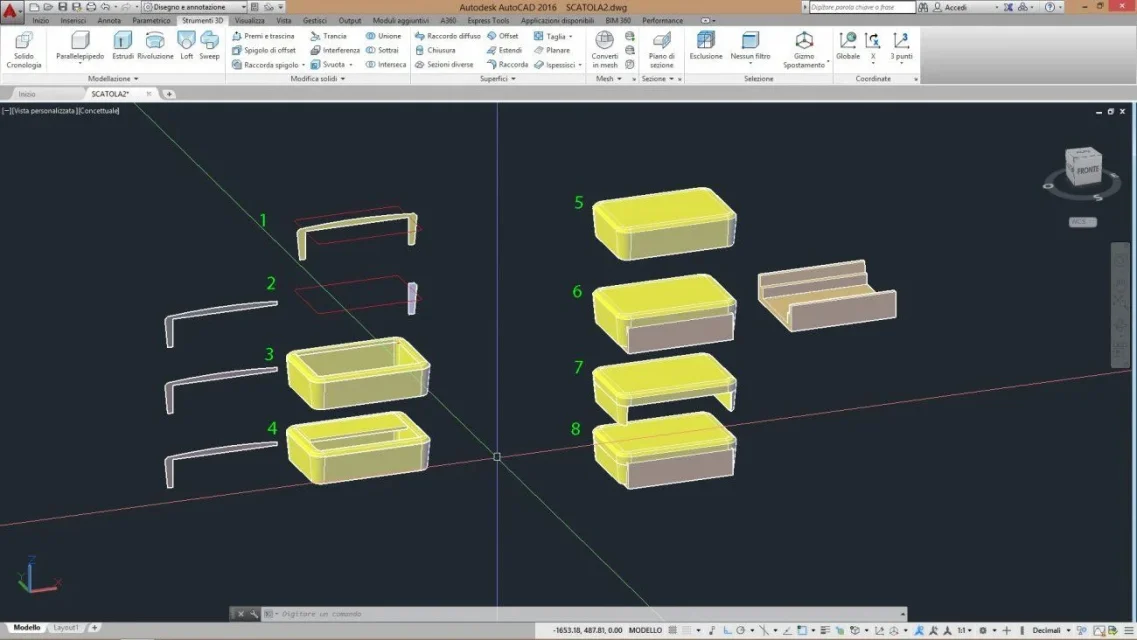
first build the inner drawer, after which you build the 3 colored blades (red, cyan, green) obtained from the measures of the pdf you provided. realize them as polylinee, then command planar surface with subcommand object. polylines will become surfaces. place the 3 dimes/surfaces as from image 10.

locates the edge of the cover and realize it as polyline, connects the angles with radius 0.5 / 0.7 approximately.
place the longest dima/surface as from figure 15 to step 1
draws the blade/surface in the vertical axis as at step 2.
the piece that remains will serve to make the sweep.
sweep command, select the surface piece and as trajectory select the polyline and you will have a result as in step 3.
premi-transcin or extrude command to fill the vacuum, as from step 4
take the bottom, place it in the newly built solid and draw as from step 7

at this point only the cover and the inner drawer are missing. the inside drawer is very easy to build, and the cover as I described before.
 

Attachments

  • Immagine10.webp
    Immagine10.webp
    86.7 KB · Views: 6
  • Immagine15.webp
    Immagine15.webp
    67.5 KB · Views: 9

Forum statistics

Threads
44,997
Messages
339,767
Members
4
Latest member
ibt

Members online

No members online now.
Back
Top