• This forum is the machine-generated translation of www.cad3d.it/forum1 - the Italian design community. Several terms are not translated correctly.

custom tables in sw

  • Thread starter Thread starter c.giani
  • Start date Start date

c.giani

Guest
Hello.

I have been advised to use sw for 3d design applied to the decor, I am using it for a few days... could anyone present in this forum section indicate how to automatically get in a table the measurements of the length, width and thickness of each part inserted in a set? I tried those included in the program but I can't get the above measures.

Thank you in advance who will help me,

good holidays
 
Bye!
then if drawings rectangular or cylindrical components and always parts from a base model, create one that has the following characteristics:

custom properties, enter what you want to use for purpose (size-to-size example), aside you put the name of the quota "base"x"width"x" height.

base, height and width are the names of the 3d model you designed, example extrusion1@. ...

If you save it as a model you will be able to automatically adjust the 3 values in the tables to which you will add the sized column.

Unfortunately I do not have swx underhand and can not give you more detailed instructions but it is really very simple.
 
Bye!
then if drawings rectangular or cylindrical components and always parts from a base model, create one that has the following characteristics:

custom properties, enter what you want to use for purpose (size-to-size example), aside you put the name of the quota "base"x"width"x" height.

base, height and width are the names of the 3d model you designed, example extrusion1@. ...

If you save it as a model you will be able to automatically adjust the 3 values in the tables to which you will add the sized column.

Unfortunately I do not have swx underhand and can not give you more detailed instructions but it is really very simple.
Suppose I want to find in the table the values of 2 quotas (to which I grant the names of l and h) .
I will have to bind both these values to dimensional property.
How do you do that?
more than one value to dimensional property I can't give it to it.
Do I have to create a property for every quarter?View attachment 24706View attachment 24707
 
Could that be it? I created the properties connected to the quotas in the first panel and then cloned the panel changing the measurements. the shares connected obviously are updated.
 

Attachments

Suppose I want to find in the table the values of 2 quotas (to which I grant the names of l and h) .
I will have to bind both these values to dimensional property.
How do you do that?
more than one value to dimensional property I can't give it to it.
Do I have to create a property for every quarter?
Maybe we don't have perfectly clear what you want to do.. .

is correct and functional as exemplified by re_solidworks, but it seems to me that you don't know how to connect those odds to one (or more) properties to be returned to the table.
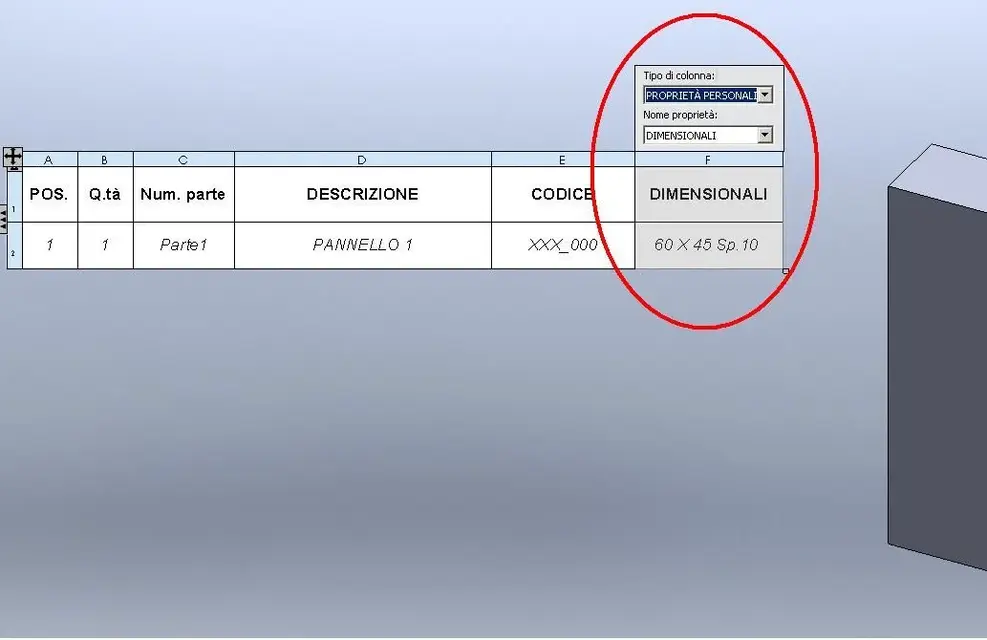
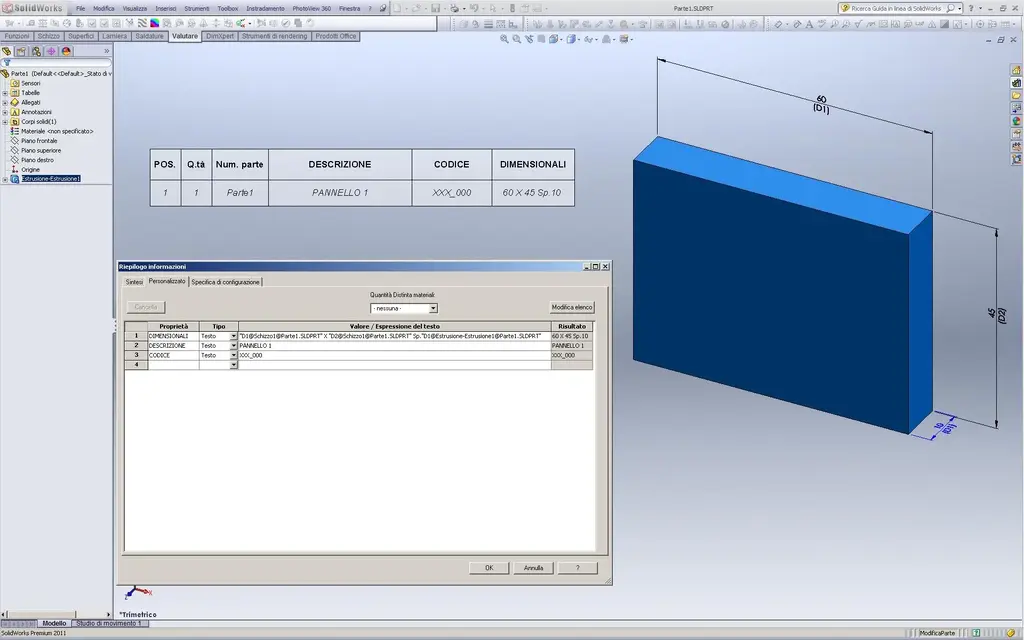
look now your "modified" part if it's as you mean:Parte1 smpm.webp _ View attachment Parte1 smpm.raryou can either create a property for each share or group it under one voice (as in the example).
you don't need to make connections/equations, just as long as you're in the field value/expression of the text highlight the odds and "touchs" with the cursor that of your interest (one or more). automatically will be shown in the field of the property table. you can add your text (the multiply sign and sp. in the case of the example) to taste.
when you go to create the distinct materials you will make columns recalling your custom properties:Parte1 smpm prop.webpquotas and tables will update to any variation/configuration you will make.

greetings and greetings
Mar
 
thanks 1000 samp.
Now it's all very clear.
It was very simple. . .
Happy birthday to you all too. :finger:
 

Forum statistics

Threads
44,997
Messages
339,767
Members
4
Latest member
ibt

Members online

No members online now.
Back
Top