
• This forum is the machine-generated translation of www.cad3d.it/forum1 - the Italian design community. Several terms are not translated correctly.

customization commands/specs

  • Thread starter Thread starter TECNOMODEL
  • Start date Start date

TECNOMODEL

Guest
Good morning to all,
using continuously inventor I realized that I would be comfortable with some personalizations.

I would like to create a command bar, such as the one connected to the view cube, in which to insert some frequent commands. for example some views, selection priorities, etc.

In addition I would like to change the aspects of some of the views, such as shading, wireframe color, monochrome color etc.

Does anyone know if it is possible to do so and where to find these settings?

Thank you.
 
to create a menu bar you have to go to the "instruments" tab and click "personality", for aspects instead ... that know you have only little stuff in "apps option" "visualize".
 
from the customization tab I don't find a command to make a new bar, I can only add commands to a tab or frequent command menu or keyboard commands.

How do you create a new bar?

I had also seen "options of application", hoping there was a way to change them.

we hope in the advice of someone more experienced.
 
from the customization tab I don't find a command to make a new bar, I can only add commands to a tab or frequent command menu or keyboard commands.
How do you create a new bar? .
Let us make a different example:
1) open an iam and stay in the assemble menu
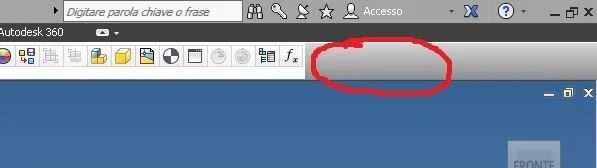
2) with the mouse go to the top gray part and from the dx mouse "personality user commands"1.webp3) choose commands in the left panel and take them to right
4) Once finished, you create a user command bar, but only available where you created it, if you need it from other parts you have to do it again.
 
Let us make a different example:
1) open an iam and stay in the assemble menu
2) with the mouse go to the top gray part and from the dx mouse "personality user commands"View attachment 391353) choose commands in the left panel and take them to right
4) Once finished, you create a user command bar, but only available where you created it, if you need it from other parts you have to do it again.
I am already using this option, as some commands I realized that I use them in multiple areas I would want to unhook them from the various tabs, or rather, have an independent card that was always visible.

will mean that I will create the same user commands tab in all tabs.
 

Forum statistics

Threads
44,997
Messages
339,767
Members
4
Latest member
ibt

Members online

No members online now.
Back
Top