• This forum is the machine-generated translation of www.cad3d.it/forum1 - the Italian design community. Several terms are not translated correctly.

customize holes notes

  • Thread starter Thread starter blubossa
  • Start date Start date

blubossa

Guest
Bye to all,
can you customize the holes notes?
In practice when I add a note on the hole comes out a long string, I would like to customize it. Can you?

Thank you.
bb
 
In practice when I go to add notes on the threaded holes I needed to get out of the table for example: m8x1.25

opening the iso.hol file add in the callout_format &metric_size header

Hi.
bb
 
In practice when I go to add notes on the threaded holes I needed to get out of the table for example: m8x1.25

opening the iso.hol file add in the callout_format &metric_size header

Hi.
bb
Hello blubossa.

This topic also affects me, in fact, long ago I had asked a similar question about the possibility to recall and customize the note concerning the hole, but I did not succeed too.
If you care, the discussion was thishttp://www.cad3d.it/forum1/showthread.php?t=26160Basically, how do you say, just open the iso.hol file and add the string it wrote, but where do you add it, just at the beginning of the file as the first line?
and then how do you customize the note in the table?

Thank you.

Hi.

Light
 
Hello!

I personally made a copy of the original .hol files and removed them from the installation path. in their place I have inserted a file that I have properly modified.
the note does not personalize the drawing, but right in the .hol file that contains all the threads I need, with the notes of "callout" in the "formed" (pass me the term) that I want: for example I decided that my notes regarding the standard threads (big pass) will not take any step (then step for me a m10 file will be m10 and that is enough, and this also in the list that appears in phase.

I also uploaded into my file, which I called holes.hol, even trapezoidal and gas fillets (cylindrical and conical), so that if you had to have the need to modify also the type of filettaura, I do not lose references in the drawings. Of course I don't know if this kind of management involves disadvantages in other situations, but for the moment I found myself well.

I attach my .hol file, for clarity... .

Of course I do not answer any errors:wink:
 

Attachments

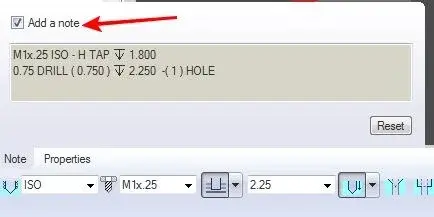
I would really like to remove the note in creation, systematically, without having to remove the check in the hole creation panel every time.
Do you have any suggestions? I just couldn't! !
of course I want to keep the 3d note display in general, and I don't want to use the layers, I would like something to implement in a configuration file so as to change the use of all stations in one shot.
I have wildifre 4.

Any help?

thanks in advance
 
The notes of the holes created automatically can be activated/unable just like the management of the plans/axis/points and sisks.
Just turn them off so you can't see them?
greetings
 
no, because so I would turn off even notes I need (notes on screen positioned flat, for example) :)
I have evaluated various solutions, excluding that of creating and deleting, even the rules-based layers, but then they all go there and touch me in some way exclude by hand, but the top would just not create them, since our corporate policy does not require it.
So I was hoping for a configuration that is easy to implement on all our 20 pro/e stations, since, during creation, it is enabled by default (see image) or something to put in the .hol file that created a non-note
 

Attachments

  • note01.webp
    note01.webp
    8.4 KB · Views: 27
Then you should go to the standard hol tables and remove the skirt that creates the notes, I think it's called callout.

Now I have no proe underhand and I don't remember.
 
If I remove callout_format, pro/e no longer find the holes table:(
If I leave it, it puts me the standard note... I don't jump out.
 

Forum statistics

Threads
44,997
Messages
339,767
Members
4
Latest member
ibt

Members online

No members online now.
Back
Top