• This forum is the machine-generated translation of www.cad3d.it/forum1 - the Italian design community. Several terms are not translated correctly.

customized propie

  • Thread starter Thread starter MARCOC
  • Start date Start date

MARCOC

Guest
hi to all, using the insertion of the custom propages from task pain, I set up a material property, and I happen this, if I stick it to the single file it works everything, changes the material and in the properties of the file adds me the material line that then visualized in distinct base in the tables. the thing changes if I apply that property from a set, I open a set select the same file or even more files, I stick the property from task pain and change the material of the file, but in the properties does not agging the meterial line.

Can you give me a few tips? ? ?

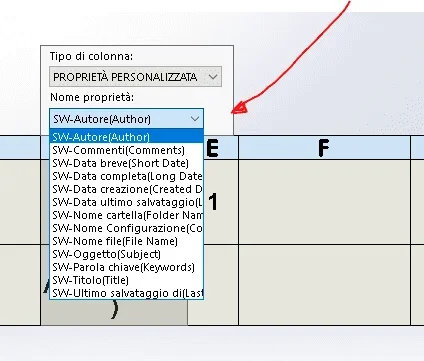
you place an imageWW.webp
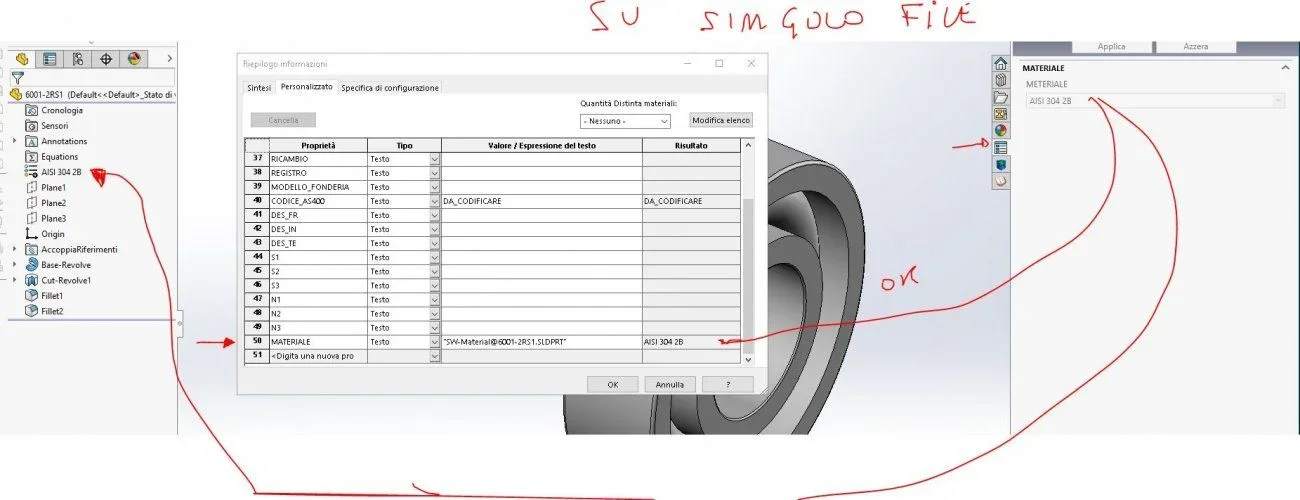
 
because if you open the task paner from together you are using the one valid for the assist and not for there part.
to edit the material on multiple parts should be a thread with a video, maybe at lunch I try to look for it.
otherwise if you use the bread task
 
I imagined it, but the material in the file sets it correctly, and for what I didn't understand.

then you split me "otherwise if you use the task pain" what do you mean?? ? ?
 
hi massive, the video method and faster than what I do, but does not solve the problem, because the material field in the properties of the file is not created.

I have a set of models that have no set properties, completely empty table, I can through the bread task to import into all files any property (always from together I am talking), except those that depend on solid parameters that start with sw-, I can only do it by bread task on the single part.
Do you have any idea how and how to do it? ? ?
 
all because if I don't impose the material as a custom property I can't make it appear in the distitis of the tables

I'll put it on
1527251254481.webpunless there is another way to make the material appear in the distinct without having it in a custom field.
 
However the real property of the material exists only for the parts. the axieme does not have the material property unless you put it and force the value to what you want it to appear... but it is a real bon thing.
 
certain mechanics, my purpose and set to a set of side files the custom property (material) obviously linked to the material given to the model without having to open part by side insert it manually, because barrels of 100 files at a time no longer end
 
hi dum, and exactly what I do attulamente, my problem and ra only for material property that if you do not select single file and apply the property you do not write in the row of properties in the file, but selecting multiple files together only apply the material without filling out the priprieta line in the file.and then I asked you if by chance you could solve this thing
 
Ah.
by memory I do not remember if for the materials I have ever made the multiple choice. .
Usually it is a property that I imposed just beginning one and maybe at the end of the project I happen to change only someone so I point a file at a time. .
Monday I do a test and I will let you know if you fill them all or give me the same problem.. :

sent by my sm-g935f using tapatalk
 
First of all it is good to insert the property into the part template for future models.
later as from tab builder it is not possible to let him enter the properties with sw variables it is best to try to use the task scheduler to insder the property on the parts or try some macros as https://www.cad3d.it/forum1/threads/problema-con-macro.50075/https://www.cad3d.it/forum1/threads/assegnazione-proprietà-in-batch.2005/or https://forum.solidworks.com/thread/99766 (but it must be crushed because it writes the mass)

once you are wrong to enter the property you can change the material in block by acting from the aid
 
I have already tried also with the task scheduler, but also they amount the property as if it were static, without being able to bind it to the part's metter, when in the value field I write "sw-material", in the paerte writes exactly that, and not in matrial set
 
when you go to write the material in the property line it is not enough to write "sw-material" but it should be written
""sw-material"
that is with double quotes at the beginning and end.
I tried by hand and it works, because I know that even with macros is the same thing, that is if you write individual quotes is a string and not a variable so they are not considered, while if you put double quotes then writes the string that includes the initial and final quotes.

Try to see and let us know
 
jenuary., the syntax indicated by you and the correct one, splitting it with double apici import the property
Great jenuary
 

Forum statistics

Threads
44,997
Messages
339,767
Members
4
Latest member
ibt

Members online

No members online now.
Back
Top