
You are using an out of date browser. It may not display this or other websites correctly.
You should upgrade or use an alternative browser.
You should upgrade or use an alternative browser.
meccanicamg
Guest
hi devis, I looked at model 3d. I don't know how you created that conduit trunk but there's a point where the fold is wrong and it's surmounted. If you got it from a program, try to do it again. However it is an incongruence of rhometry. of course development does not go.
Devis
Guest
hi, I checked what you told me xò I didn't find anything, however as you saw it is designed with solidworks 2010, but I noticed that the problem creates the tilted cut, xché blocking that the figure stretches in plan x development. Maybe it's because of how I did the tilted cut? that is nothing but a tilted plane with the extruded cut command. do not look that it is a forty-angle, it had to be a tilted cut cylinder.
re_solidworks
Guest
the problem is cutting, changing the sketch of that cut and you will see that everything goes well.
Mike1967
Guest
Hello Devis...hi, I checked what you told me xò I didn't find anything, however as you saw it is designed with solidworks 2010, but I noticed that the problem creates the tilted cut, xché blocking that the figure stretches in plan x development. Maybe it's because of how I did the tilted cut? that is nothing but a tilted plane with the extruded cut command. do not look that it is a forty-angle, it had to be a tilted cut cylinder.
in function cutting-extrusion2 attiva il flag normal cutwith the functions in sheet metal you have to activate it if not tribules for nothing.
However it is a form that you can draw with a simple bow
of 359,9° and extrude with linguetta flangia on base.
Then make the cuts that interest you.
Hi.
Attachments
Devis
Guest
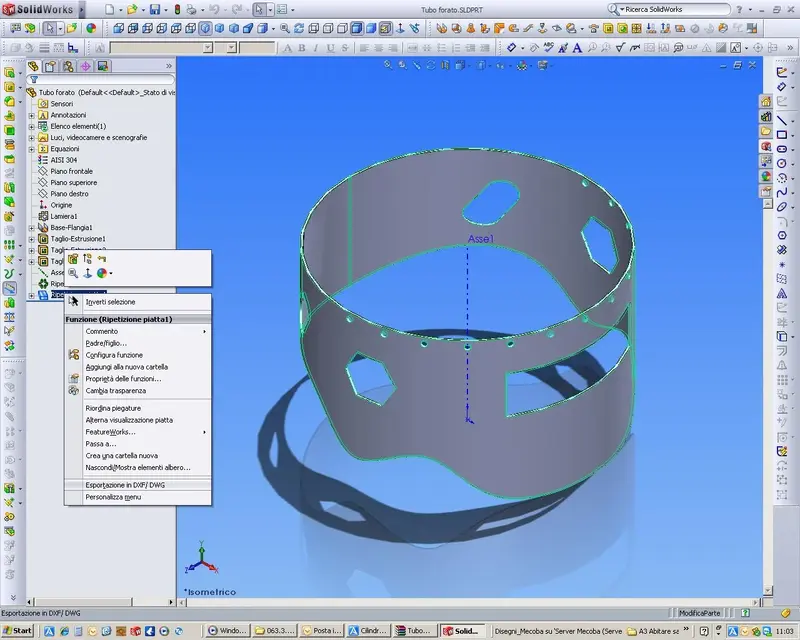
I took your design I ran the flat command and everything ok the solid got stuck, xò now I want to save it that dxf, but when I launch the command saves dxf the design disappears and so I can't save it in dxf
Mike1967
Guest
But maybe something wrong.. .I took your design I ran the flat command and everything ok the solid got stuck, xò now I want to save it that dxf, but when I launch the command saves dxf the design disappears and so I can't save it in dxf
Attachments


Mike1967
Guest
Devis
Guest
nothing to do can not develop, but not even your design that you sent me, that is the solid designed by you I took it, I did all three steps but when should open the window of dwg editor to see the piece on the floor, this does not happen, maybe there are quanche wrong setting? even x why if I had designed a square cone, hexane, but not round would have developed the correct way all phases, some never?
Mike1967
Guest
You want to tell me that in my table, both on sheet1 and on sheet dxf, you don'tnothing to do can not develop, but not even your design that you sent me, that is the solid designed by you I took it, I did all three steps but when should open the window of dwg editor to see the piece on the floor, this does not happen, maybe there are quanche wrong setting? even x why if I had designed a square cone, hexane, but not round would have developed the correct way all phases, some never?
Is that the spy piece?
If so, reinstall solidworks, there's something that doesn't work.
In the meantime, if someone else downloaded the file, it might say if he has similar problems.
controllofiamma
Guest
Hi.
I just tried to use your file and I would say it's okay
:finger::finger::finger:
I just tried to use your file and I would say it's okay
:finger::finger::finger:
Mike1967
Guest
thanks for confirmation, good to make. :finger:Hi.
I just tried to use your file and I would say it's okay
:finger::finger::finger:
Devis
Guest
no I do not mean that, that is your files I see them, but if I take your solid that you sent me back to flatten it as you do, xò when I have to export it to dxf and click to confirm this execution the image disappears, and then I can't have the dxf.
Devis
Guest
I tried it on another pc where I installed solidworks 2010 but also gives them the same problem, is there any registration settings to be changed?
Mike1967
Guest
give an eye to the tree below, make sure you don't have the pieceI tried it on another pc where I installed solidworks 2010 but also gives them the same problem, is there any registration settings to be changed?
I don't know what else to think.
Teamviewer could help us.
Last edited:
Devis
Guest
If you explain how to save the image like yours that you just sent me, I'll send you mine, but from what I see it all seems appropriate. I can't get out of this.
Mike1967
Guest
a simple "print screen" from the keyboard (pulsante after f12) gluedIf you explain how to save the image like yours that you just sent me, I'll send you mine, but from what I see it all seems appropriate. I can't get out of this.
in the paint of windows...:biggrin:
Devis
Guest

Mike1967
Guest
you tried to look at the image....sending image

