
• This forum is the machine-generated translation of www.cad3d.it/forum1 - the Italian design community. Several terms are not translated correctly.

cylindrical/cono flat model with machining

  • Thread starter Thread starter Mec_1802
  • Start date Start date

Mec_1802

Guest
Good morning to all,
Someone can help me... I can't find a solution.
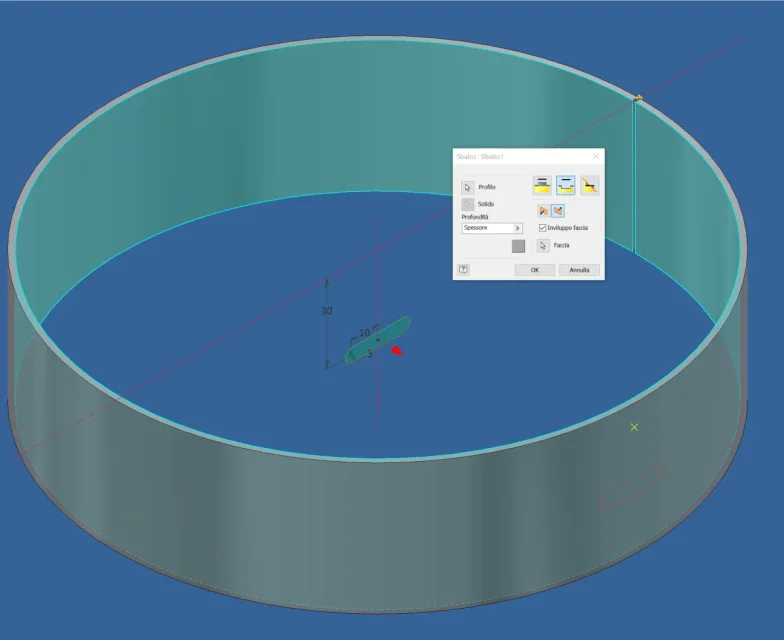
working in sheet metal environment and creating a cylinder or cone and performing work (holes, sunshades etc...etc. )on the circumference, once the flat model is created and the table of the latter is developed, the processing results with double profiles because the processing crosses the external and internal diameter and the profiles of the processing are not "perpendicular" on the flat model plane and when the table is exported to a possible dxf to pass the laser cutting process the double profiles of the processing create problems to the laser cutting software, does anyone know how to be able to circular
I hope I could explain!
 
the concept is very clear, if you make a hole of 40mm. of diameter on a flat sheet of 5 mm thick and enter a tube of 40mm, after the displacement to obtain a cylinder, the tube no longer enters the hole, as the only valid quota remained, is the width of 40 mm of the hole, measured on the cylinder generator.
the other quota is less than 40 mm, due to the displacement.
with trigonometric projections and calculations, you can calculate all the quotas of the points that form in the plane, a kind of ellipse on the outer surface.
However, the inclinations of all cuts remain, which further decreases the hole.
should be possible, inserting in the program the outer diameter of the cylinder, also obtain the inclined movements of laser cuts, along the entire path of the hole.
if it is not possible, it is necessary to do as many, that is to work on the cylinder with cuts parallel to the axis of the tube of 40mm with a real circular movement.
 
the double lines are the projections of the inner diameter and the outer diameter of the thickness that will turn to displace, with the greater the thickness is higher will be the distance between these two lines.

I do this personally, I don't know if it's the best procedure.
I echo the dxf of flat development and gate the inner lines of geometry.

for small thicknesses you have no problem, logically on high thicknesses the error can not be acceptable, if you want a precise hole, you will have to perform it after the operation of rolling, through tool machine, laser cutting or high definition plasma.
 
when you cut, do not use hole but the cutting command is select "normal cut". At least I think it's called in the Italian version (cut normal). that makes development automatically consider cutting through thickness and you get a single line.
 
when you cut, do not use hole but the cutting command is select "normal cut". At least I think it's called in the Italian version (cut normal). that makes development automatically consider cutting through thickness and you get a single line.
on a flat surface ok, how do you do on a calandrated piece?
 
on a flat surface ok, how do you do on a calandrated piece?
It's also on the piece.
Have you tried? I always did.
Look, I've been working with sheet metal for years in different software. with the right settings there is no need to make manual adjustments in the dxf. there are cases that the asola for the angled hole gets you too big, but that is another problem.
 
It's also on the piece.
Have you tried? I always did.
Look, I've been working with sheet metal for years in different software. with the right settings there is no need to make manual adjustments in the dxf. there are cases that the asola for the angled hole gets you too big, but that is another problem.
It'll be because I use the 2013 version, but I can't on the piece. I can see if I'm doing the wrong part using the surfaces, using the cutting tools of the surfaces and then inspecting the value I need.
 
I use a different command: I use the "explain" command and realize the correct hole on the developed sheet. folding deforms properly.
I also use this road, once it is defined, use "explain" command executes the perpendicular hole and then "fill" and in the table the representation is correct
 

Forum statistics

Threads
44,997
Messages
339,767
Members
4
Latest member
ibt

Members online

No members online now.
Back
Top