
• This forum is the machine-generated translation of www.cad3d.it/forum1 - the Italian design community. Several terms are not translated correctly.

da lt ad inventor

  • Thread starter Thread starter AngeloB
  • Start date Start date

AngeloB

Guest
Hello, everyone.
I use lt 2007 with a mechanical application (top).
in the transition from lt to inventor 2010 is it possible to continue using the 2d?
Can I, in inventor, do a preliminary in 2d with the same ease as I do it in autocad?
in inventor is it possible to draw in 2d parametric? Can I create blocks and then simulate 2d cinematography?
to me they had explained that once passed to the 3d, the 2d is no longer used, but according to me the concept is wrong, especially for a designer.
I know that with inventor they also give autocad, but I don't know if the two programs are fully integrated. I would prefer to have all the files in the native format of inventor.
I would like some opinions on this before requesting a demo to autodesk

greetings
 
practically all 3d operations in inventor are made starting from 2d drawings called sketches that are then extruded, rotated, etc...
2d sketches can also be used as a preliminary "skeleton" on which to build an entire mechanism and from the last version 2010 it is possible to create blocks in the sketches that can be bound together in order to simulate cinematism, then from each block create parts or assemblies 3d.
you can import into sketches made in autocad, but I personally don't need it, I can do everything in inventor... I think it can only be useful if you have a design already made in autocad for other reasons and you want to exploit it without doing it again.
 
but in inventor the "bozzes" do you do them in the environment in which you make the tables quoted or in the environment in which you make parts and assemblies?
my client sends me 2d drawings in autocad, ex various transverse sez of a ship )no sense for me to turn these into a 3d) I would like to use these sez. as a background, to draw the draft of my mechanism from which then, if you need to get the 3d, or directly the quoted drawings of my pieces, is it possible?
I realize that I'm asking to use inventors like lt, but it was the woodness of the 3ds I tried that I didn't convince myself. in the end I have to produce tables quoted as soon as possible more than solid models
 
I wonder if you don't need the 3d, which you cover for inventor? :
joke, but if you have to draw the boards directly without making the 3d, I would use autocad directly... the tables in inventor are comfortable if you have already made the 3d, because then just place the views of the piece and quote them. It's useless to spend a lot of money on a program that you don't use, so you better stay with the 2d.
 
Yes, in fact or you change mindset or you stay at 2d, maybe you will take a little more time to create the tables but you have a lower margin of error, for me a test you better make it, it doesn't cost anything, then if you don't like it, it doesn't do your case or you can't change habit in short time let it go. . .
 
I disagree.
I could progressively pass from a detailed crane in 2d to a detailed in 3d.
I could continue to use the 2d lay-outs of my customers, placing only a silhouette of my crane.
If I have to study a missing scale, then maybe I won't be ordered by the client, I'd better work in 2d and exploit an existing table, but if I could already take advantage of the parameterization and the simulation cinema I would save a lot of time.
have you taken working model2d?
 
but in inventor the "bozzes" do you do them in the environment in which you make the tables quoted or in the environment in which you make parts and assemblies?
my client sends me 2d drawings in autocad, ex various transverse sez of a ship )no sense for me to turn these into a 3d) I would like to use these sez. as a background, to draw the draft of my mechanism from which, if you need to get the 3d, or directly the quoted drawings of my pieces, is it possible?
I have almost your own needs (and I went from lt to inventor)... in the sense that customers almost always ask me only the autocad boards.
I use inventor to do the studies (preliminaries, encumbrance, handling, detailed), importing from autocad sections and "graphics" of customer reference, and then from 3d I often echo the views that then quoted in autocad (for speed, my ignorance in using the design part of inventor and to scrupulously adhere to the required company standards).
that's all in the phrase "if you need to get the 3d"...
For example, if they are complex designs in which the 3d allows you to obtain otherwise difficult to detect (unless complicated geometric constructions), then the 3d is a manna... If you leave from drawings similar to other and simple "in space", then you just need it.
it was for me, I would abandon autocad but sometimes it remains indispensable (just think about when they give you a job all in .dwg where you just change the size of various components and it is absolutely useless to rebuild everything in 3d). at the end often commands the customer.. .
 
Sorry if I insist
My customers would gladly send me the 3d of all the yacht. It would be, for them a manna and for me a curse.
I do not want to use the 3d of the yards because they are spoiled, often wrong and very difficult to use as contractual documents.
As far as I am concerned, with some time available, I could also work always in 3d (apart from the drafts of imaginative inventions).
the problem and create the "hybrids" 2d - 3d. when I had tried inventor11 in the tables were made only quotations, drawing a 2d draft was a nightmare.
 
Sorry if I insist
My customers would gladly send me the 3d of all the yacht. It would be, for them a manna and for me a curse.
I do not want to use the 3d of the yards because they are spoiled, often wrong and very difficult to use as contractual documents.
As far as I am concerned, with some time available, I could also work always in 3d (apart from the drafts of imaginative inventions).
the problem and create the "hybrids" 2d - 3d. when I had tried inventor11 in the tables were made only quotations, drawing a 2d draft was a nightmare.
I believe that the just one told you Ilario:
Try the 3d, even because you can see how it works.
But if you want to continue working as work now (as I think I have understood that your work takes place : 2d scraps and motion simulations always in 2d)
you don't want to switch to 3d; it can still be useful (for the design and the parametric quotation) the autocad passage 2010.
 
I have almost your own needs (and I went from lt to inventor)... in the sense that customers almost always ask me only the autocad boards.
I use inventor to do the studies (preliminaries, encumbrance, handling, detailed), importing from autocad sections and "graphics" of customer reference, and then from 3d I often echo the views that then quoted in autocad (for speed, my ignorance in using the design part of inventor and to scrupulously adhere to the required company standards).
that's all in the phrase "if you need to get the 3d"...
Hello everyone,

I have desperately tried to find a forum in which we had already talked about this topic and this seems to me the most appropriate.

I write because I have the need to make the passage between dwg and inventor sketch easier, which will be a part that will be skeleton in a study.

my need arises when I work on machines in 3d (inventor 2014, then design and development machines exclusively in 3d..) but still remain tied to the 2d mainly because we treat entire production lines where more machines have to be put together (comprehensive of transport photocells) and must respond to the guide of a layout which, for the heaviness the amount of lines and how much else, must be managed by a 2d is

said this the problem would be that if I have a dwg that in autocad is opened in 15 seconds... If I cover it in an inventor's sketch, I'll plant my pc.

I have seen that there is an interface for which you can import directly via command from the sketch from a dwg but little changes.

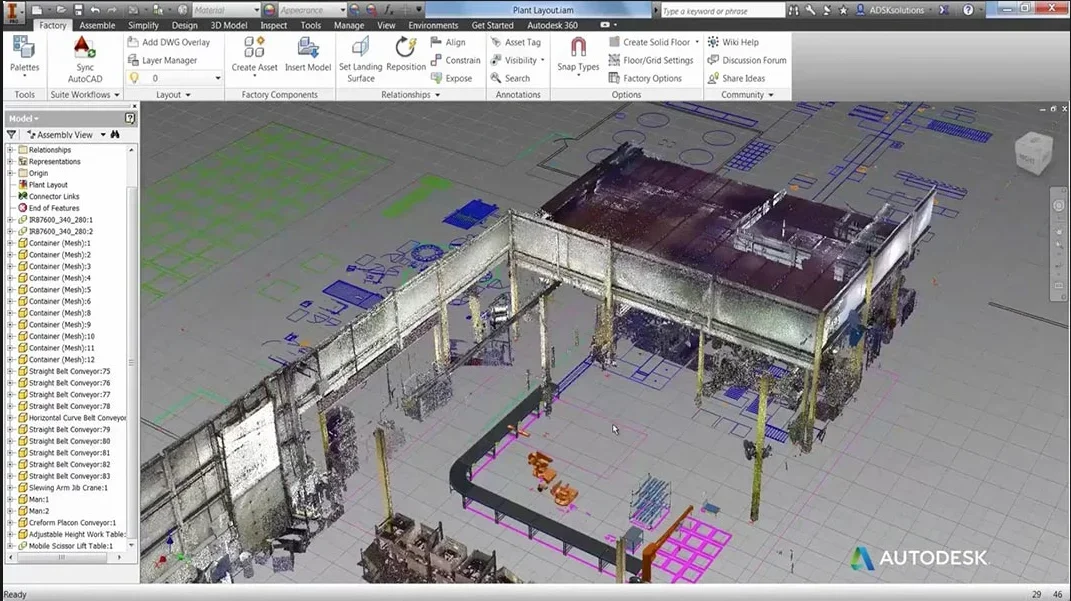
instead they told me of an intermediate passage consisting of "inventor factory" see attached image
Cattura3.webpAccording to legend this manages to process the dwg in inventor as autocad and you can have a virtually active skeleton that goes to repeat the source file at each opening.

would be ideal

while having the professional package I do not have this card...

someone can tell me if and how to get the same result directly between the dwg file and the inventor sketch? even just a paste copy that does not process in so much time.

thanks for the attention.

ps I tried the paste copy of a layout quite simple, in half yet no life no
 
Hello everyone,

I have desperately tried to find a forum in which we had already talked about this topic and this seems to me the most appropriate.

I write because I have the need to make the passage between dwg and inventor sketch easier, which will be a part that will be skeleton in a study.

my need arises when I work on machines in 3d (inventor 2014, then design and development machines exclusively in 3d..) but still remain tied to the 2d mainly because we treat entire production lines where more machines have to be put together (comprehensive of transport photocells) and must respond to the guide of a layout which, for the heaviness the amount of lines and how much else, must be managed by a 2d is

said this the problem would be that if I have a dwg that in autocad is opened in 15 seconds... If I cover it in an inventor's sketch, I'll plant my pc.

I have seen that there is an interface for which you can import directly via command from the sketch from a dwg but little changes.

instead they told me of an intermediate passage consisting of "inventor factory" see attached image
View attachment 43850According to legend this manages to process the dwg in inventor as autocad and you can have a virtually active skeleton that goes to repeat the source file at each opening.

would be ideal

while having the professional package I do not have this card...

someone can tell me if and how to get the same result directly between the dwg file and the inventor sketch? even just a paste copy that does not process in so much time.

thanks for the attention.

ps I tried the paste copy of a layout quite simple, in half yet no life no
you have to have the inventor factory suite and it actually works like this. but that it is not all gold that glitters: first you have to configure
 
instead they told me of an intermediate passage consisting of "inventor factory"
factory is not an intermediate step, it is an inventor with features dedicated to the layouts and, if not mistaken, costs more than the ultimate suite.

In fact the management of dwg files in inventor is unlikely.
 
Good morning

Nothing. I'll see to get the factory at this point. .

I don't have to take anything out of my pocket.


so to what I understand there is no solution. . Are we sure there is no way to stem the problem?
for example the blocks are also in inventor, probably as a series of indefinite lines would manage them better...
the problem is that I can create them in the sketch but if I try to import them it does not keep them as blocks.. while instead there is a command "insert autocad block" but it only works for drawings :frown:

Is there no way to keep these blocks?

Thanks again,

greetings to all
 

Forum statistics

Threads
44,997
Messages
339,767
Members
4
Latest member
ibt

Members online

No members online now.
Back
Top