• This forum is the machine-generated translation of www.cad3d.it/forum1 - the Italian design community. Several terms are not translated correctly.

define a summit by means of multiple ways of "osnap" at the same time

  • Thread starter Thread starter Angelo2449
  • Start date Start date

Angelo2449

Guest
Hello everyone,
by autocad it is possible to define a summit by means of several ways of "osnap" at the same time.
how can I set the osnap "intersection", "center" and "start" at the same time?
Thank you.
 
setting the variable osmode to the right value

but... sooner or later you will have to share your work with the forum. given the quantities of requests :lol:
 
thanks crystal,
I shared my work to "spezzoni".
My application uses code lisp + code gui together and I should therefore share the latter too, which would become problematic.
returning to my request, what is the right setting?
for example, for "int" and "cen" together, value?
Thank you.
 
I answer to myself,
at the moment when I clicked the "Send Response" button, I realized how to proceed!
it is enough to make the sum of the osnap values!
 
there are often requests for lisp or problems solved through lisp, you could help even in that sense
For example:
 
you can also set it like this: (command "_osnap" "_int,_mid,_end")
yes rpor, but the convenience of osmode is that you can not only set the osnap value with a simple numerical value, but also recover the current snap value (getvar "osmode") and maybe store it in a variable to then restore it later.
But I don't have to teach you anything, but I think you give me a lot of points:)
 
osmode variable allows you to set or verify which remarkable points (osnap) of autocad are activated and disabled.

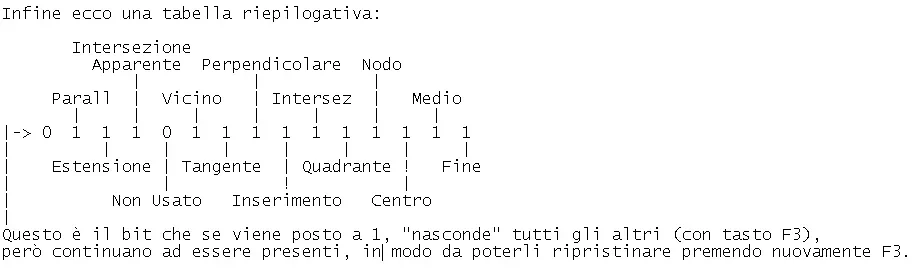
the particular thing is that the whole n. found in osmode is a number that turned into binary number, from a sequence of 0 and 1 that represent respectively: " switch off" and " switch on" of each type of osnap. but we proceed with order...

try to remove all the osnap by holding ctrl and by right-clicking the item "osnap settings". click on "deselect everything" and then "ok". in this way you have removed all the osnap. if on the command line write osmode and from the sending, you will see that the value is 0: writes:

type new value for osmode <0>:

you try to give him 1 followed by sending; then back to see the osnap settings with right mouse + ctrl.
You will see that now you have "end" activated.
now disable "end" and activate "medium point", accepts with sending and returns to give osmode on the command line. You will see that now the value is 2:

type new value for osmode <2>:

What if instead of 2 I put 3? Maybe I'll get another kind of osnap? no, it will activate both "end" and "medium point". you can always check it with dx + ctrl mouse: you will see activated the 2 snaps above.
If you now disable them both and activate "center" and then go check the value of osmode, you will notice that now the value is 4.

going forward and trying to activate one by one the various osnap, you will realize that the osmode value doubles: 1 2 4 8 16 ...
in the old versions of autocad, it reached up to 512 (near), but in the last versions were added other values: they have jumped 1024, but they have introduced 2048 (appeal intersection), 4096 (extension) and 8192 (parallele).

Why do these values double every time? because this allows to preserve its position if transformed into a track: the value 2 (average point) turned into track becomes 10 i.e. 1 which indicates that the bit of the average point is lit and 0 which indicates that the 'end' is turned off. for this reason (as mentioned above) the decimal value 3 (which in binary is 11) indicates to me that end and average are both active.

then adding the values I get the numbers that autolisp turns into binary and thus manages to understand which osnap we want to activate and which to disable.

for example, I am good at having an osmode with value 59, which turned into a track would be 111011: this indicates to autolisp to activate: fine middle node intersection dial .... and turn off the others.

what value do we get if we activate them all? try with mouse button + ctrl setting osnap - select everything - ok. the value you get is 15359; that in binary would be 11101111111111: as you see it remained to 0 the bit still unused .... that of 1024.

there is still a value for osmode: what goes from 16384 to 31743 (which in binary would be 111101111111111), this instead of adding ... removes everything! you get by pressing the f3 key of the keyboard. basically is the way it has autocad to temporarily exclude all osnap and then restore them by recovering f3.
in autolisp however it is convenient to store the decimal value in a variable at the beginning of the program, then to place osmode to 0 and at the end of the program to restore the original value.

in autolisp to "take" a value contained in osnap, the command is:

(setq val_osnap (getvar "osmode")

"Insert" a value we can use:

(setvar "osmode" val_osnap).

1588582553130.webp
 

Forum statistics

Threads
44,997
Messages
339,767
Members
4
Latest member
ibt

Members online

No members online now.
Back
Top