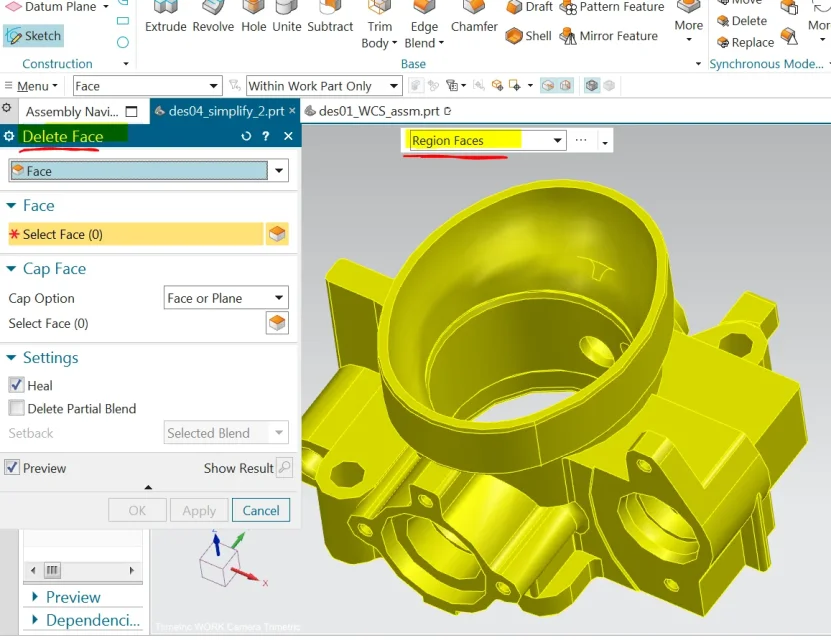
I would like to eliminate through the delete face the internal faces of the solid.
Am I using the right selection? (evidence in figure). I don't think so because I can't figure out where to select the seed and boundary surface.
if by eliminating you intend to eliminate them completely from the object and not have them anymore then you have to remove the check on heal, the selection you make is right; I don't know what you mean.
I would like to eliminate only internal faces and leave the outside using the "delete face" command as it says in the exercise of siemens. seed and boundary for selection exists in many cad. I think I'm using it wrong.
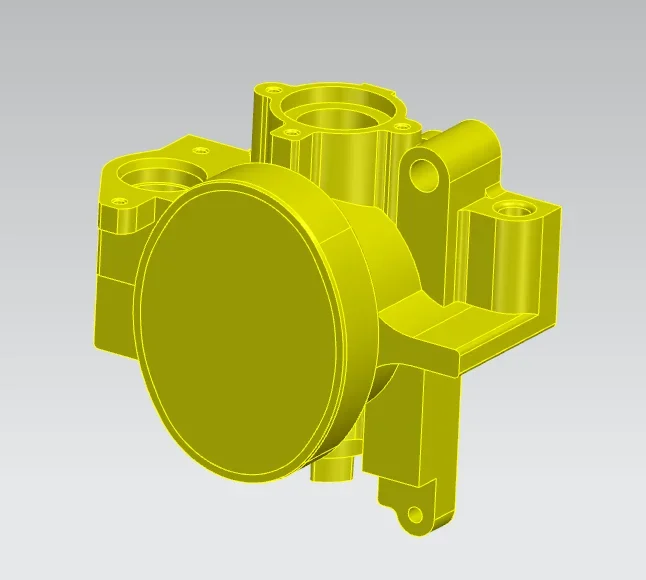
for example the image below I made it extracting the internal surfaces using - extract geometry>region of faces.
It is not clear where, once I enter the delete face command, I must specify the seed face and boundary faces.
Maybe I think I understand, from the first picture you posted the selection you do is correct.
select the delete face command and the selection method click on region faces; at this point click on your seed face and then without clicking in other parts select your boundary faces immediately.
if you are wrong not to correctly select all boundary faces is normal that the command does not function or function unexpectedly.
I attach you a video that maybe is more explanatory, although it is version 12 you should understand the same.