
Antonio1981
Guest
Save to all of you, as from title I have a problem with displaying dwg file icons with windows 7.
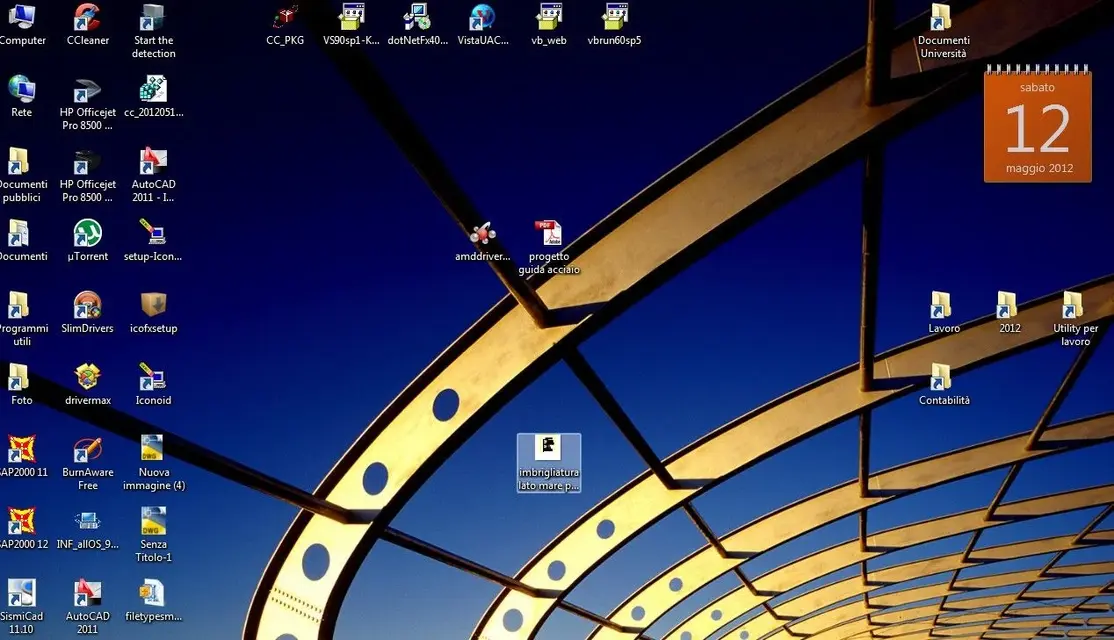
my despite I went from xp to windows seven, and I think I will be back soon; among the various problems quite annoying, as compatibility with free calculation programs that do not turn well, there is the unbearable one of the display of the icons of the fiel dwg as preview, in practice here the photo dle my desktpo in which you see selected a dwg file.
You can see that the classic icon of autocad does not appear, that beautiful red and gray that immediately stands out.. but it looks like a photo!!!! porca vacca I tried in all the ways but nienete to do, if I try to disable the option "view icon and preview of the file" in the general options of viewing folders, then I also disappear preview of the photos!!! !
But how can I do to solve my problem? ? often in a same folder there are myriads of files and can I ever make confusion between photos and dwg files..? ?
I think I will return to my beloved windows xp.
Thank you very much to all of you
my despite I went from xp to windows seven, and I think I will be back soon; among the various problems quite annoying, as compatibility with free calculation programs that do not turn well, there is the unbearable one of the display of the icons of the fiel dwg as preview, in practice here the photo dle my desktpo in which you see selected a dwg file.
You can see that the classic icon of autocad does not appear, that beautiful red and gray that immediately stands out.. but it looks like a photo!!!! porca vacca I tried in all the ways but nienete to do, if I try to disable the option "view icon and preview of the file" in the general options of viewing folders, then I also disappear preview of the photos!!! !
But how can I do to solve my problem? ? often in a same folder there are myriads of files and can I ever make confusion between photos and dwg files..? ?
I think I will return to my beloved windows xp.
Thank you very much to all of you
Attachments
Last edited by a moderator: