• This forum is the machine-generated translation of www.cad3d.it/forum1 - the Italian design community. Several terms are not translated correctly.

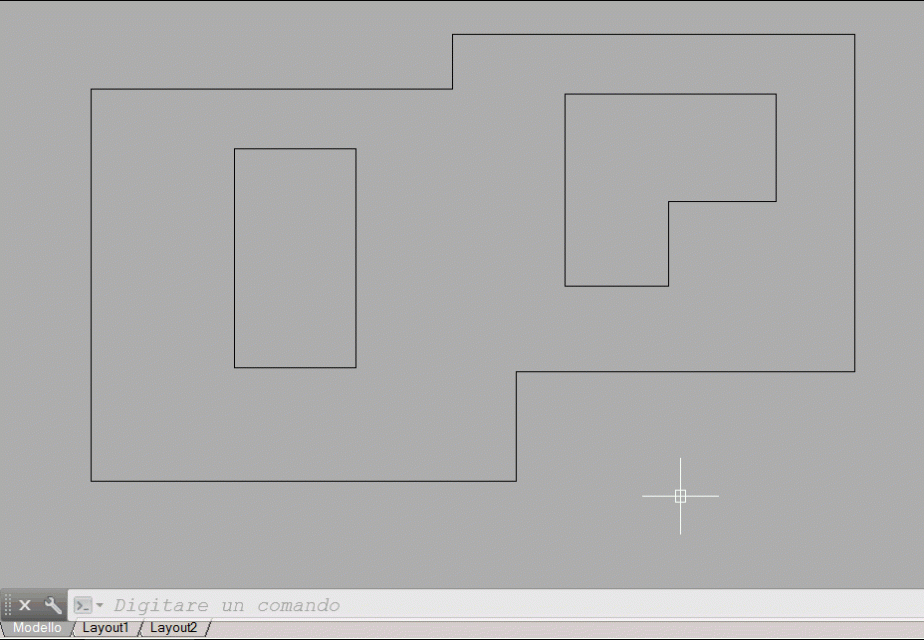
design circles inside a polylinea

  • Thread starter Thread starter Zoro76
  • Start date Start date

Zoro76

Guest
Good morning to all my name is ivan and I am a designer cad.

the work in my office consists, in part, in drawing circles of various diameters within a planimetry.
I was wondering if it was possible to get help to make this operation faster.
Unfortunately, I have no programming knowledge and that's why I'm writing.

the diameters of the circles I have to draw are:

0.180m with pitch measured from center to center of 0.20m
0.225m with 0.25m pitch
0.270m with step 0,30m
0.315m with 0.35m pitch
0.360m with step 0,40m
0,405m with step 0,45m
0.450m with 0.50m pitch


I thought you could initially draw a polylinea and inside this, once assigned the diameter, make the circles automatically draw.

Is there someone who thinks it's possible to create something like that?

I thank you for your attention.

Hi.
 
I honestly don't know the command. But I think it works like a simple sampling.

I need every single circle to be manageable (delete it, count them all, color some). Is it possible to do it with superhatch?
 
Just explode.
Tristan, are you aware of any changes to the command? with 2014 a series of individual blocks is created.
 
the command has been the same for 20 years. I don't think it will ever be modified/improved
 
But what is it? a bottom stopper?
the lisp you ask is quite complicated because (from what I see) or you draw the red beads according to the chosen diameter/pass or choose the step/diameter depending on the size you have (which are strangely perfectly seems on the edge).
in the first (and easier) you will have to draw the red beads by counting all the various steps+ the two extremes for each side (it is an irregular :-/)
In the second question, it's complicated. finding a more or less common step in all directions is an operation not so immediate. . .
 
First of all I thank all for the interest. :
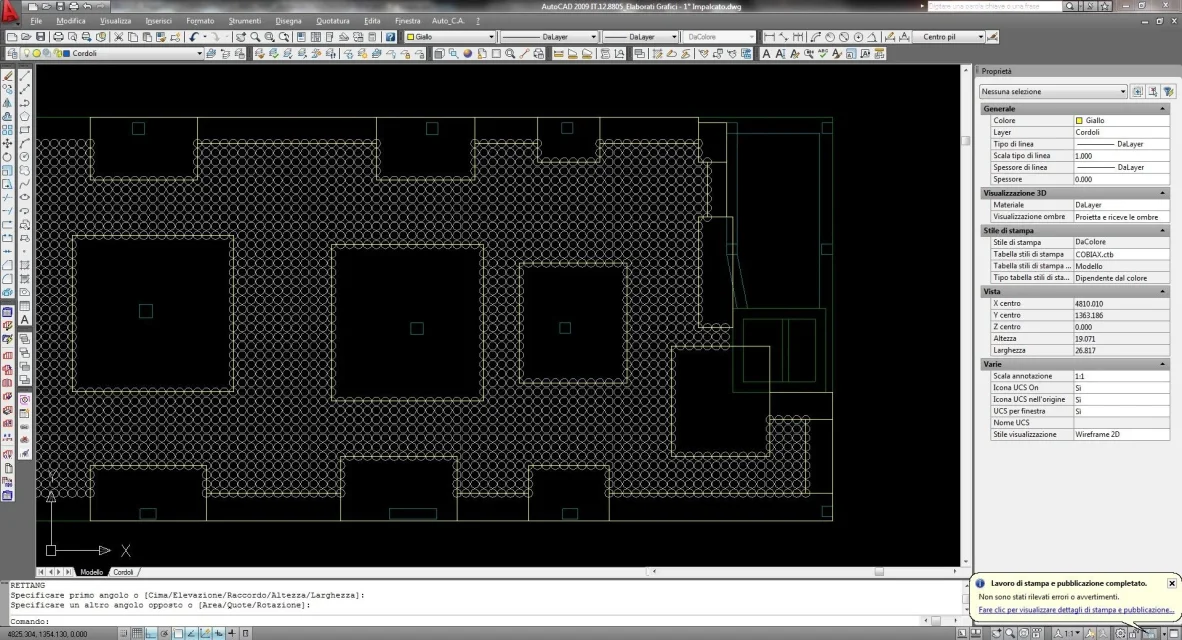
I try to explain the procedure I use so maybe I can make it easier. (I also attach the images of the procedure).

1. I choose the diameter of the circles (for each diameter there is only one step)
2. I choose the direction I will have to follow to copy the circles.
3. I begin to copy the circles to cover (at spans) the area concerned.
4. after identifying the areas that should not be covered by the circles I go to delete them.

(this image went to me as an attachment, I don't know why)View attachment 34320Step 2: In this image I chose to start drawing circles starting from the bottom right of my planimetry. the direction in this case is perfectly horizontal. the center of the first circle is located "in the corner". After that I began to copy the circles to the left with his step.
Immagine2.webppoint 3: I copied the circles covering practically all the planimetry. By doing so, of course, I will have to go back on my steps and clear the circles in disobey. (around the pillars, the elevator compartments, etc.). the removal of the circles, unfortunately, is an operation that I carry out more than once before completing the project.
That's why I don't need a perfect lisp. I could use one to speed up.
Immagine3.webppoint 4: I have deleted the circles that I do not need.

I've been thinking about it for a long time to ask you my request as simple as possible and try to write it.

- First of all, I think it's easier not to use polylinea.
- serve in all 4 or 5 information to insert:
1. diameter of the first circle
2. if in the lisp you can assign the fixed data of the step then this point does not serve otherwise: step of the circles
3. initial point of the first circle
4. x direction with final point
5. direction in y with final point

- in this way I go to draw all the circles forming a square or a rectangle.Immagine4.webpin the image I hypothesized 2 rectangles (marked in yellow)
and that would be what would basically make the lisp.

possibly with a second lisp you could, draw a polyliena, let him erase all the circles that are located within this (in the area). an extra bean would be to make him recognize also the circles that touch polylinea.Immagine5.webpI hope I've been able to explain my thoughts and hope you can find a solution that doesn't take too long.

Thank you.
 

Attachments

  • Immagine1.webp
    Immagine1.webp
    104.6 KB · Views: 9
Sorry.
is there someone who can help me or what I ask is difficult to achieve or takes too long?

Thank you.
 
It is not simple and at least a quick thing to do. . But thank you, maybe on the weekend I can take a look.
 
Sorry, but is it not easily solved by an array->extrim->filter arc->cancella arc sequence?
 
Sorry, but is it not easily solved by an array->extrim->filter arc->cancella arc sequence?
from what seems to me to have understood regarding the needs of zoro76 as a solution seems correct.
What's wrong with the crystal solution?
 
I hope I have not neglected some variable that can affect the result.
the series is built parallel to the current uct.
439.gif
 

Attachments

Hi, gp.

I'm trying to use your lisp but I can't figure out which points I have to select, I'll explain:
- launch the "dcer" command ->ok
- select the diameter -> ok
- sample origin -> ok
- internal point, this error:

internal point; error: an error occurred within the function
* error* setting of the autocad variable rejected: "hpislanddetection" nil

Can it be because I use autocad 2009 or does not hit anything?

Sorry to bother you, but I saw from the attached image that you were able to create exactly what I wanted.
 
I can just say one thing. !

You have no idea how much time I can save in the future.

Thank you very much
Bye-bye
 
Please.

I was undecided whether to use the gap between the circles also towards the boundary (limited to the first row), I opted for the tangent construction, maybe I guessed.

curiosity, what do you look for?
 

Forum statistics

Threads
44,997
Messages
339,767
Members
4
Latest member
ibt

Members online

No members online now.
Back
Top