• This forum is the machine-generated translation of www.cad3d.it/forum1 - the Italian design community. Several terms are not translated correctly.

design with phases

  • Thread starter Thread starter CAROLINA
  • Start date Start date

CAROLINA

Guest
Bye to all,

I would like to know why I demolish a window in the plant of my project and in the prospectuses remains a square line of the size of the window.
when I should see the wall.

Moreover it is possible in revit to set a project that starts from a state of fact, that is completely demolished, and to set the project, but then also the variants in progress?

for now I have always made a copy of the project where I set the new project as a factual state and then create the variant. but it is not possible to do everything in one file of revit. if you like.....

thanks and a thousand
carolina
 
regarding the first question there is something wrong with filters, most likely you will have left active for the views of the prospectus that "show everything".

for the second of course it is, it is a question of creating a new phase next to that of project (panel steps insert after), duplicate the views where you have to make the changes set them on the new phase you have created, and make the changes of the case.

I forgot from view > user interface you can change the project browser so that it is organized by stages, this helps a lot when you go beyond the canons 2.

ps:do not demolish phases are one of the things that really work wonder in revit:wink:
 
Moreover it is possible in revit to set a project that starts from a state of fact, that is completely demolished, and to set the project, but then also the variants in progress?

for now I have always made a copy of the project where I set the new project as a factual state and then create the variant. but it is not possible to do everything in one file of revit. if you like.....
Yes, it is enough to create the "variant" phase in addition to the initial stages and project!
 
... but it is not possible to do everything in one file of revit. if you like.....
Yes, it is possible. as other friends have said, phases is a good feature in revit. you can have the existing phase and phase of new construction in the same model.
 
Good evening!
I have a project set in:
- current status
- project
- comparison

Now I'm running the first variant and I don't know how to handle duplicates. what was before the project, now becomes approved. What do I do? duplico la file revit? even for the tables for example, numbering could not resume from 01 as in the first tables there are drawings of the first project.

I hope I've made myself understand:-)
 
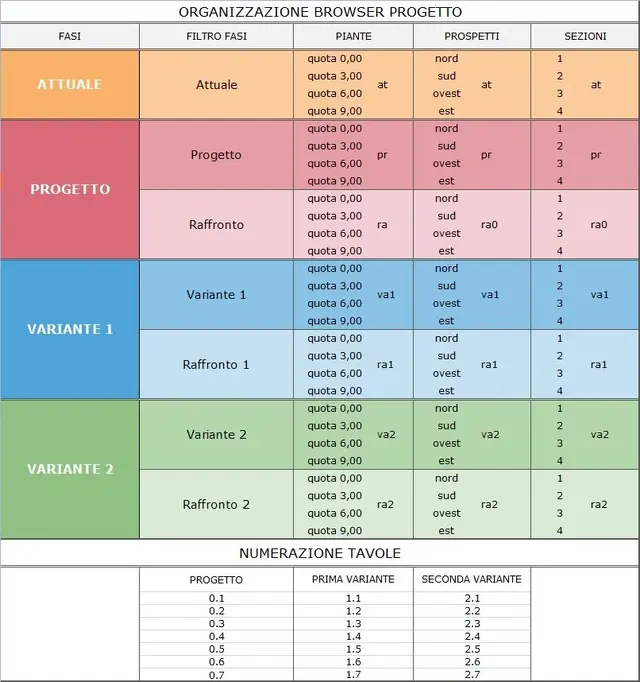
Senza titolo-1.webpI thought of fixing by setting the file according to this table here, so as not to have duplicate views. What do you think?
 
Good evening!
I have a project set in:
- current status
- project
- comparison

Now I'm running the first variant and I don't know how to handle duplicates. what was before the project, now becomes approved. What do I do? duplico la file revit? even for the tables for example, numbering could not resume from 01 as in the first tables there are drawings of the first project.

I hope I've made myself understand:-)
actually the stages are two:
1) Current status
2) project, from which to apply the filters you get the "project" with the filter applied to the only "built"; and the "raffronto", applying filters and colors to the new built as well as to the demolished
 
View attachment 35691I thought of fixing by setting the file according to this table here, so as not to have duplicate views. What do you think?
is correct the synoptic table, while the numbering of the tables is wrong, as the numbering of the "current state" is missing, and in my opinion, the code does not take into account the specific views (plan - sections - prospects) defined in a unique way, example, for variant status 2:
2 = variation (2)
2.1 Project (2)
but then misses:
2.1.x (2)
2.1.x.x = ground floor (2)
2.1.x.y = first floor (2)
(2)
Sections (2)
2.1.z.x
2.1.z.y
(2)
2.1.v = prospects (2)
2.1.v.x
2.1.v.y
2.1.v.n

and therefore passing to comparison:
2 = variation (2)
2.2 = comparison (2)
to continue as above, replacing the second code 2 instead of 1
 
Last edited:

Forum statistics

Threads
44,997
Messages
339,767
Members
4
Latest member
ibt

Members online

No members online now.
Back
Top