
• This forum is the machine-generated translation of www.cad3d.it/forum1 - the Italian design community. Several terms are not translated correctly.

development helical slip

  • Thread starter Thread starter skia51
  • Start date Start date

skia51

Guest
Hello everyone
I did a little research on the forum but did not find what I need
in practice as from title I have to make development for a sheet metal slide, helical shape
I'm going through the various functions, even those relating to the surfaces, but I can't get over it.
for now I managed only to realize the shores of the slide, I remain the plan
Does anyone know how to do that?
Thank you.
 
Hi, let us see what you did, otherwise it takes the crystal ball. . .
Hello, sir, I'm sorry you're right, but I'm really wasting a lot of time for this slide.
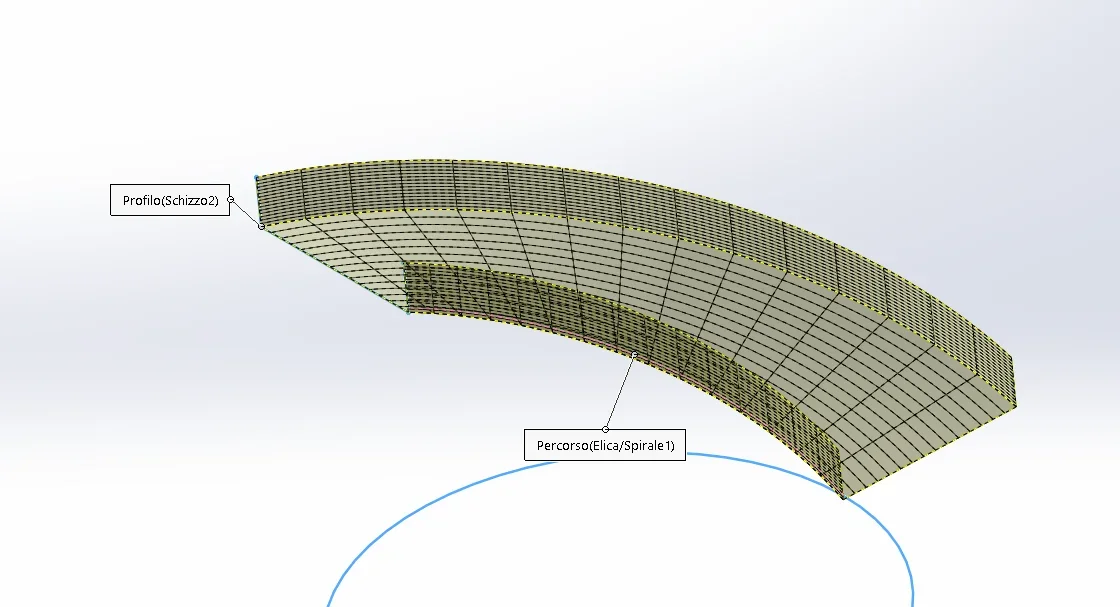
In practice I have to do thisscivolo.webpscivolo2.webpIt is a sheet metal slide that must connect two floors that are at a difference of about 400mm and rotated by 90°, a helical slide.
the side bands I made them, I miss the development of the plan so that I can send everything to laser cutting
I hope it is clear now
Hi.
 
I don't think that deformation is typical of solidworks. try to see here:
 
Hello everyone
for now the simplest system seemed to me to draw a tilted sheet, and then on the front floor make a normal curved cut, as in phototaglio.webpin practice the sketch of the cut is made on the front level, while the sheet is located on a sloped plane with a difference level equal to that I need
in practice comes out an elliptical arch
I'm not sure it's correct at 100x100 but it seems to me the best solution.
Does anyone have a better method?
Thank you.
if you tell us step and total h of the spirare (if regular) I try to put down something
 
hi asblo apologies the time. as written before I have to connect 2 floors with a difference of about 400mm, rotated 90° the internal radius is 500mm, the external one 885. I tried to make a spiral and then sweep it with the sheet, but I can't do the development.
I hope you can help me
 
to achieve development, if I don't remember badly, use the convert function in sheet metal by selecting a long edge.
 
to achieve development, if I don't remember badly, use the convert function in sheet metal by selecting a long edge.
Hello Massive
I tried to model and then convert to sheet, but it didn't work. then I tried to shape with the surfaces but also in that case I couldn't get the flattening of the surface.
Besides the cut made of a tilted plane, I can't find other solutions.
 
did you use the propeller function? to me it seems there was more than a discussion with this need
 
 
you have to do it with a loft sheet, there are no other solutions.
Hello re_solidworks
thanks to the file I will be very useful
But could you write the steps you've done and why?
There is something that is not clear to me
Thanks again
and thanks to all those who have committed to solving my problem
thanks to all
 
Hello re_solidworks
thanks to the file I will be very useful
But could you write the steps you've done and why?
There is something that is not clear to me
Thanks again
and thanks to all those who have committed to solving my problem
thanks to all
I try to explain the concept to you, I hope I can. considers that the loft sheet combines 2 profiles and manages to combine virtually all imaginable forms. Starting from this concept, I go to "unite" with the loft sheet the 2 helical edges that border the helical sheet. in this way I can give a very precise direction. to create these edges you can make 2 curves (insert->curva->elica/spiral) or use the edges of a propeller surface that matches a sheet face. I preferred the second option, so I control the shape of the propeller in a unique way.
 
I try to explain the concept to you, I hope I can. considers that the loft sheet combines 2 profiles and manages to combine virtually all imaginable forms. Starting from this concept, I go to "unite" with the loft sheet the 2 helical edges that border the helical sheet. in this way I can give a very precise direction. to create these edges you can make 2 curves (insert->curva->elica/spiral) or use the edges of a propeller surface that matches a sheet face. I preferred the second option, so I control the shape of the propeller in a unique way.
hi re-solidworks
I had a little difficulty in making the slide as you did,
it was not clear how to insert the sketch3d, in the end I managed, but this passage was not immediate.
Thanks again
 

Forum statistics

Threads
44,997
Messages
339,767
Members
4
Latest member
ibt

Members online

No members online now.
ciao
Back
Top