
• This forum is the machine-generated translation of www.cad3d.it/forum1 - the Italian design community. Several terms are not translated correctly.

development spiral coclea

  • Thread starter Thread starter Tarkus
  • Start date Start date

Tarkus

Guest
Hello everyone,
I'm a bit behind with the versions, currently working with 2019.
I ask if with the latest versions it is possible to develop an element for cochlea spiral.
Thank you.
 
Bye! I haven't seen you.
answering the question:
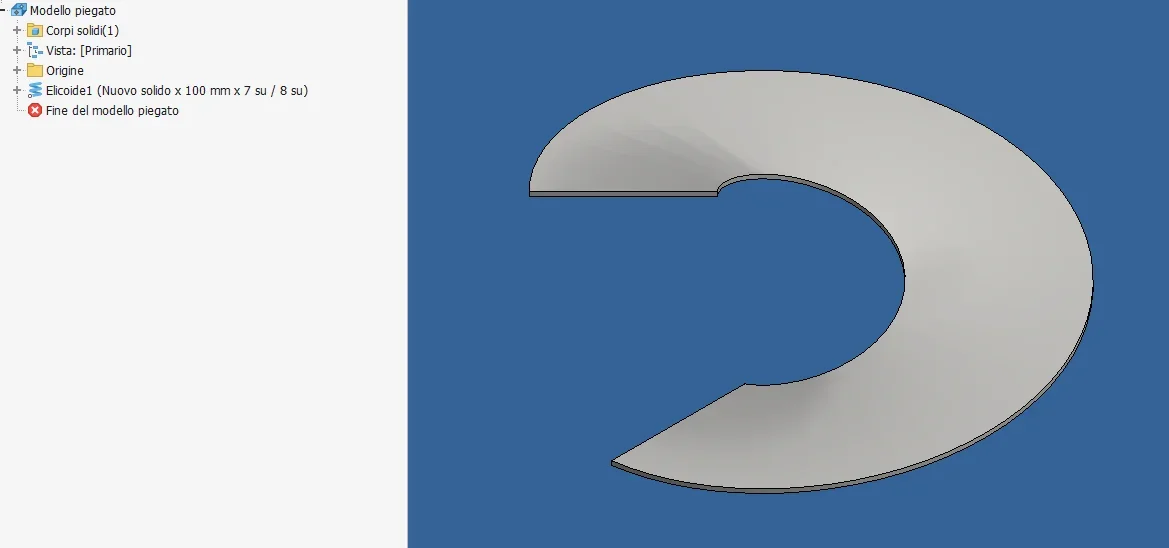
In a precise way I think not (always happy with denial!), I did this test:1681462150161.webpand you cannot develop: However with the command you turn, working on the surface of the solid (it is indifferent that it is sheet) you get this approximation. personally I have never used the command if not for some quick tests and I do not know how to assess its effectiveness, and it certainly does not treat the sheet as such and surely errors are introduced; but maybe for your application things are also good the approximation that will be there. I do not remember if the command was already present in 2019.1681462396077.webp
 
hi catafract, in fact I am much less active on the forum.....
However you have as usual found the solution to the problem.
in 2019 the command turns does not exist, but in 2020 I have installed but that I do not usually use yes.
remains to be physically checked if developments are correct.
Thank you.
 
Thank you so much! What a wonderful thing, I would never have arrived... and actually even doing the test successfully I can't understand why it's necessary to pass through the loft... Can anyone explain it?
In fact, if you try to do it with the surface generated by the helid does not work, while with the loft yes.
And then, if you try to make a hopper with the loft, you don't develop it... .
 
I have also tried to compare the loft and helicoid thickenings and, from Boolean subtraction, nothing remains: it looks like solids are equal... boh!
 
I can't understand why it's for the loft... Can anyone explain it?
I have long stopped searching for logic in the inventor:)
years ago a frustrating in this debate had written something like this:
"inventor is possessed by an unbalanced dialect whose task is to understand what you are trying to achieve and do exactly the opposite 78% of the times. 22% in which it does well is just to confuse you. some version ago, autodesk added a button ... that (suppose) had to solve a problem. My theory is that by selecting that button you activate a sharp stick that repeatedly sniffs the devil in the butt, making him personally hate you."I've been printing it for years in the office every time I tie it I can't help but laugh. .
 
I have long stopped searching for logic in the inventor:)
years ago a frustrating in this debate had written something like this:
"inventor is possessed by an unbalanced dialect whose task is to understand what you are trying to achieve and do exactly the opposite 78% of the times. 22% in which it does well is just to confuse you. some version ago, autodesk added a button ... that (suppose) had to solve a problem. My theory is that by selecting that button you activate a sharp stick that repeatedly sniffs the devil in the butt, making him personally hate you."I've been printing it for years in the office every time I tie it I can't help but laugh. .
use inventor from a while and I can only confirm this quote, :roflmao::roflmao::roflmao:
 

Forum statistics

Threads
44,997
Messages
339,767
Members
4
Latest member
ibt

Members online

No members online now.
Back
Top