
• This forum is the machine-generated translation of www.cad3d.it/forum1 - the Italian design community. Several terms are not translated correctly.

diameter quotation in details

  • Thread starter Thread starter weldox
  • Start date Start date

weldox

Guest
Hello, everyone!

I have a problem that I usually go around, but in a slightly slender way.

I use sw2010 sp0, often and gladly I find myself having to quote the detailed view of the profile of the section of a cylinder (cianfrini for welding, triggers, etc...).

In this section detail I have to quote the diameters of the various points of the profile...but I can never do it automatically.
I'll run the problem by using the "annotation" command and arrange with sketches and what else. .
the problem is that I lose time and sometimes it generates chaos.. .
Moreover, the quotas must be drawn aside and transcribed as a record with the risk (besides the risk of wrong) that, if I change the 3d, they are not changed.

Can you help me?
Thank you so much in advance! !
Mauritius
 
Hi, it depends on what you have to select. sw 2010 sp2.1 not from problems and however we do not have the same geometry to compare.

the solution is to mark the circle of detail, share everything with smart quota and then reduce the circle of detail... quotas remain but reduce geometry.
 
In this section detail I have to quote the diameters of the various points of the profile...but I can never do it automatically.
I'll run the problem by using the "annotation" command and arrange with sketches and what else. .
I didn't understand what size you couldn't quote. We should see an example. I don't normally have these problems.

However I notice that we are now at sp 4.0 and many "youth horrors" are resolved. the 0.0 is better to jump to evener.

greetings
Marco:smile:
 
I think the problem is not so much about the sw version, how much ignorance I am!

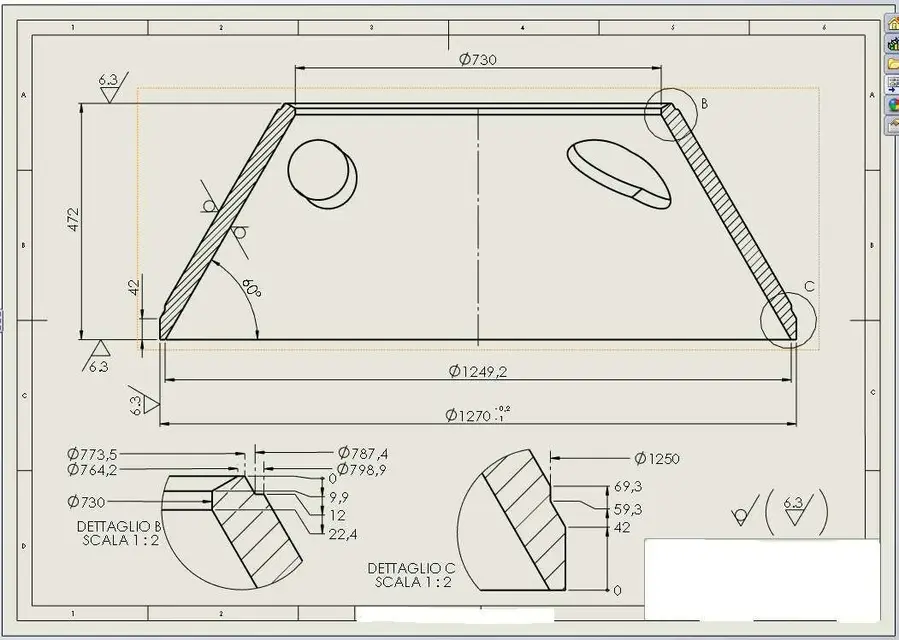
I attach an image so you understand better what I mean:


I have to quote the diameters in the details of the section...but, as you can see, I had to arrange with sketches and annotations.

thanks for the interventions!
Mauritius
 

Attachments

  • image1nx.webp
    image1nx.webp
    51.7 KB · Views: 106
Last edited by a moderator:
did you try to make these odds in full views and then drag them to the detail view with the ctrl pressed?
 
Bye!
I tried to drag them with ctrl pressed...but a ban symbol comes out and I can't hook them to the detail profile. . .
 
I usually do as I wrote you above and works, attached an example image.
I have a doubt that could justify the problem: when do you share the whole view of the entities of the model or the entities of sketch type virtual sharp or lines? because in this case in the other view there are not and the quotas fail to hook up.. .

can you post your model?
 

Attachments

  • Cattura.webp
    Cattura.webp
    15.3 KB · Views: 84
I did some evidence!

actually if you do the detail of a view your method is perfect!
to quote I believe to quote right, i.e. quoto entity of the model.
I just need to figure out how to do only half an arrow in detail. ..because I see it all in detail (there is some option I don't put you see.).

the problem is that I have the need to quote the detail of a "section"...in that case I can not hook up the quota that I draw with ctrl and gives me the same problem as before.

I try to attach the model!
Thank you again!
Mauritius
model
 

Attachments

Bye!
I tried to drag them with ctrl pressed...but a ban symbol comes out and I can't hook them to the detail profile. . .
the sign of ban appears dragging until you are near the area of a view. but arrived on the view of detail becomes the classic symbol of altitude; release the mouse and the share automatically hooks (just be in the area, without going to touch a edge). then right clik on the quota, hide quotation line and cut half without reference, still right clik and exclude the center quota (among display options). Now you can drag it as long as you want.

greetings
Mar
 
I tried and works perfectly when I quote the detail of a view....but the ban remains when I try to quote the detail of a section.

I mean, if I take my flange and dissect it, and then I do the detail of the dissected profile, it gives me this inconvenience.

the fact is that I need to work on the section because sometimes I have to share the internal profile as well as the external one (see the first image I have attached).

Thank you!
 
I tried and works perfectly when I quote the detail of a view....but the ban remains when I try to quote the detail of a section.

I mean, if I take my flange and dissect it, and then I do the detail of the dissected profile, it gives me this inconvenience.

the fact is that I need to work on the section because sometimes I have to share the internal profile as well as the external one (see the first image I have attached).

Thank you!
but are you doing a proper section? because then yes, you are right.. possible operations on section views are limited.
in this case not having the need to keep the view father (you hid it?) you have to make a Subsequent section. with this all works, I tried your model (you could also attach the draw) and with the bet it is all right.

greetings
Mar
 
exact, I was trying to quote the detail of a real section (hidden father view)!

with the decomposed section works perfectly. . I will work for this solution!
Thank you so much!

ps: you're right, sorry, I didn't think of attaching the draw too!

thanks again to all for the tips and explanations! Fixed question!
 
exact, I was trying to quote the detail of a real section (hidden father view)!

with the decomposed section works perfectly. . I will work for this solution!
Thank you so much!

ps: you're right, sorry, I didn't think of attaching the draw too!

thanks again to all for the tips and explanations! Fixed question!
:finger:

greetings
Marco:smile:
 
In my opinion, the management of sections such as other views, is an implementation to be requested as an improvement in assistance and I will do so. a less effective alternative to the uncomposed but at least parametric view is to create the extension line by hand and attach a note. instead of writing the text of the note you touch the corresponding quota in the other view and the text of the note remains tied to this text ance in case of changes.
It's not the best but it's another alternative.

Hi.
 
You're right! Thank you!
also because having already made the 2d with the view of section...in such way I do not have to be there to change it with decomposed section....but I use the method you indicated to bind the values!:finger:

Since we talk about annotations... if we don't go too much ot, there is a way to put the line automatically horizontal? Otherwise I have to be there to do everything by hand and eye.

Thank you!
Mauritius
 
Since we talk about annotations... if we don't go too much ot, there is a way to put the line automatically horizontal? Otherwise I have to be there to do everything by hand and eye.

Thank you!
Mauritius
would be another thing to ask since this function already there is for tolerances of form and position. It would suffice a grip at 0-30-45-60-90 degrees to drag to make life + easy.
 

Forum statistics

Threads
44,997
Messages
339,767
Members
4
Latest member
ibt

Members online

No members online now.
Back
Top