brizzo1982
Guest
Good morning, everyone.
I have just passed to autocad mechanical 2012 and I have a problem in managing xrif. the situation is described below.
I have a file full of external references (model file) that I use as a "viewer" of several dozen dwg files (the xrif in fact).
with all previous autocad versions (including autocad lt 2014), the program at the time of opening the model file if it did not find some xrif was limited to signaling it in the xrif palette.
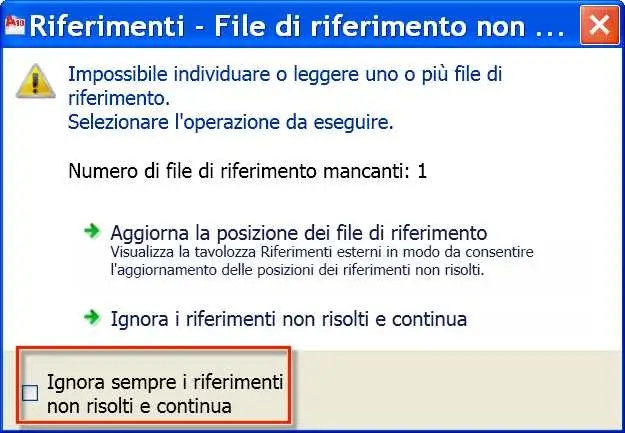
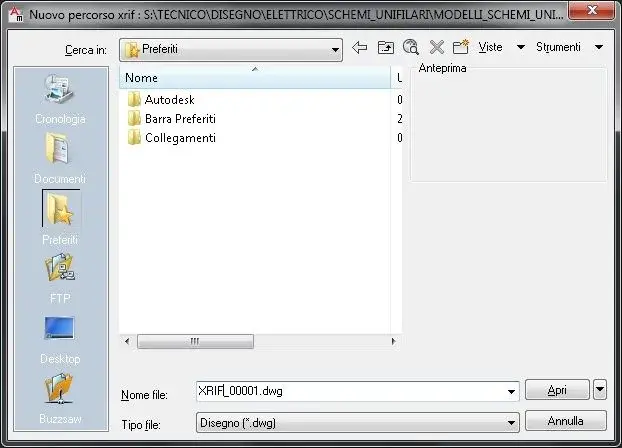
with mechanical 2012 instead, at the opening of the file model opens for every xrif, the menu dedicated to the reassociation of the path of the missing xrif.
the thing is a bit annoying since the file model has hundreds of xrifs!
How can I delete this request? Is there a variable I can refer to?
I looked for a little but in vain. .
Thank you.
I have just passed to autocad mechanical 2012 and I have a problem in managing xrif. the situation is described below.
I have a file full of external references (model file) that I use as a "viewer" of several dozen dwg files (the xrif in fact).
with all previous autocad versions (including autocad lt 2014), the program at the time of opening the model file if it did not find some xrif was limited to signaling it in the xrif palette.
with mechanical 2012 instead, at the opening of the file model opens for every xrif, the menu dedicated to the reassociation of the path of the missing xrif.
the thing is a bit annoying since the file model has hundreds of xrifs!
How can I delete this request? Is there a variable I can refer to?
I looked for a little but in vain. .
Thank you.