
• This forum is the machine-generated translation of www.cad3d.it/forum1 - the Italian design community. Several terms are not translated correctly.

display problem

  • Thread starter Thread starter sagara_939
  • Start date Start date

sagara_939

Guest
Good morning.

use solidworks 2018 on pc with certified video card. For a while, on some asses, he's been making me an annoying joke. while setting the shaded display with edges, some components are displayed without edges.
Here is a screenshotImmagine 2022-07-02 101455.webpas you can see, the two stems attached to the base plate do not have the visible edges. this generates confusion during design. the strange fact is that the other components have visible edges. I tried to open the detail without edge, but it is displayed correctly. being this particular also in other assemblies, opening one of these also is displayed correctly.
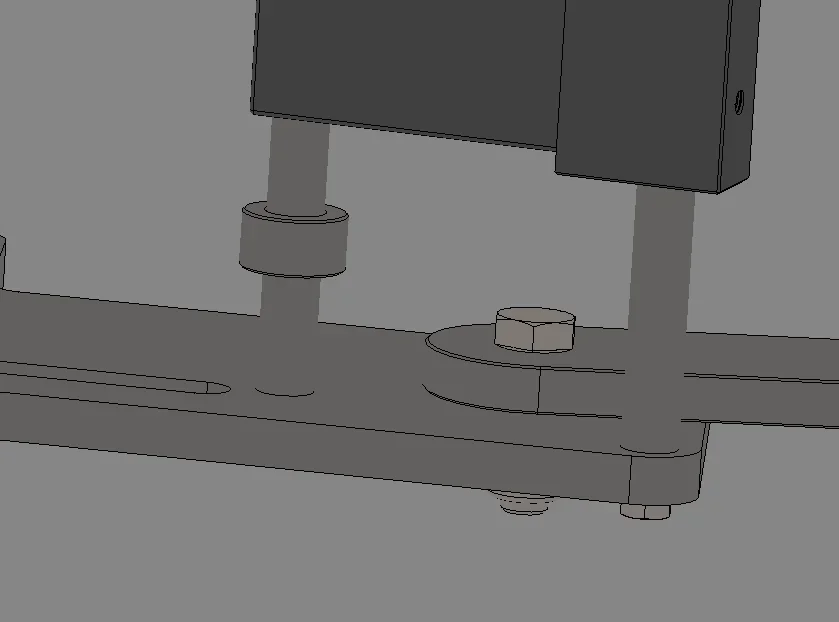
This is not the only exempt. I have a fairly complex set that has different details displayed this way. Sometimes, it's hard to work.

I have already tried to:
  1. set all possible combinations of display in the options menu
  2. reset software default settings
  3. uninstall the software and reinstall it
It's already the third time I've been taking this issue into my hands, I've also done other pass tests and I don't remember. Now I'd like to finally settle.

Can anyone help me? Have you ever happened?

Thank you!
 
if on some assemblies you do it and in others it is not a problem of performance of the video card combined with an honest modeling in terms of performance.
so before handing to the video card you have to understand why the axieme is problematic.
which settings are set (I don't only talk about the display ones)
Are you in great modes?
Do you have any details loaded in light weight?
do you have graphically heavy details?
Did you do a performance and function statistics?
.........
 
Good morning, thank you.

So, I'm in great axioms. there are no special loads in light weight. I don't think there are graphically heavy details, they're all pretty simple details at the design level. this is a set that has few details (it is a group of a car). if I open the machine, which connects all the groups in question and others, the object group and the machine assembling are displayed correctly and without problems.

I'll get you the performance report. I am sincere, I have never used this tool. Actually, it says that there are very thin components, probably due to threads (usually, I always represent them).
 

Attachments

how is it managed?
attention that a subaxieme, from what I remember, requires less performance than its individual components because all internal relationships are not calculated (try to make the subaxieme flexible and see what happens).
for performance one thing I always recommend to do and remove the tick to move by assigning to move and wheel dedicated keys; also the selection through transparencies must be inhibited; other tips found in the forum
 
Massive good morning,
how is it managed?
attention that a subaxieme, from what I remember, requires less performance than its individual components because all internal relationships are not calculated (try to make the subaxieme flexible and see what happens).
the upper axieme does not have any display problem, even the axieme in question is displayed correctly. the display you see in the image attached in the first post, is taken from the axieme opened individually. In fact, this is also what makes me perplexed: If I open it individually, it makes me this joke. if I open a set, where he is a subaxieme, it is displayed correctly. I would have expected the opposite.. .

However, the particularity is that it does only on some details, so it does not seem to be a visualization setting, but almost an error of the file itself.

I tried to make it flexible in the upper axieme, but nothing changes.

here are two screenshots showing the differences.
together open individually:esterno.webptogether displayed in a top-level set:interno.webpas known, the perpendicular stems to the base plate, are displayed with two different shades and with the visible edges.
for performance one thing I always recommend to do and remove the tick to move by assigning to move and wheel dedicated keys; also the selection through transparencies must be inhibited; other tips found in the forum
I have to figure out how to do it, as soon as I can do some research, thanks to the advice!
 
I'm with cell, so I don't have solidworks in front. try rebuilding by doing ctrl+q, if you see that the edges appear, the problem is that solidworks does some optimization in its own way to ensure performance. to me he does it with the sections and makes all the edges disappear! Surely if you break between the options there is something that according to them leads to the optimizations of the frame rate that then makes sti subterfugi. I didn't hit us so much, but with ctrl+q, solve it right now.
 
Good morning, I also had a very similar problem a short time ago, after several attempts to set in sw without success, I tried to reinstall the driver of the video card with a previous version and in this way it worked.
in my case I set a rtx 5000 picture and use this driver:
452.96-quadro-desktop-notebook-win10-64bit-international-dch-whql
downloadable from the site nvidia
(this for solid 2018)
 

Forum statistics

Threads
44,997
Messages
339,767
Members
4
Latest member
ibt

Members online

No members online now.
ciao
Back
Top