• This forum is the machine-generated translation of www.cad3d.it/forum1 - the Italian design community. Several terms are not translated correctly.

display problems at the table

  • Thread starter Thread starter Jeffcott
  • Start date Start date

Jeffcott

Guest
Hello everyone,
I have a problem with making boards in think3.
in the past I always worked in 'model' and solting from a while I have the need to go in 'table' for the realization of some drawings, I so observed that the worksheet appears completely black not succeeding in thus displaying how much traccio on the work plane. having no idea how to solve this problem I ask help to you all of the forum. Thank you.
 
hi cerbonim, unfortunately it is not about the colors of the pens as I set the bench for the table and the black for the pens, also changing these settings the same problem is resumed.
 
hi cerbonim, unfortunately it is not about the colors of the pens as I set the bench for the table and the black for the pens, also changing these settings the same problem is resumed.
it will be a fool I say but you tried with a default settling type >autocad
> format
> materials colors
> sector
> autocad
 
...though yes, I tried with the default setting but unfortunately without any result!
 
do you recommend installing it again? ...I have already made an attempt but without any result! :frown:
 
Hi, jeffcott.

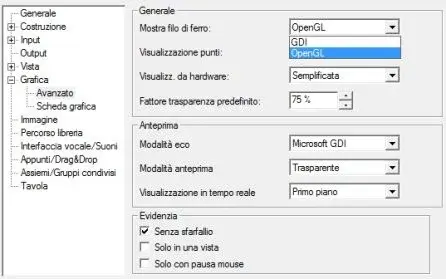
check that you have set on "software" the rendering of the table:

menu "instruments" > options/properties > graphics \ advanced : in the box "iron wire" put the item "table" on software (if it is not already).

Let me know:)

Bye!
 
thanks gabris, but I couldn't solve the problem
I followed the suggested path: menu> tools/properties/properties\ advanced but I could not make the suggested changes... If you think I have to change something else, I wait for more advice.
 

Attachments

  • think3.webp
    think3.webp
    15.1 KB · Views: 21
What graphics card do you have?
could be a driver problem. For example, ati is not suitable for cad
 
is not a problem of stef_design card because on both cards (ati & nvidia) the same problem!
 
I don't remember, I haven't used it for more than four years.
Maybe you should call assistance and if they don't solve it... you know what the solution is.
 
sin! I thought I could avoid the call for assistance, even because the program I use at home and not at work:cool:
 
The problem is that in your 3d model there are points so far from the represented figure that you can't see the detail. try from the menu you find in your left set current then zoom entity so you should see. If you can't do that, they are to be found in the 3d model where the problem is. attention could also be a degenerated surface.
 
...I was referring to the realization of the drawings in 'table'. I have observed that the worksheet appears completely black not succeeding in this way to view how much I draw on the work plane.
 
...I was referring to the realization of the drawings in 'table'. I have observed that the worksheet appears completely black not succeeding in this way to view how much I draw on the work plane.
two things if you draw in 3d it all works ok, even the passage at the table?
Why don't you put a view of when you draw at the table?
 
You said that you can't see how much tracked on the worktop that I suppose was designed in model environment"3d". What did you design solid surfaces, curves? once designed in the model environment you have to go to the table environment; under menu insert, – table view - main - customized. once you do all this process opens a screen you have to press the first button at the top left. “properties seen” under the model visibility menu, put the check on what you want to see. so you should see go.
 

Forum statistics

Threads
44,997
Messages
339,767
Members
4
Latest member
ibt

Members online

No members online now.
Back
Top