• This forum is the machine-generated translation of www.cad3d.it/forum1 - the Italian design community. Several terms are not translated correctly.

distance 1.5

  • Thread starter Thread starter Robert Tutu
  • Start date Start date

Robert Tutu

Guest
hi to all, remaining outside the discussions that have been created in the past because of some of my inability to understand what the person who answered me meant, I am here to ask you a advice because as I have already repeated I am not a magician with creo 2.0 and sometimes I struggle (I have used autocad for a long time)
Then I should work a plane of a piece by drilling it inside giving a distance from all sides of 1.5 mm, only that when I try to quota it some quotas do not change me if type and 1.3 from the edge and write 1.5 nothing changes... I think it is linked to the references taken or the constraints but I am not sure for that I ask you that you surely know many more. even if I put it as a strong share I can't change it.
I attach image to make you understand what I mean.
 

Attachments

  • cats.webp
    cats.webp
    49.6 KB · Views: 19
when you are in the extrusion sketch, use the offset command and select ring (loop), then select the area you want to work and press the forward/back key to select the loop you want.
once chosen, do done and enter the quota 1.5 mm.
I autocad haven't used it for 7 years, but I remember that even you could do it like that in 2d.
 
Thank you so much, but after I did as you say, it says incomplete section. . .
do not use the loop, but do one by one, and if you have some problem with some ring sector you intend to offset, then you complete it by hand with bows and lines.
 
another question and I don't break anymore... to reverse the sense of the arrow as I do? because when I do the offset sends me the arrow in the outer part of the piece but I want to make it go in the inner part
 
another question and I don't break anymore... to reverse the sense of the arrow as I do? because when I do the offset sends me the arrow in the outer part of the piece but I want to make it go in the inner part
Don't reverse it.

depending on the verse, enter a positive or negative share.
in your case must be negative, then -1.5 mm
 
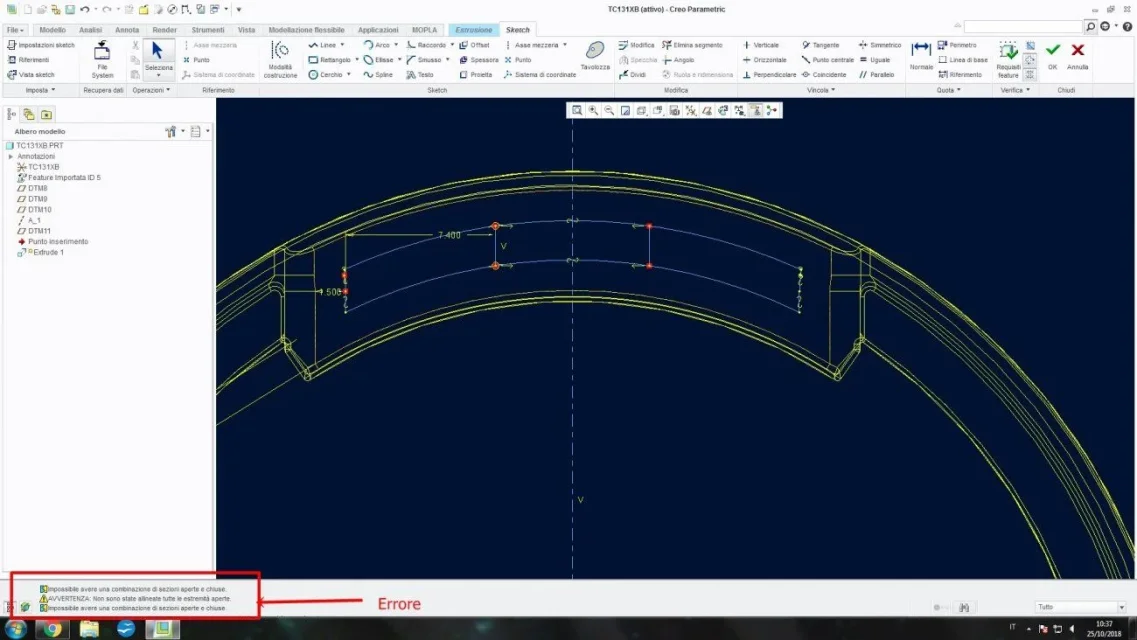
I solved it! thank you so much now gives me a problem of closed and open lines... actually zooming the offset is open... how do I close?
igo image
 

Attachments

  • cats.webp
    cats.webp
    80.8 KB · Views: 11
use the corner command, it is used as in autocad.

if you do not solve, remake the bows and segments by hand.
 
I know him, I tried to remake my bows, but he always tells me that there is an open loop... I have remade practically all the shape with bows and lines....I don't understand what the problem is...I also used the angle command but nothing.
 
I understand the problem...practically the program sees open the two lines separating the holes that I want to make... I attach image to make understand... I tried to give constraints but it takes nothing.
How can I proceed according to you?
 

Attachments

  • cats.webp
    cats.webp
    61.6 KB · Views: 11
as you see in the "open" part there are 3 arches. the central one probably if you delete it all goes well. if so it wasn't erasing all the bows below one and then the remaining one joins the true curves with the corner (which does not only trim but also extends)
 
In addition to the advice of going to third parties, another solution could be to set up a 1mm plan from the processing plan you have considered now, and take back the sketch.

otherwise the best solution would be to remove all the rays of that area...but it is better than to leave. .
 
as you see in the "open" part there are 3 arches. the central one probably if you delete it all goes well. if so it wasn't erasing all the bows below one and then the remaining one joins the true curves with the corner (which does not only trim but also extends)
It's not 3 arches, it's one... .
 
I have tried to remake the bows but still nothing...every time I remake the bows goes something out of place... I try after the lunch break because if not I become more delayed than what I am already... anyway thank you so much!
 
I can't give a division of 1.5mm between the new squares I have to do...of course they have to keep the shape of geometry... I attach a photo made with the right cell phone to make the concept understand. How can I do that? should come up with something like that.
 

Attachments

  • 20181025_155712.webp
    20181025_155712.webp
    13.9 KB · Views: 9
I finally managed, the result is this... there were some odds that blocked me but I managed to fix them.
 

Attachments

  • cats.webp
    cats.webp
    46.4 KB · Views: 8

Forum statistics

Threads
44,997
Messages
339,767
Members
4
Latest member
ibt

Members online

No members online now.
Back
Top