:3553:too easy :biggrin:dimstile command > selection of text used for quotas > text card > offset from quota line

that on the left I got it indicating "move text, add director" and move the text by hand :redface:Or could you change a share as desired, and then apply properties to others?
Unfortunately, yes, you did wrongbut is it not the jog size factor, or the dimgap variable?
Am I wrong?
How do you do it??dear marco
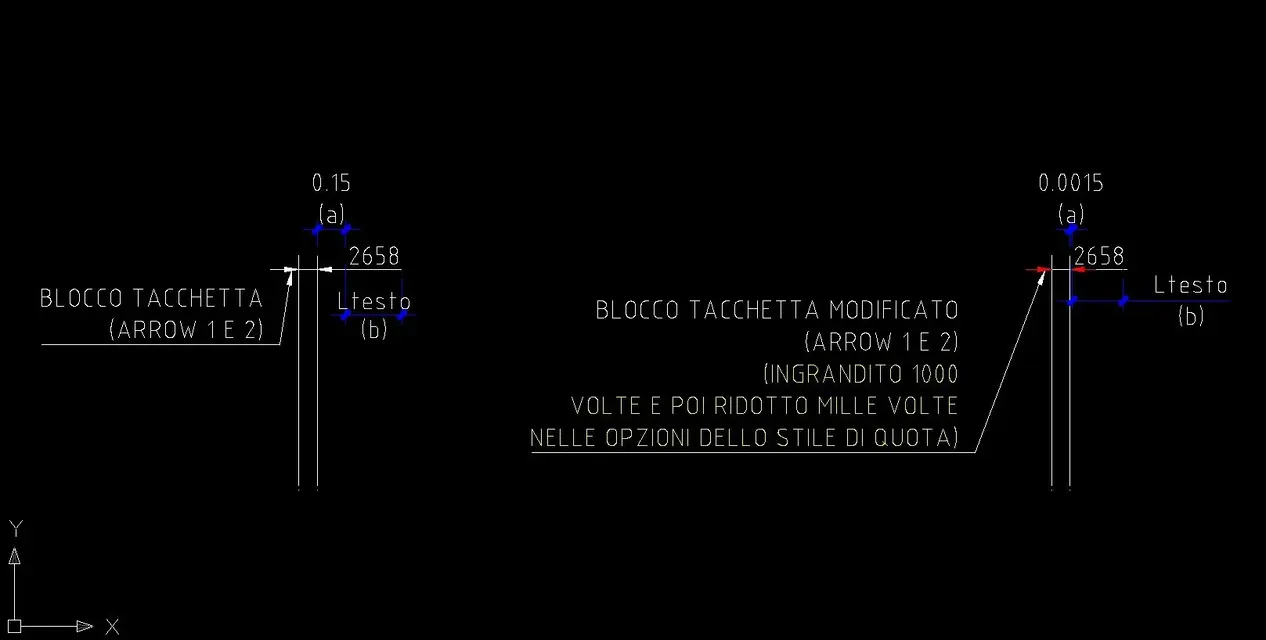
the distance you want to shorten is given by a "frame" of the text (fixed), added to the size of the block that constitutes the notch.
the only way to reduce it (automatically) would be to decrease the size of the notch block (also locally).
However, this is part of the "manual" changes to be made for quota...another way (very comfortable, but to be applied manually) is to set not "post text, add director" but "move text, without director"
to insert it directly into the quota style, from the _ddim window, tab fit, in the "text placement" pane, flag over dimension line, without leaderin the property panel (size), fit card, text movement field, choose move text, no leader
for now you are in the lace for good coffee and good ban...as a comedian said.... "I won what?? ?" :biggrin:
to me it seemed that the variable (keyboard) was dimoff, which apparently does not exist.Unfortunately, yes, you did wrong
dimgap controls the distance between text and quota line (the one that indicated planner road)
jog size factor is the jog control (the pair of lines that indicates that the size quotes an element not fully represented)
try to give from keyboard dimjogline and select a quota, to understand what I'm talking about
the only way, automatically, it's an escamotage that I show you in the attached imageHow do you do it??![]()
There are, there are...disappeared:
I think he's lost in the meanders of autocad quota blocks:biggrin: