
You are using an out of date browser. It may not display this or other websites correctly.
You should upgrade or use an alternative browser.
You should upgrade or use an alternative browser.
do not automatically add the diameter symbol to the text of the quota
MassiVonWeizen
Guest
You mean a mechanical command?
in such case if I don't remember badly there is the possibility to use a style, selectable with a double click on the quota, which instead of the ø insert m
in such case if I don't remember badly there is the possibility to use a style, selectable with a double click on the quota, which instead of the ø insert m
Sleepers
Guest
You mean a mechanical command?
sì.
Here, I imagined something like this, and before asking here I had spent more than half an hour passing all the options of the ribbon first, and the settings (and styles of quota) then; as penultimate attempt I asked san google, always without riding a spider from the hole.in such case if I don't remember badly there is the possibility to use a style, selectable with a double click on the quota, which instead of the ø insert m
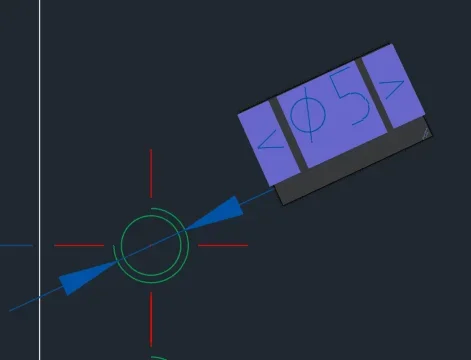
in "sets - quota" you can customize the quota text ("default text..."), where you can also add special characters and symbols, but do not remove (the text between <> that you see in the image remains unchanged).
MassiVonWeizen
Guest
but if you double-click on the quota do not appear a curtain with the choice of quotation?
Sleepers
Guest
no, it highlights the quotation text as in the image, and activates the ribbon quote power (where I searched without luck).but if you double-click on the quota do not appear a curtain with the choice of quotation?
thank you anyway; for now I have edited the share by hand (ehm...), reserving to understand more.
I find myself mechanical on the pc, but I use it sporadically for old designs, usually use inventor.