
Atreiou
Guest
regularly work with large assemblies with thousands of parts, (which default weight load) formed mainly by the same repeated parts tens of times.
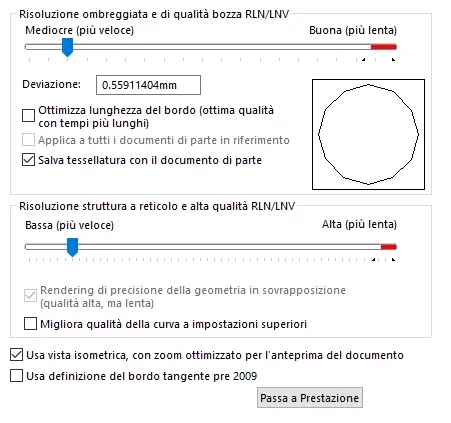
to improve performance and speed. I was advised by the assistance to adjust the parameter "image quality"
in the property of the document, which from what I understand should increase only the performance at the graphic level but not necessarily as opening and reconstruction, is that correct?
But now we need clarification, let's imagine that to a part imposed the parameters as indicated in the image, if this part is then contained in a set, should I apply the same "regulation" also to the assemblies?
or if the part has a higher setting, if the axieme that contains it instead has the set slider in less quality how does the regulation affect the performance? what is contained in the axieme passes everything in low quality?
the answer I need to understand if I have to re-pass the entire library and lower the quality of the parts I use most, or if it is enough to set the quality on the axieme that contains them.
to improve performance and speed. I was advised by the assistance to adjust the parameter "image quality"
in the property of the document, which from what I understand should increase only the performance at the graphic level but not necessarily as opening and reconstruction, is that correct?
But now we need clarification, let's imagine that to a part imposed the parameters as indicated in the image, if this part is then contained in a set, should I apply the same "regulation" also to the assemblies?
or if the part has a higher setting, if the axieme that contains it instead has the set slider in less quality how does the regulation affect the performance? what is contained in the axieme passes everything in low quality?
the answer I need to understand if I have to re-pass the entire library and lower the quality of the parts I use most, or if it is enough to set the quality on the axieme that contains them.