• This forum is the machine-generated translation of www.cad3d.it/forum1 - the Italian design community. Several terms are not translated correctly.

dome command

  • Thread starter Thread starter bradipo666
  • Start date Start date

bradipo666

Guest
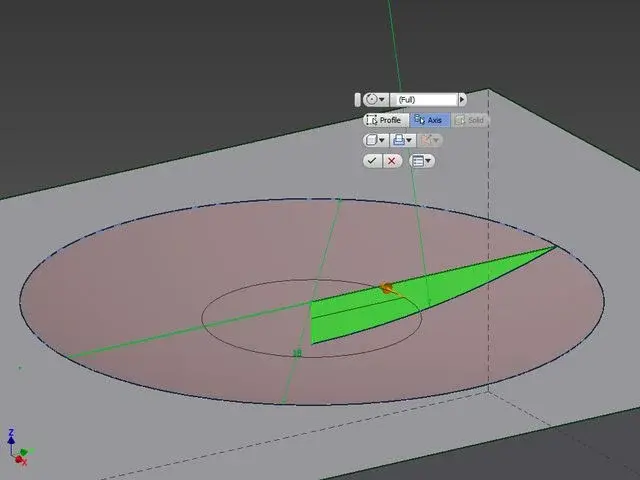
hi guys I'm trying to draw the remote apple (the apple remote control, aluminum model) with inventor 2013. I created the body, I beveled, I created the buttons with the function "face division" and so far everything ok... now comes the problem: I have to get on the central button a recess to the inside type dome, with solidworks exists the function "Dome" with inventor how do I do? I tried drawing a profile and performing a revolution with cut.... then I tried drawing a surface and performing "sculp" but the result is always the same: Once I cut the solid, I get a non-circular but oval recess given by the surface not flat but curve! :confused:
I attach some screenshots, thanks
 

Attachments

  • w1ad0y.webp
    w1ad0y.webp
    17.9 KB · Views: 30
  • 2z5m4nd.webp
    2z5m4nd.webp
    5.1 KB · Views: 8
Last edited by a moderator:
you have to make a dome sketch to be able to revolutionize and cut from the main solid
 

Attachments

  • cupolab.webp
    cupolab.webp
    17.8 KB · Views: 27
Last edited by a moderator:
thank you for the lattu answer! I have already tried to create a sketch and revolution though when I follow the cut of the solid, observing the object from above I realized that it comes out an elliptical dome and not circular! Do you have any other advice to give me?
 
you have to make a dome sketch to be able to revolutionize and cut from the main solid
I already tried. this solution is valid if the plan where you go to perform the revolution-cutting is slow. in my case though it is curved...:confused:
 
Last edited by a moderator:
a possible way is to create a loft (1/4 dome) to be subtracted to the solid, creating it with sections resting on the marked profile but moving upwards from the face and then mirrored
 
That's the best I could do.
obviously there will be a simpler command or procedure
I tried with the loft, in various ways but the result is not of the best :36_1_31: I look confident other advice from some other volenteroso... Thank you very much:
 
instead of projecting the circle extruding it by creating a groove in your remote control.
now perform smooth operation on the side of the groove.
This is a solution that I managed to think in a quarter of an hour so I don't make a perfect result.
I'll give you my proof
 

Attachments

Forum statistics

Threads
44,997
Messages
339,767
Members
4
Latest member
ibt

Members online

No members online now.
Back
Top