Dott.Rise
Guest
Good morning to all,
I write you because I have a problem with holes but looking here on the forum, I have found nothing that can do to my case.
for my project of year I find myself having to make a threaded connection; we take as example this, in which I have a green square plate (from which to insert the screw) that must be connected to a yellow rectangular plate:
 during my studies, I learned that a threaded coupling can be done in two ways:- Case 1: by means of a threaded bolt at the end + nut. this fits into a smooth hole;- Case 2: through a life. and in this case the hole that connects the two plates must be threaded only on the plate that will receive the tip of the screw.If there is any mistake, please correct me already from now.all the holes I will go to realize were made with "guided creation of holes".
in case I have to realize the first case (bullone+vite) I would need to make a smooth hole and I oriented towards the drilling option (the third of the first line available between "hole type") with a size, suppose, m10. the result is exactly what I had in mind, smooth hole in which to insert the bolt that will then be screwed on the bottom with a nut:
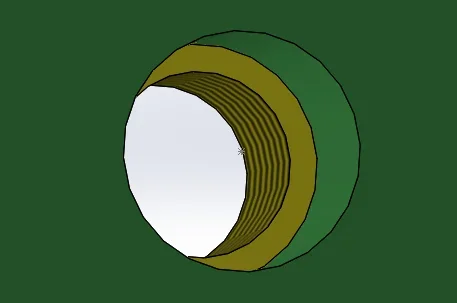
 Suppose now that it should connect with screw (case two). instinctively I oriented to "linear fingering" (the first of the middle row in "hole type"); m10, result:
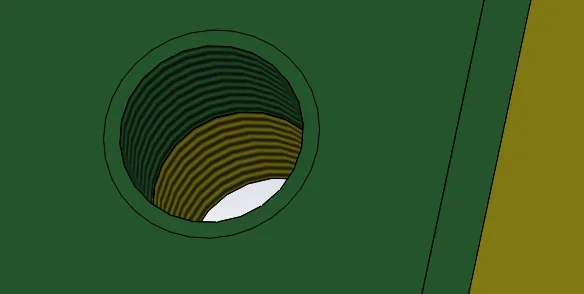 that is not what I wanted (as only the yellow plate must be threaded).
then I had the idea of making a simple hole m10 as the first case and then manually threading only the yellow plate by means of " cosmetic fingering":
 and here are the painful notes: first of all because I don't know if this way of acting can be accurate, can anyone confirm?and then because at the moment when I do the mapping of the hole m10, in "dimensions" are present only those from m14 up. Shouldn't I have the option to choose a m10 yet?
 Everything makes me confused, is there anyone who can help me? in particular I would like to understand how to actually make a connection by means of a screw, in which only the lower part of the coupling is threaded.
Thank you in advance.
I write you because I have a problem with holes but looking here on the forum, I have found nothing that can do to my case.
for my project of year I find myself having to make a threaded connection; we take as example this, in which I have a green square plate (from which to insert the screw) that must be connected to a yellow rectangular plate:
during my studies, I learned that a threaded coupling can be done in two ways:- Case 1: by means of a threaded bolt at the end + nut. this fits into a smooth hole;- Case 2: through a life. and in this case the hole that connects the two plates must be threaded only on the plate that will receive the tip of the screw.If there is any mistake, please correct me already from now.all the holes I will go to realize were made with "guided creation of holes".in case I have to realize the first case (bullone+vite) I would need to make a smooth hole and I oriented towards the drilling option (the third of the first line available between "hole type") with a size, suppose, m10. the result is exactly what I had in mind, smooth hole in which to insert the bolt that will then be screwed on the bottom with a nut:
Suppose now that it should connect with screw (case two). instinctively I oriented to "linear fingering" (the first of the middle row in "hole type"); m10, result:that is not what I wanted (as only the yellow plate must be threaded).then I had the idea of making a simple hole m10 as the first case and then manually threading only the yellow plate by means of " cosmetic fingering":
and here are the painful notes: first of all because I don't know if this way of acting can be accurate, can anyone confirm?and then because at the moment when I do the mapping of the hole m10, in "dimensions" are present only those from m14 up. Shouldn't I have the option to choose a m10 yet?Everything makes me confused, is there anyone who can help me? in particular I would like to understand how to actually make a connection by means of a screw, in which only the lower part of the coupling is threaded. Thank you in advance.