
malf
Guest
Hello, I installed solidworks 2017, but the same problem I had with 2016, on a laptop with video card nvidia gtx 960m.
a screen has 4k resolution, but set to 2048x1152 and resize 150%, while the other side is 1920x1200 with 100% resize. the reason for the two resizes is that the first is the screen of the laptop and is small and the second is the side screen and is much larger.
solidworks presents the problem known as dpi scaling issue on the second monitor. an image to understand what happens: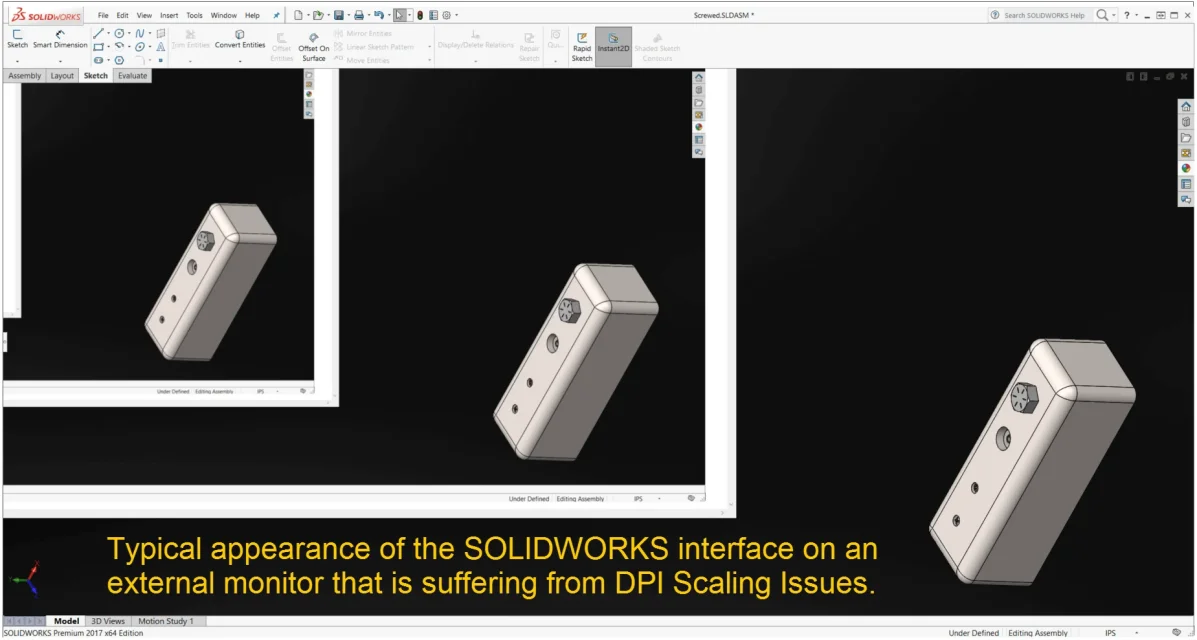 now the problem solves it going into property of the sw boot executable file and setting in compatibility "disables screen resize for high dpi values"
this operation solves the appearance of multiple nested screens, but makes the interface gigantic... very large and written icons as well. the remaining space for the model window is reduced.
how can I make the interface more effective?
a screen has 4k resolution, but set to 2048x1152 and resize 150%, while the other side is 1920x1200 with 100% resize. the reason for the two resizes is that the first is the screen of the laptop and is small and the second is the side screen and is much larger.
solidworks presents the problem known as dpi scaling issue on the second monitor. an image to understand what happens:
now the problem solves it going into property of the sw boot executable file and setting in compatibility "disables screen resize for high dpi values"this operation solves the appearance of multiple nested screens, but makes the interface gigantic... very large and written icons as well. the remaining space for the model window is reduced.
how can I make the interface more effective?