• This forum is the machine-generated translation of www.cad3d.it/forum1 - the Italian design community. Several terms are not translated correctly.

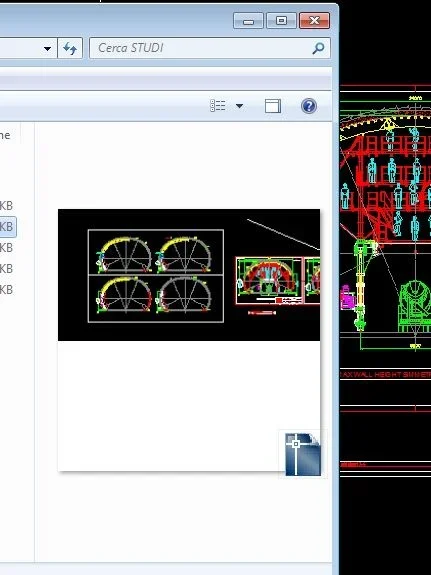
dwg previews with different sizes depending on the saved version

  • Thread starter Thread starter jim78b
  • Start date Start date

jim78b

Guest
I have autocad 2013 because if I save with the 2013 version I have previews of the files that fill the whole box and if except with previous versions es:2010 I have half window?
ps:preview 2013.jpg saved in 2013
preview.jpg saved in 2010
 

Attachments

  • preview 2013.webp
    preview 2013.webp
    8.3 KB · Views: 23
  • preview.webp
    preview.webp
    23.5 KB · Views: 23
previews can be saved to various resolutions.

in the autocad version 2013 from a minimum of 64x64 pixels at a maximum of 2560x2560 pixels (depending on the variable setting thumbsize).

in the format dwg 2010 the maximum allowed was instead 256x256pixels. That's why you see them smaller.
the program adapts to the standards of that format by reducing the resolution and also changing the recording format in bmp. from 2013 on, in fact, autodesk used the png
 
previews can be saved to various resolutions.

in the autocad version 2013 from a minimum of 64x64 pixels at a maximum of 2560x2560 pixels (depending on the variable setting thumbsize).

in the format dwg 2010 the maximum allowed was instead 256x256pixels. That's why you see them smaller.
the program adapts to the standards of that format by reducing the resolution and also changing the recording format in bmp. from 2013 on, in fact, autodesk used the png
Thank you very much . Too bad to see them so .I can not save them in 2013 xthat other people use 2010.
it happened to me that auticad had stuck and even if set to save as 2010 saves me files in 2013 maybe I thought a lisp that I launched ....now save in 2010.
 

Forum statistics

Threads
44,997
Messages
339,767
Members
4
Latest member
ibt

Members online

No members online now.
Back
Top