• This forum is the machine-generated translation of www.cad3d.it/forum1 - the Italian design community. Several terms are not translated correctly.

eat i create a genere layout?

  • Thread starter Thread starter p@po
  • Start date Start date

p@po

Guest
Hello everyone,
Yesterday, at a studio, I looked at a guy who designed in autocad and saw him do something to me new.

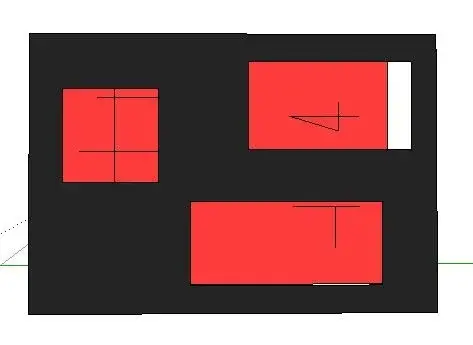
in substance had in a layer the forehead of a project table with many frames within which there were constructive details and here....

the thing that intrigued me is that if it had to modify here particular constructions did not act on the forehead layer but went on a second layer in which we were actually drawings that went to change.
the comfortable thing is that there were also so many useless scarabots that, however, they did not see why, what then appeared was only what "filtrated" attaraverso those panes.

Does anyone know how to do something like that?

to make the speech more clear I attach two images I hope explanatory.
00.webp 01.webpin black the forehead layer and in red the design on which the guy actually made the changes.
the drawings in the red layer went through those of the black layer and it was only seen what "passed" through the frames.
 
Last edited by a moderator:
Front? probably you talk about layout where you can insert all the windows you want (command windows ).
in each layout window then you can give different stairs and different views. what you see in the layout windows are nothing but selected views of the model.
 
autocad previews a space "model" where to make the drawing, and a space "layout" or "carta" where you can also draw, which however serves to put in the table of the "pieces".

typically the cartilage fits directly into the paper space.

there are some, that in autocad courses claim that the correct procedure is to quote drawings in paper space. I personally find this statement absurd.
 
absolutely agreed, probably those "unnecessary shorts" kept them on frozen layers only in the views on the lay out.

fulvio, the quotation on the paper space or in the model are chosen, there is no better or worse, depending on the type of design.
 
there are some, that in autocad courses claim that the correct procedure is to quote drawings in paper space. I personally find this statement absurd.
aahhhhhhh!!! sacrilege! did you hear autocad teachers say this?? but where we'll end up.. . ?
 
absolutely agreed, probably those "unnecessary shorts" kept them on frozen layers only in the views on the lay out.

fulvio, the quotation on the paper space or in the model are chosen, there is no better or worse, depending on the type of design.
I am stranded with lightning...quote a whole table on paper space and then you realize that you have to change scale, size or location of one or more windows or objects contained in a window...and your odds on the layout?? Well, my dear, you have to move them by hand or delete them and give them back. that of the quotation on layout is undoubtedly the worst method! (especially since the 2008 release and the appearance of the annotation scales).
 
I am stranded with lightning...quote a whole table on paper space and then you realize that you have to change scale, size or location of one or more windows or objects contained in a window...and your odds on the layout?? Well, my dear, you have to move them by hand or delete them and give them back. that of the quotation on layout is undoubtedly the worst method! (especially since the 2008 release and the appearance of the annotation scales).
the idea is that with a single text style you can quote in different scales and always get the same font size.

the problem is that if you make some changes in the layout you lose the shareassociation...I don't say then if you're wrong to click and the quoted size is that of the layout instead of that of the model... you risk to have errors of 1:50!

But wasn't there a thread we were talking about about?
 
I am stranded with lightning...quote a whole table on paper space and then you realize that you have to change scale, size or location of one or more windows or objects contained in a window...and your odds on the layout?? Well, my dear, you have to move them by hand or delete them and give them back. that of the quotation on layout is undoubtedly the worst method! (especially since the 2008 release and the appearance of the annotation scales).
Hi tristan,
I did not write that it is better on paper space, I wrote that it depends on the "type of design". e.g. if you have so many objects made in 3d of small and large dimensions and you have to quota them in 3 views (axis of Cartesian), it is better to quote on the lay out xché if you share them in the paper space you must first share on different layers and then go to freeze the various floors in the various views.
 

Forum statistics

Threads
44,997
Messages
339,767
Members
4
Latest member
ibt

Members online

No members online now.
Back
Top