romy
Guest
Good morning to all,
I have noticed a behavior that I think is abnormal but I would like to have an opinion from you
usually to create internal drains type bearing/parail locations use custom hole function
when I go to make the table and insert the quotas used on the model with the command "elements of the model" only appear the size of the funzoni type extrusion, cut extrusion or revolution
even those of threaded holes appear well
instead those used with custom hole function do not appear
I then tried to erase custom hole functions and use normal functions such as cutting extrusion, cutting revolution etc and appear well
I attach a flight test with the two variants:
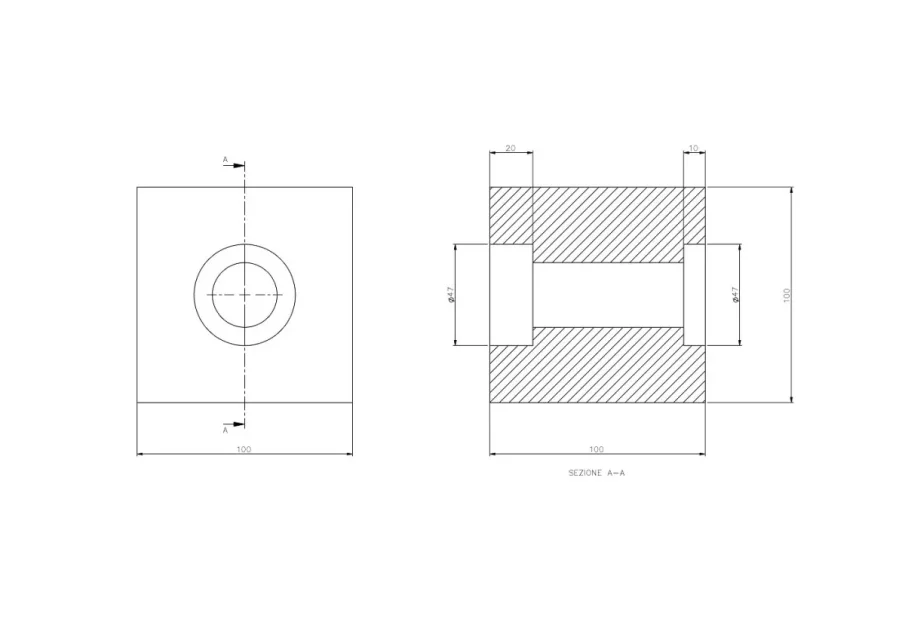
in that made with custom hole are indicated in the front view diameter and profodity of holes from ø47x20
that I can't move/copy in the view in section
the hole from ø20 is not remotely considered
instead in the test with functions are indicated in the view in the diameter and depth section
that I can also copy or move to the other view without problems
use sw 2020 sp. 5.0 but the problem was also found on old versions
Have you ever noticed this difference?
greetings
I have noticed a behavior that I think is abnormal but I would like to have an opinion from you
usually to create internal drains type bearing/parail locations use custom hole function
when I go to make the table and insert the quotas used on the model with the command "elements of the model" only appear the size of the funzoni type extrusion, cut extrusion or revolution
even those of threaded holes appear well
instead those used with custom hole function do not appear
I then tried to erase custom hole functions and use normal functions such as cutting extrusion, cutting revolution etc and appear well
I attach a flight test with the two variants:
in that made with custom hole are indicated in the front view diameter and profodity of holes from ø47x20
that I can't move/copy in the view in section
the hole from ø20 is not remotely considered
instead in the test with functions are indicated in the view in the diameter and depth section
that I can also copy or move to the other view without problems
use sw 2020 sp. 5.0 but the problem was also found on old versions
Have you ever noticed this difference?
greetings