• This forum is the machine-generated translation of www.cad3d.it/forum1 - the Italian design community. Several terms are not translated correctly.

error during flattening

  • Thread starter Thread starter pasquale83
  • Start date Start date

pasquale83

Guest
Hello.
I modeled the sheet through the function "cratching" (because I need to recover dwg...)
the original design was free of discharges, so I first got the circular discharges and then I realized the 2 folds (3, but for symmetry, 2 I got them with the same function)

only that when I press "flattened" tells me "this part contains functions that cannot be flattened" :confused::confused::confused:

I don't understand where the mistake is


I'll try to change the discharges, but I want to understand why it doesn't spread to me... As far as I know, it should be correct :confused:
 

Attachments

the problem, which I have not understood from what it depends, solve it by dividing the Sketch fold 1 in 3 functions.

I partially realized that it has to do with the two folds to 90° side. in fact making a side and the central one in the same function plus a separate function for the other side the flattening takes place without problems
 
Last edited:
Here!
Thank you!


in the meantime I tried to change the discharges, making them huge, not solving the problem
and finally I made it with flanges of the edge:frown:


another thing:
as it is bent, no waste is required,
but if I want to make the folds with the function "cratching", I have to practice them before the fold... Is there no way to get around the problem?

I can make the discharges, then bend,
and once flattened, suspend the function "scarichi" (extruded cut), or do you give me error? (as I presume)
 
in the meantime I tried to change the discharges, making them huge, not solving the problem
and finally I made it with flanges of the edge:frown:
It was the most obvious thing to me, but I figured you needed the sketch folds. indeed I would have already started with the folded sheet v adding the flanges of the edge and then getting the development
I can make the discharges, then bend,
and once flattened, suspend the function "scarichi" (extruded cut), or do you give me error? (as I presume)
bhé this is a moment to verify it. open the file, do it and see the result.
However you cannot suspend a function upstream of flat repetition, especially if this from error without the other. what you can do is add a filling function . flat repetition. but remember that this last function you do not have to activate it, if not temporarily to check the model. to be able to exploit it you must necessarily insert the model into the drawing by selecting vista appiattita and that way a development configuration will be created where rflat inspection. Now by activating the development configuration you can delete the drains that will be removed only from the flattening and not in the folded sheet.
 
the problem is the first sketch bending, sw goes in confusion if you change the crease sketch.
You should first make the two pleats and the first bending you do it with three sketch folds, then everything works.
 
It was the most obvious thing to me, but I figured you needed the sketch folds. indeed I would have already started with the folded sheet v adding the flanges of the edge and then getting the development


bhé this is a moment to verify it. open the file, do it and see the result.
However you cannot suspend a function upstream of flat repetition, especially if this from error without the other. what you can do is add a filling function . flat repetition. but remember that this last function you do not have to activate it, if not temporarily to check the model. to be able to exploit it you must necessarily insert the template into the drawing by selecting vista appiattita and that way a development configuration will be created where rflat inspection. Now by activating the development configuration you can delete the drains that will be removed only from the flattening and not in the folded sheet.
:confused: non ho capito:confused:
the problem is the first sketch bending, sw goes in confusion if you change the crease sketch.
You should first make the two pleats and the first bending you do it with three sketch folds, then everything works.
I am not with your reasoning,
as suggested by massivonweizen, if I divide the first fold into two (central and lateral together + the other side), everything works :confused:
 
to be able to work with flat plate to make work you have two ways:
1 use the extended function, do the functions you need and then use the fold function. but in this case you can not do it because without those drains the sheet does not bend
2 do the jobs after the flat repetition function. but this function, which is created automatically when using the sheet commands, is used to develop the sheet and then it is suspended. Obviously if the active you no longer have the sheet built initially. then you have to create a configuration where you can activate it. to do this the correct and painless way is to go through the drawing file with this process:
-In the drawing file open the feature manager to insert the sheet part
- between the views proposed selections vista appiattita-the positions in the sheet.
in this way the part file automatically creates a subconfiguration called development where the flat repetition function is activated and pa follow add the function to remove the discharges. attention that this function will be dependent on flat repetition then in the default configuration, where the latter function is suspended, the discharges will be present
 
Okay!

therefore creates a father/son relationship between the flattening function and extrusion, which suspends extrusion when suspending the flattened view,

but in the table, recalling the flattened view, the filling of the waste is also displayed
(even if it creates the bad incongruence between the views of the model and the development plan)
 
in the table, recalling the flattened view, the filling of the discharges is also displayed
(even if it creates the bad incongruence between the views of the model and the development plan)
That's right. You can hide the lines of the drains if you want in the views. It is not a good way of working, but if it is a tantum to avoid inconsistencies I think you can close an eye.
the alternative is to make the model differently with other functions.
 
:confused: I did not understand:confused:


I am not with your reasoning,
as suggested by massivonweizen, if I divide the first fold into two (central and lateral together + the other side), everything works :confused:
I just wanted to explain why the flat repetition goes wrong.

you do the first sketch piego, then with the second go bend the previous sketch, in this situation is no longer able to develop.
In fact as I suggested above, if you take the edge after, with three folds the problem does not exist.

then clearly, such a sheet, is completely different because you start from what you want to get, and you will calculate the development, and not vice versa.
 
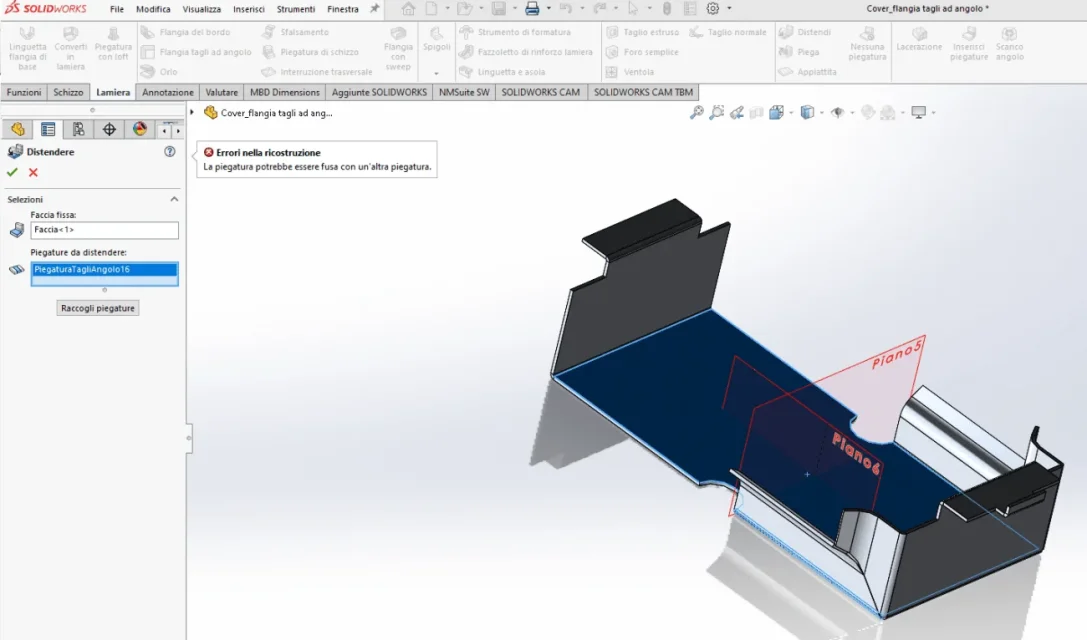
I'm sorry, I'm taking it from here to avoid doubles. first a short presentation: I write x the first time but I've been following you for a long time, I start very little with solidworks and I'm not practical of forums so I apologize immediately x any brownery. I also ask that I have a lot of problems to ask you... this is the first: I created a "flangia with corner cuts" now I would like to "distend" x to perform holes but it appears to me "errori in the reconstruction the bending could be melted with another bending". I read the above but I didn't understand much. be magnanimi:-)
 
I have created a "flangia with corner cuts" now I would like to "distend" x perform holes but it appears to me "here in the reconstruction the bending could be melted with another bending". I read the above but I didn't understand much. you are magnanimi
without images, without files how do you help?
 
This is an element of the tutorial that is executable. read the passages well.
this message appears when two folds at the time of flattening overlap and therefore make development impossible
 
This is an element of the tutorial that is executable. read the passages well.
this message appears when two folds at the time of flattening overlap and therefore make development impossible
if you mean it's an exercise done by the tutorial I confirm, if you're suggesting to open an existing file I don't follow you. In any case, it seems to me that I have followed the instructions to the letter but here I implore.
 
This is an element of the tutorial that is executable. read the passages well.
this message appears when two folds at the time of flattening overlap and therefore make development impossible
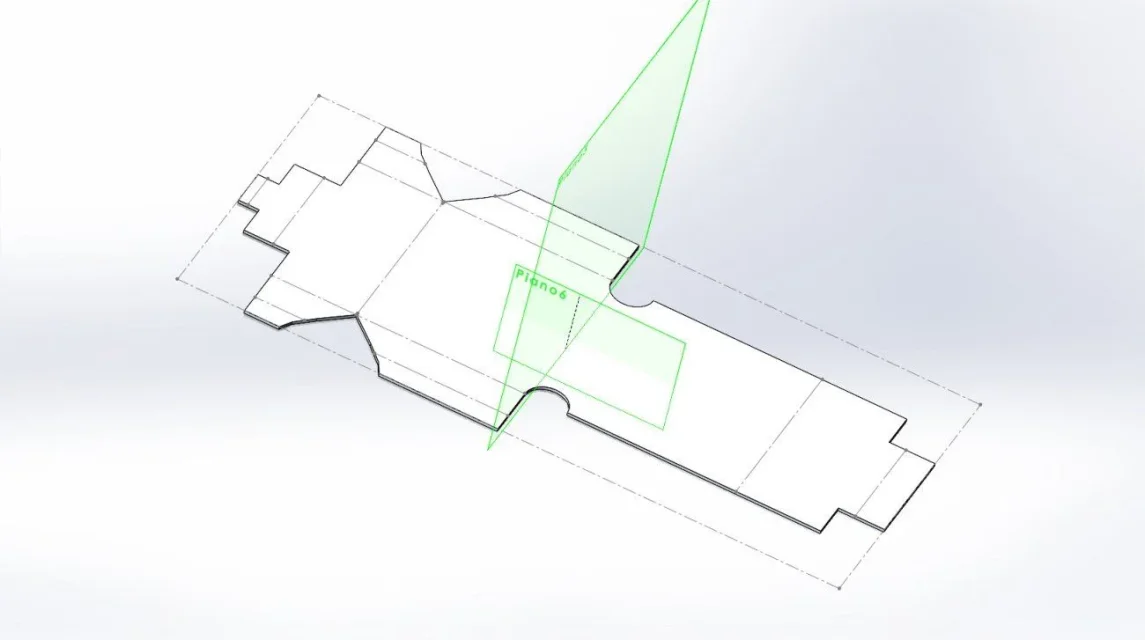
... cmq the problem must be other, this development is very feasible
 
from the image you can see that you are proceeding to the extension of the sheet.
this means that previously there is a function with an error.
analyze function by function to find what is not good; to do this suspend all functions and then activate them once, from above, and try to make flattening (from the toolbar > flattened) until you find the one with the error.
somewhere in the forum there is the particular already shaped because another user had problems about it.
 
discussion with particular developable
 
from the image you can see that you are proceeding to the extension of the sheet.
this means that previously there is a function with an error.
analyze function by function to find what is not good; to do this suspend all functions and then activate them once, from above, and try to make flattening (from the toolbar > flattened) until you find the one with the error.
somewhere in the forum there is the particular already shaped because another user had problems about it.
The flattened function works, it is the extended command that gives me the error. I try to find more in the forum. Thank you
 

Attachments

  • Cover_flangia tagli ad angolo.webp
    Cover_flangia tagli ad angolo.webp
    28.4 KB · Views: 4

Forum statistics

Threads
44,997
Messages
339,767
Members
4
Latest member
ibt

Members online

No members online now.
Back
Top