Osammot
Guest
I would like to ask you a question concerning the installation of autodesk products.
yesterday I ran the download from the autodesk site of the version of autocad 2013 and mechanical 2013.
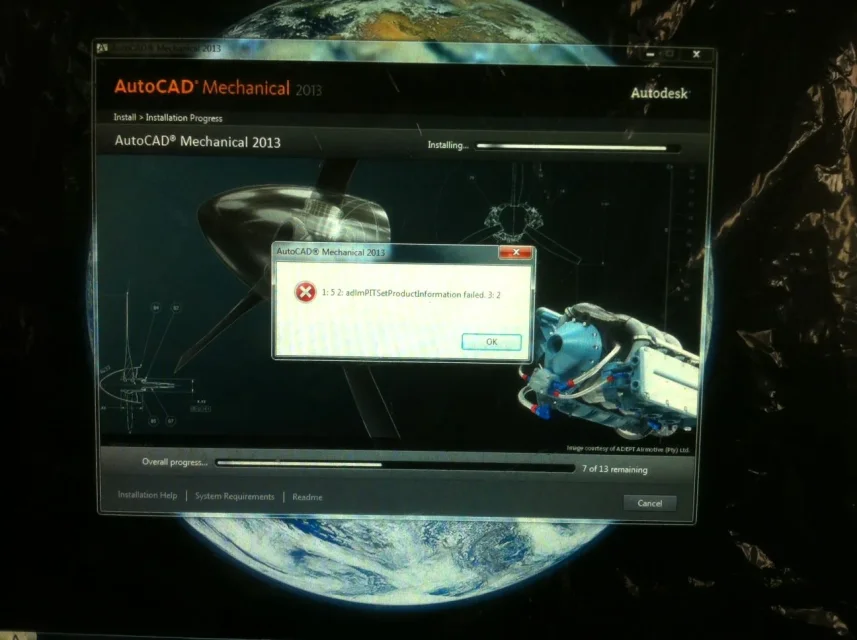
the problem is that there is no system to end the installation properly. at some point the error I photographed appears and you can see in the image in jpeg.
I tried all these systems:
http://usa.autodesk.com/adsk/servlet/ps/dl/item?siteid=123112&id=2887771&linkid=9240697
http://forums.autodesk.com/t5/insta...setproductinformation-failed-3-2/td-p/3129252in practice there are instructions on how to uninstall old versions of autocad, delete files that you install here and there and clean the registry. I followed them to the letter but there's nothing to do. always at the same point, both with autocad and with mechanical always gives the same error and always at the same point. The one in the picture.
when that error appears the only thing I can do is press ok. at that point it starts to uninstall everything and at the end it tells me the installation did not go well. the only thing is that I return a text file that I uploaded between the attachments.
I saved the file that I attached in rar (because otherwise it was too big). I don't know what the mistake might be. I also updated microsoft frameworks to version 4.5, I updated the directx. then I cleaned the log both as it is suggested in the autocad forum and with ccleaner.
I don't know if at this point the only way is to format the machine. but, if possible I would like to avoid. If you have any suggestions, I'd be grateful.
Tommaso
yesterday I ran the download from the autodesk site of the version of autocad 2013 and mechanical 2013.
the problem is that there is no system to end the installation properly. at some point the error I photographed appears and you can see in the image in jpeg.
I tried all these systems:
http://usa.autodesk.com/adsk/servlet/ps/dl/item?siteid=123112&id=2887771&linkid=9240697
http://forums.autodesk.com/t5/insta...setproductinformation-failed-3-2/td-p/3129252in practice there are instructions on how to uninstall old versions of autocad, delete files that you install here and there and clean the registry. I followed them to the letter but there's nothing to do. always at the same point, both with autocad and with mechanical always gives the same error and always at the same point. The one in the picture.
when that error appears the only thing I can do is press ok. at that point it starts to uninstall everything and at the end it tells me the installation did not go well. the only thing is that I return a text file that I uploaded between the attachments.
I saved the file that I attached in rar (because otherwise it was too big). I don't know what the mistake might be. I also updated microsoft frameworks to version 4.5, I updated the directx. then I cleaned the log both as it is suggested in the autocad forum and with ccleaner.
I don't know if at this point the only way is to format the machine. but, if possible I would like to avoid. If you have any suggestions, I'd be grateful.
Tommaso