• This forum is the machine-generated translation of www.cad3d.it/forum1 - the Italian design community. Several terms are not translated correctly.

error opening idw

  • Thread starter Thread starter tmeinventor
  • Start date Start date

tmeinventor

Guest
hello to all

you know what this error might be due to

In practice it does not allow me + to open the Mass that table idw, I made some variations to the model, but since it is not the first time I wanted to know if there was a chance to make a recover or to understand what could be the error

Otherwise, when he touches me, he'll do it again.

Thank you.

p.s. I have already reinstalled inventor
 

Attachments

  • Errore_Inventor.webp
    Errore_Inventor.webp
    6.4 KB · Views: 15
I don't think it's an inventor's problem (which rel. ? )
that video card you have, how much memory on the pc and that s.o. you have.
Is it complicated?

Bye.
 
I think it's a swap file prob.
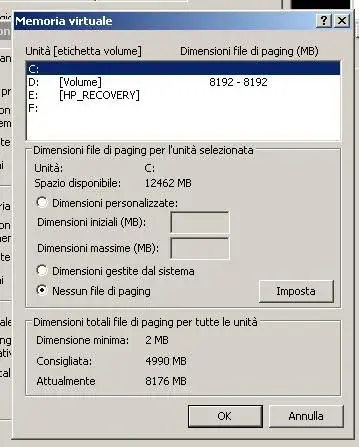
How much ram do you have? and how much is the swap file set? (start -> control bench -> system, advanced tab, performance area, settings key, advanced tab, virtual memory area, change key and post screenshot)
 
inventor is 2010

video card of a ws is the picture fx 3500 256mb

of the other is an ati hd 5800 with 2gb

the first card is on winxp 32bit with 4gb

the second card is on win 7 64bit with 8gb

Could it be that I work on the corporate network?

Thank you.
 
for the swap file I explained earlier.

But maybe it's not the one based on the machines you described, it's certainly not on win7 x64... So the same problem gives you even on this operating system?
ie on both machines gives you the same problem with the same design? and with other symil-complete tables?
 
you will trust me on all and both machines only that on 64bit instead of 12bit says allocation of 24bit

Strange?

I did it again... at this point you don't want it to be the 3d model that has something he doesn't like
 
then, seeing the screen seems set well in half, in the sense, apparently it is the screen of windows xp and not win7, then, if you say that xp x32 you have 4gb of ram, there you have a max value and min of 8gb and it is not right. is set well because it points on a different unit from c: and this is good.
Now, if you have xp x32 with 4gb well (you don't see more than 3 anyway), make sure you have the sp3 installed so you don't have pippe so for the 3gb, in that window select the drive d:, make sure that d: as hd (it is not a partition of c: true?) has available at least 10gb, then set the values as min to 4000 and as max to 8000. I don't know if that's the problem, but it might be if the dhd: it's a c partition: or if you don't have at least ten gb available on d: or if you don't have the installed sp3.
 
I think it's a c partition:, for now I did it again I saved it also in dwg so case never if you should not + open idw open the dwg that is not subject to change

If I see that the problem is resumed, I will also try to remake the model 3d, understood as a whole, since the ipts do not think they give me problems

I hope it doesn't happen to me +, I thought it was a mistake that appeared if one wronged any procedures of "assimage", but from what you say I don't think it happened to others

thanks cmq for each straight

soon
Hi.
 

Forum statistics

Threads
44,997
Messages
339,767
Members
4
Latest member
ibt

Members online

No members online now.
Back
Top