
• This forum is the machine-generated translation of www.cad3d.it/forum1 - the Italian design community. Several terms are not translated correctly.

errore in ricerca con solidworks explorer

  • Thread starter Thread starter andrea.boerio
  • Start date Start date

andrea.boerio

Guest
Good day to all,

I have just arrived, cause change of work, on sw10 from inventor (I had used already sw until 2005) as soon as possible (right), I will make a presentation, at this moment I am in the office I needed to try to see if some pious soul can help me with a practical problem.

I am trying to use solidworks explorer to search for parts/axis/signs by exploiting the possibility of searching "for property"

in our side files I have introduced properties (file\propriety\custom list...) with our names, which are recalled in drawings, boms and so on. everything seems to work here.

e.g.
ownership > > value
mass
mass
mass

I want to find those documents where the mass parameter1 is set to 120
in the search field of swexplorer
- if you type "120", or 120, you find me all the documents that report "120" somewhere;
- if I type, as I thought I had to mass1: "120", or mass1: 120, I find nothing;
- if I type "mass1" I find the documents where the string is present or where that property exists;

search paths are set, I tried to look around for guides if I am formatting badly the search string, but I do not go out.

Sorry, I think it's a banality, but I'm stuck.
thanks in advance,
a.
 
Good day to all,

I have just arrived, cause change of work, on sw10 from inventor (I had used already sw until 2005) as soon as possible (right), I will make a presentation, at this moment I am in the office I needed to try to see if some pious soul can help me with a practical problem.

I am trying to use solidworks explorer to search for parts/axis/signs by exploiting the possibility of searching "for property"

in our side files I have introduced properties (file\propriety\custom list...) with our names, which are recalled in drawings, boms and so on. everything seems to work here.

e.g.
ownership > > value
mass
mass
mass

I want to find those documents where the mass parameter1 is set to 120
in the search field of swexplorer
- if you type "120", or 120, you find me all the documents that report "120" somewhere;
- if I type, as I thought I had to mass1: "120", or mass1: 120, I find nothing;
- if I type "mass1" I find the documents where the string is present or where that property exists;

search paths are set, I tried to look around for guides if I am formatting badly the search string, but I do not go out.

Sorry, I think it's a banality, but I'm stuck.
thanks in advance,
a.
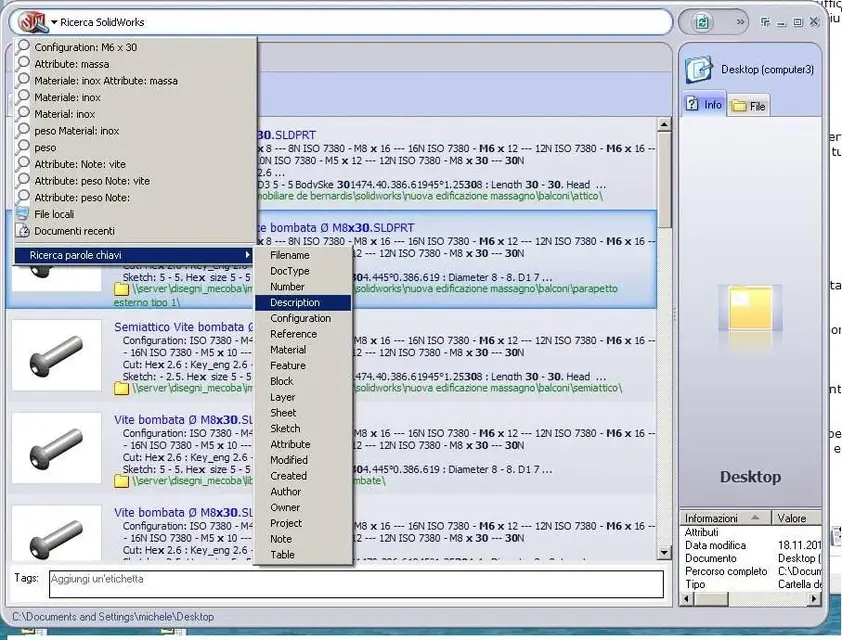
Not even with keyword search??
 

Attachments

  • Immagine.webp
    Immagine.webp
    109.7 KB · Views: 21
Not even with keyword search??
thank you first,

the fact is that the properties we have inserted in our components do not appear in the list of keywords.

if I go in edit list from inside sw I find them all (I already set the path to the file of the properties) but from sw explorer I can not make them recognize as keywords.

? ?
 
last week I attended the presentation of the new functions 2011 (we have not yet made the update), and I did not find suggestions.
Is there no way to add the names of our custom properties to the list of key words? ?
maybe trying from register file or other lower level settings?
Have any of you ever tried?
Hi, a.
 
the correct syntax is:
mass1: 120

I must tell you that I remember a limitation that I don't know if it's gone, the one where the custom property has to reside in 'personalized' and not in 'configuration specifics'.
 
the correct syntax is:
mass1: 120

I must tell you that I remember a limitation that I don't know if it's gone, the one where the custom property has to reside in 'personalized' and not in 'configuration specifics'.
And yet it is a road that I have already tried to travel... and when I do so it finds nothing. the property is customized :-(
If it has to work so then it can be that I set something else not properly, or that I haven't set something up.

the fact is that I can't make my properties appear in the list of explorer keywords, as suggested by others above.
 
And yet it is a road that I have already tried to travel... and when I do so it finds nothing. the property is customized :-(
If it has to work so then it can be that I set something else not properly, or that I haven't set something up.

the fact is that I can't make my properties appear in the list of explorer keywords, as suggested by others above.
the only reason is that the file should be indexed.
if the file is indexed, sw finds it.
check in windows search paths if there are.
do files reside on the server or locally?
check if by clicking in explore resources in the location where the parts reside, windows tells you that the path is not indexed.

that list is hard coded, so you can't do anything and anyway they are special searches.
custom properties are found by the method you used.
Everything is in indexing.
 

Forum statistics

Threads
44,997
Messages
339,767
Members
4
Latest member
ibt

Members online

No members online now.
Back
Top